¶ Issue Description
The touch screen or Fluidd displays the error message during printing:
Please run'SDCARD RESET FILE'or 'FIRMWARE RESTART' to resume,!! Move exceeds maximum extrusion
¶ Reasons
-
Select the incorrect printer type when slicing.
-
Relative extrusion is not enabled in the slicing software.
¶ Troubleshooting Steps
¶ Step 1 Check whether the printer type is correct
-
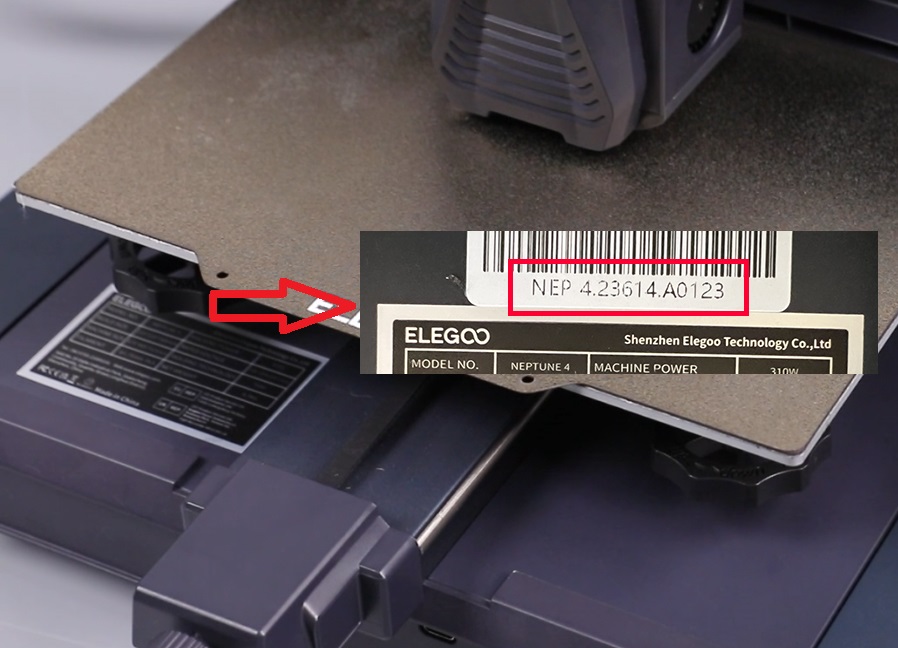
Check the SN of your printer, which can be found on the white sticker on the left side of the heated bed bottom. Confirm your printer type.
NEP 4 → Neptune 4
NEP 4 Pro → Neptune 4 Pro
NEP 4 Plus → Neptune 4 Plus
NEP 4 Max → Neptune 4 Max
-
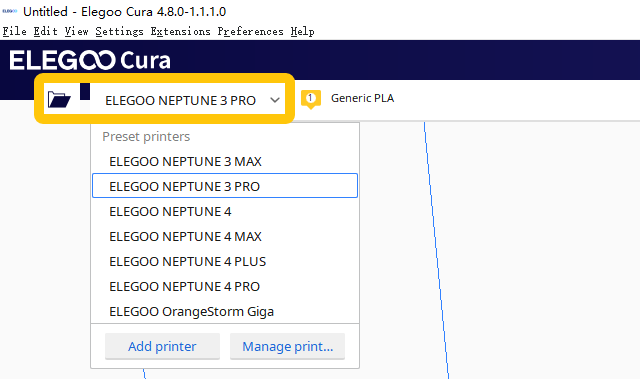
Check the printer type selected in the slicing software. If an incompatible printer is selected, re-select the correct printer model. After re-slicing the model, upload the .gcode file to the printer.
Note:
-
The .gcode files for the Neptune 3 series of printers cannot be used directly with the Neptune 4 series.
-
The .gcode files for the Neptune 4Plus and Neptune 4 Max cannot be used directly with the Neptune 4 and Neptune 4 Pro.
¶ Step 2 Enable Relative Extrusion when slicing the model
-
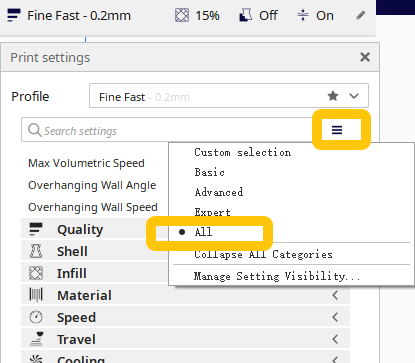
Enable all settings on the top right corner of the slicing software.
-
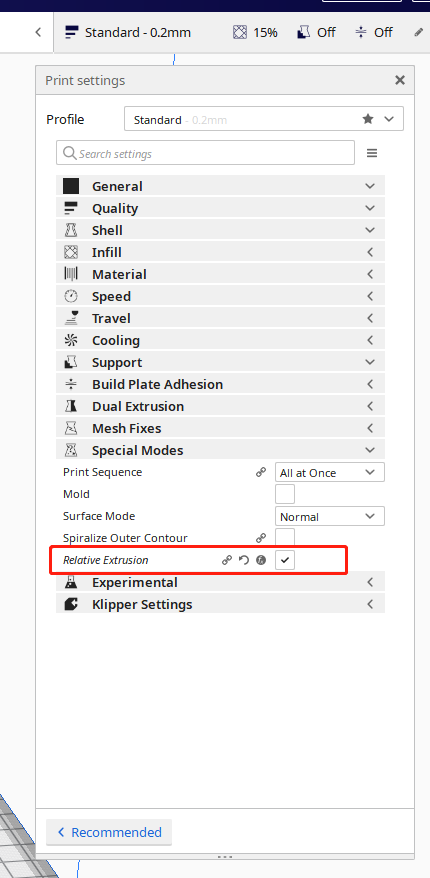
In special modes, enable Relative Extrusion.
-
Import the model file into the slicing software and re-slice the model. Export the .gcode file.
¶ Step 3 Update the firmware to the latest version
How to load the fix pack and update the motherboard firmware and the touch screen firmware for Neptune 4 Plus and Neptune 4 Max:
How to use the fix pack
How to use the motherboard firmware and touch screen firmware
How to load the fix pack and update the motherboard firmware and the touch screen firmware for Neptune 4 and Neptune 4 Pro:
How to use the fix pack
How to update the motherboard firmware and the touch screen firmware