¶ Important Notice
Do not update the Neptune 4 +/Neptune 4 Pro+ with the Fix Pack,This may brick the printer.
Before updating the firmware, please first confirm your printer version according to the instructions below.
Neptune 4 Series: How to Identify Your Printer Version.
¶ Tools and materials needed for troubleshooting
- A USB flash drive (FAT-32 format, less than 16 GB capacity)
- A TF card (less than 32GB capacity)
- A 2.0 mm Allen key
¶ Preparation
-
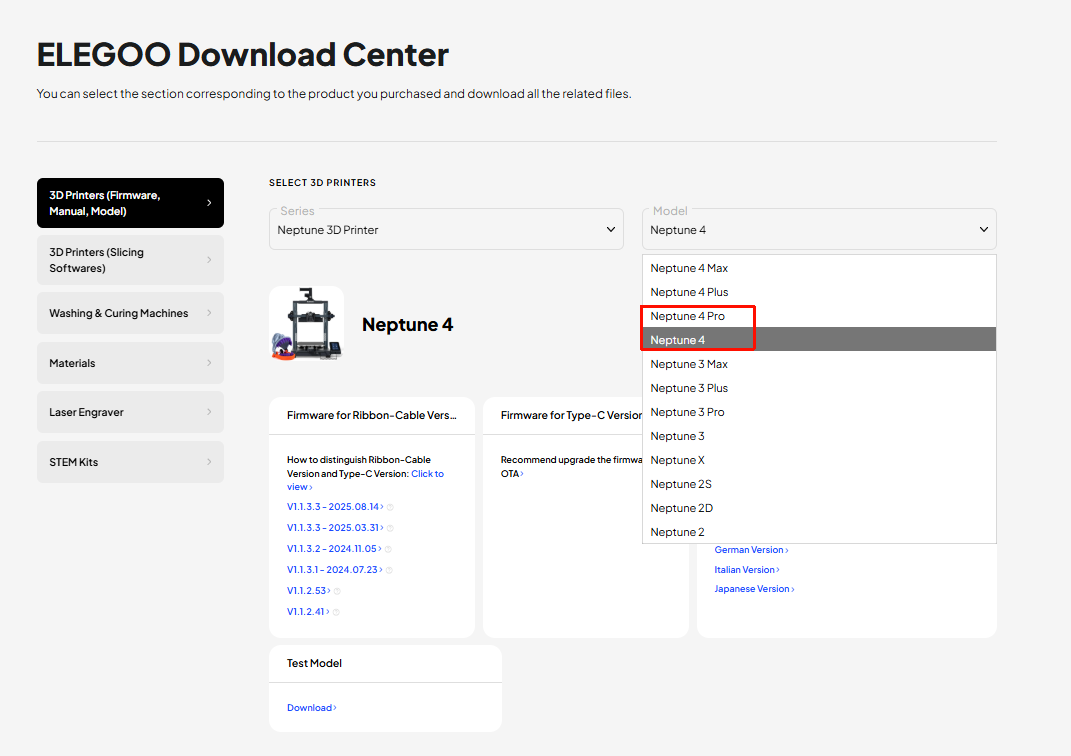
Click the link below and download the package.
https://www.elegoo.com/pages/download
-
Confirm the package folders corrsponding to your printer.
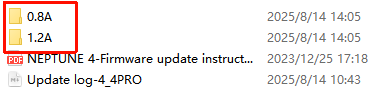
a. After unzipping the package, you can find two folders named 0.8A and 1.2A.
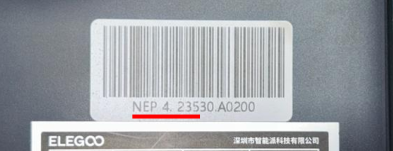
b. Check the label in the lower left corner of your printer:
-
If NEP 4. 234, NEP 4. 235, NEP 4. 236 is displayed, select the 0.8A folder.
-
If other serial numbers are displayed, select the 1.2A folder.
¶ Load the fix pack
-
Format the USB flash drive.
-
Turn the power switch OFF (symbol "〇").
-
Copy the fix pack into the root directory of the USB flash drive.
Note: The root directory can be accessed by double-clicking the USB flash drive.
-
Insert the USB flash drive into the printer.
-
Turn the power switch ON (symbol "|") and wait for about two minutes after powering on the printer.
-
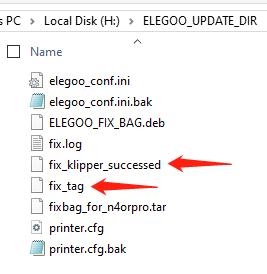
Check the USB flash drive and files named "fix_klipper_succssed" and "fix_tag" are created, it indicates that the fix pack is loaded successfully.