¶ Issue Description
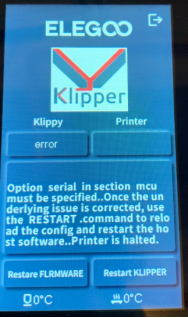
The touch screen or Fluidd displays an error message:
Option serial insection mcumustbespecified..oncetheunder lying issue is corrected,use the RESTART.command to reload the config and restart the host software..Printer is halted.
¶ Reasons
-
The firmware settings are incorrectly changed.
-
The firmware is updated via Fluidd. The Neptune 4 series printers are equipped with the customised version of Klipper. Firmware updated via Fluidd is not compatible, which results in the printer becoming bricked.
¶ Troubleshooting Steps
¶ Tools needed for troubleshooting
-
An eMMC adapter
-
USB flash drive (FAT32 with a capacity of less than 16GB)
-
TF card (FAT32 with a capacity of less than 32GB)
-
TF card reader
-
A 2.0 mm Allen key
¶ Step 1 Load the fix pack
For Neptune 4 and Neptune 4 Pro, refer to the guide below to load the fix pack.
How to use the fix pack
For Neptune 4 Plus and Neptune 4 Max, refer to the guide below to load the fix pack.
How to use the fix pack
¶ Step 2 Update the motherboard firmware and the touch screen firmware
For the Neptune 4 and Neptune 4 Pro, refer to the guide below to update motherboard firmware and touch screen firmware.
How to update the motherboard firmware and the touch screen firmware
For the Neptune 4 Plus and Neptune 4 Max, refer to the guide below to update motherboard firmware and touch screen firmware.
How to use the motherboard firmware and touch screen firmware
¶ Step 3 Update the mirroring files
Refer to How to Install the Firmware Image with the EMMC Model and update the mirroring files.