¶ Issue Description
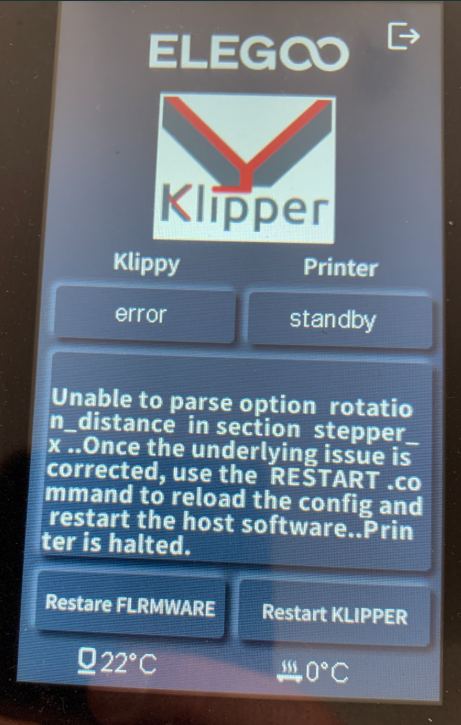
The touch screen or Fluidd displays the error message:
Unable to parse option rotation_distance in section stepper
¶ Reasons
-
The number of motor rotation steps in the configuration file is modified incorrectly.
-
The rotation step value has unrecognised characters, such as a comma.
¶ Troubleshooting Steps
¶ Step 1 Enter correct value into the printer.cfg file
-
Refer to Web Page Control and connect the printer to Fluidd.
-
Enter into the backend via Fluidd.
-
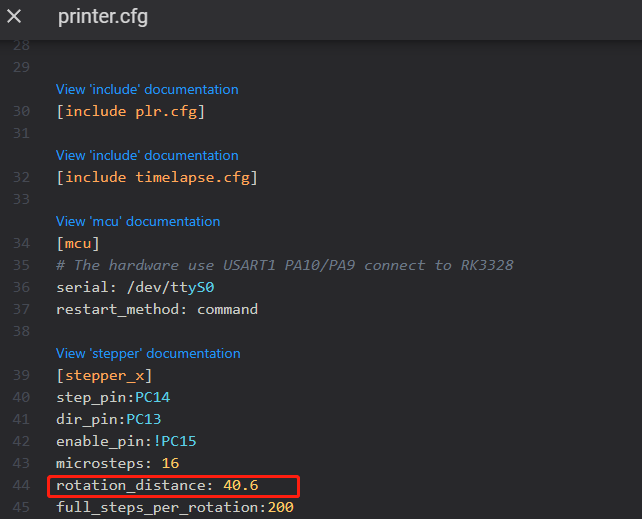
Delete any special characters of the rotation distance value except decimal points.
For example:
- Correct: rotation_distance: 40.6
- Incorrect: rotation_distance: 40/6
¶ Step 2 Update the firmware
For the Neptune 4 and Neptune 4 Pro, refer to the guide below to update motherboard firmware and touch screen firmware.
How to update the motherboard firmware and the touch screen firmware
For the Neptune 4 Plus and Neptune 4 Max, refer to the guide below to update motherboard firmware and touch screen firmware.
How to use the motherboard firmware and touch screen firmware