¶ GraphicsTest
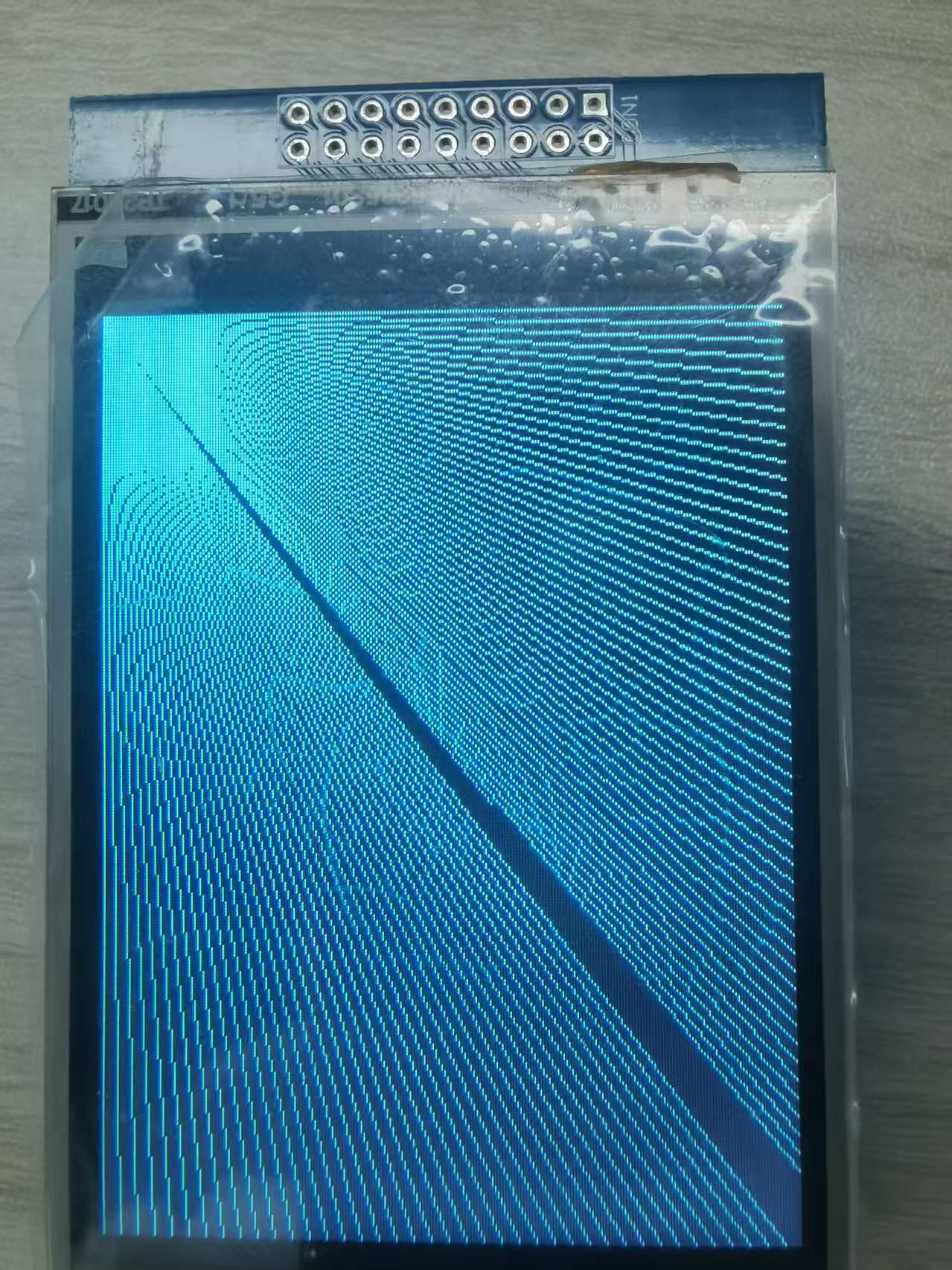
This sample program demonstrates comprehensive graphics rendering capabilities of the TFT LCD screen. It tests various drawing functions including text display, lines, rectangles, circles, triangles, and rounded rectangles, while also performing performance benchmarking.
¶ Code Explanation
The sample code demonstrated here is based on Arduino UNO R3. The operation logic of other microcontrollers is roughly the same。
¶ Basic Configuration (Brief)
The following content has been explained in detail in the DisplayString example, so only a brief introduction is provided here:
- Library Introduction: Includes
Elegoo_GFX.h(core graphics library) andElegoo_TFTLCD.h(hardware driver library) for LCD display functionality. - Pin Definition: Defines five control pins (LCD_CS, LCD_CD, LCD_WR, LCD_RD, LCD_RESET) for communication between Arduino and LCD screen.
- Color Definition: Defines eight RGB565 color values (BLACK, BLUE, RED, GREEN, CYAN, MAGENTA, YELLOW, WHITE) for direct use in code.
- Object Instantiation: Creates
Elegoo_TFTLCD tftobject as the entry point for all subsequent screen operations.
¶ Detailed Explanation of setup() Function
The setup() function completes the initialization of the serial port and LCD screen. It runs only once when the Arduino is powered on or reset. It also performs a comprehensive benchmark test of all graphics functions.
void setup(void) {
  Serial.begin(9600);
  Serial.println(F("TFT LCD test"));
  Serial.println(F("Elegoo 2.8\" TFT Screen"));

  Serial.print("TFT size is "); Serial.print(tft.width()); Serial.print("x"); Serial.println(tft.height());

  tft.reset();

  uint16_t identifier = tft.readID();
   if(identifier == 0x9325) {
    Serial.println(F("Found ILI9325 LCD driver"));
  } else if(identifier == 0x9328) {
    Serial.println(F("Found ILI9328 LCD driver"));
  } else if(identifier == 0x4535) {
    Serial.println(F("Found LGDP4535 LCD driver"));
  }else if(identifier == 0x7575) {
    Serial.println(F("Found HX8347G LCD driver"));
  } else if(identifier == 0x9341) {
    Serial.println(F("Found ILI9341 LCD driver"));
  } else if(identifier == 0x8357) {
    Serial.println(F("Found HX8357D LCD driver"));
  } else if(identifier==0x0101)
  {
      identifier=0x9341;
       Serial.println(F("Found 0x9341 LCD driver"));
  }else {
    Serial.print(F("Unknown LCD driver chip: "));
    Serial.println(identifier, HEX);
    identifier=0x9341;
  }

  tft.begin(identifier);

  Serial.println(F("Benchmark                Time (microseconds)"));

  Serial.print(F("Screen fill              "));
  Serial.println(testFillScreen());
  delay(500);

  Serial.print(F("Text                     "));
  Serial.println(testText());
  delay(3000);

  Serial.print(F("Lines                    "));
  Serial.println(testLines(CYAN));
  delay(500);

  Serial.print(F("Horiz/Vert Lines         "));
  Serial.println(testFastLines(RED, BLUE));
  delay(500);

  Serial.print(F("Rectangles (outline)     "));
  Serial.println(testRects(GREEN));
  delay(500);

  Serial.print(F("Rectangles (filled)      "));
  Serial.println(testFilledRects(YELLOW, MAGENTA));
  delay(500);

  Serial.print(F("Circles (filled)         "));
  Serial.println(testFilledCircles(10, MAGENTA));

  Serial.print(F("Circles (outline)        "));
  Serial.println(testCircles(10, WHITE));
  delay(500);

  Serial.print(F("Triangles (outline)      "));
  Serial.println(testTriangles());
  delay(500);

  Serial.print(F("Triangles (filled)       "));
  Serial.println(testFilledTriangles());
  delay(500);

  Serial.print(F("Rounded rects (outline)  "));
  Serial.println(testRoundRects());
  delay(500);

  Serial.print(F("Rounded rects (filled)   "));
  Serial.println(testFilledRoundRects());
  delay(500);

  Serial.println(F("Done!"));
}
¶ Serial Port Initialization
Serial.begin(9600);
Serial.println(F("TFT LCD test"));
Serial.begin(9600): Set the serial baud rate to 9600 for debugging information outputF()macro: Store strings in Flash memory to save RAM resources. Arduino has limited RAM, and using theF()macro for constant strings is a common optimization technique.
¶ Screen Size Detection
Serial.print("TFT size is "); Serial.print(tft.width()); Serial.print("x"); Serial.println(tft.height());
Call tft.width() and tft.height() to obtain the screen resolution and print it to the serial port for verification.
¶ LCD Reset
tft.reset();
Send a reset signal to the LCD screen to restore it to the initial state.
¶ LCD Driver Chip Identification
This is the core part of the initialization process. The code identifies the LCD driver chip model through the following steps:
-
Read Driver ID:
uint16_t identifier = tft.readID();
Call thereadID()method to read the ID of the LCD driver chip. Different driver chips have different ID values. -
Driver Model Matching:
The code uses multipleif-else ifstatements to match the read ID with known driver models:0x9325: ILI9325 driver0x9328: ILI9328 driver0x4535: LGDP4535 driver0x7575: HX8347G driver0x9341: ILI9341 driver (the most common driver)0x8357: HX8357D driver
-
Special ID Correction:
Some LCD screens may return incorrect ID values due to hardware compatibility issues:- When the read ID is
0x0101, it is corrected to0x9341(ILI9341)
- When the read ID is
-
Default Driver Setting:
} else { Serial.print(F("Unknown LCD driver chip: ")); Serial.println(identifier, HEX); identifier=0x9341; }If the driver ID cannot be recognized, the code defaults to using the ILI9341 driver, which is the most widely used driver model and has good compatibility.
-
Screen Initialization:
tft.begin(identifier);Call the
begin()method with the identified driver ID to initialize the LCD screen. The initialization process includes configuring screen parameters such as display mode, color format, and refresh rate.
¶ Benchmark Tests
After initialization, setup() executes a series of benchmark tests to measure the performance of each graphics function:
- testFillScreen(): Tests filling the entire screen with different colors
- testText(): Tests text display with various colors and font sizes
- testLines(): Tests diagonal line drawing from all four corners
- testFastLines(): Tests optimized horizontal and vertical line drawing
- testRects(): Tests outline rectangle drawing
- testFilledRects(): Tests filled rectangle drawing with outline borders
- testFilledCircles(): Tests filled circle drawing in a grid pattern
- testCircles(): Tests outline circle drawing
- testTriangles(): Tests outline triangle drawing with gradient colors
- testFilledTriangles(): Tests filled triangle drawing with gradient colors
- testRoundRects(): Tests outline rounded rectangle drawing
- testFilledRoundRects(): Tests filled rounded rectangle drawing
Each test returns the time taken in microseconds, which is printed to the serial monitor for performance analysis.
¶ Detailed Explanation of loop() Function
The loop() function is the main loop of the Arduino program, which runs repeatedly after the setup() function is executed. It demonstrates screen rotation functionality.
void loop(void) {
  for(uint8_t rotation=0; rotation<4; rotation++) {
    tft.setRotation(rotation);
    testText();
    delay(2000);
  }
}
¶ Screen Rotation Demonstration
The loop() function cycles through all four screen rotation angles:
-
Rotation Loop:
for(uint8_t rotation=0; rotation<4; rotation++)
Iterates through rotation values 0, 1, 2, and 3, corresponding to 0°, 90°, 180°, and 270° rotation respectively. -
Set Rotation:
tft.setRotation(rotation)
Sets the screen rotation angle. This function adjusts the coordinate system of the display. -
Display Test Text:
testText()
Calls thetestText()function to display sample text at the current rotation angle. -
Delay:
delay(2000)
Pauses for 2 seconds to allow the user to observe the display at each rotation angle.
After completing one full cycle (all four rotations), the loop repeats indefinitely.
¶ Detailed Explanation of Benchmark Test Functions
¶ testFillScreen() - Screen Fill Test
unsigned long testFillScreen() {
  unsigned long start = micros();
  tft.fillScreen(BLACK);
  tft.fillScreen(RED);
  tft.fillScreen(GREEN);
  tft.fillScreen(BLUE);
  tft.fillScreen(BLACK);
  return micros() - start;
}
This function tests the speed of filling the entire screen. It sequentially fills the screen with BLACK, RED, GREEN, BLUE, and BLACK again, then returns the total time taken.
¶ testText() - Text Display Test
unsigned long testText() {
  tft.fillScreen(BLACK);
  unsigned long start = micros();
  tft.setCursor(0, 0);
  tft.setTextColor(WHITE);  tft.setTextSize(1);
  tft.println("Hello World!");
  tft.setTextColor(YELLOW); tft.setTextSize(2);
  tft.println(1234.56);
  tft.setTextColor(RED);    tft.setTextSize(3);
  tft.println(0xDEADBEEF, HEX);
  tft.println();
  tft.setTextColor(GREEN);
  tft.setTextSize(5);
  tft.println("Groop");
  tft.setTextSize(2);
  tft.println("I implore thee,");
  tft.setTextSize(1);
  tft.println("my foonting turlingdromes.");
  tft.println("And hooptiously drangle me");
  tft.println("with crinkly bindlewurdles,");
  tft.println("Or I will rend thee");
  tft.println("in the gobberwarts");
  tft.println("with my blurglecruncheon,");
  tft.println("see if I don't!");
  return micros() - start;
}
This function tests text rendering capabilities with various font sizes and colors. It displays strings, floating-point numbers, and hexadecimal values, demonstrating the library's text formatting capabilities.
¶ testLines() - Diagonal Line Test
unsigned long testLines(uint16_t color) {
  int w = tft.width(), h = tft.height();
  tft.fillScreen(BLACK);

  // Draw lines from top-left corner
  for(x2=0; x2<w; x2+=6) tft.drawLine(x1, y1, x2, y2, color);

  // Draw lines from other corners
  // ...

  return micros() - start;
}
This function draws diagonal lines from all four corners of the screen, testing the general line drawing algorithm. Lines are spaced 6 pixels apart.
¶ testFastLines() - Fast Horizontal/Vertical Line Test
unsigned long testFastLines(uint16_t color1, uint16_t color2) {
  for(y=0; y<h; y+=5) tft.drawFastHLine(0, y, w, color1);
  for(x=0; x<w; x+=5) tft.drawFastVLine(x, 0, h, color2);
  return micros() - start;
}
This function uses optimized line drawing functions (drawFastHLine and drawFastVLine) for horizontal and vertical lines, which are significantly faster than the general drawLine function.
¶ testRects() - Outline Rectangle Test
unsigned long testRects(uint16_t color) {
  int cx = tft.width() / 2, cy = tft.height() / 2;
  for(i=2; i<n; i+=6) {
    i2 = i / 2;
    tft.drawRect(cx-i2, cy-i2, i, i, color);
  }
  return micros() - start;
}
This function draws concentric outline rectangles centered on the screen, increasing in size by 6 pixels each iteration.
¶ testFilledRects() - Filled Rectangle Test
unsigned long testFilledRects(uint16_t color1, uint16_t color2) {
  for(i=n; i>0; i-=6) {
    i2 = i / 2;
    tft.fillRect(cx-i2, cy-i2, i, i, color1);
    tft.drawRect(cx-i2, cy-i2, i, i, color2);
  }
  return t;
}
This function draws concentric filled rectangles with outline borders, starting from the largest size and decreasing.
¶ testFilledCircles() - Filled Circle Test
unsigned long testFilledCircles(uint8_t radius, uint16_t color) {
  for(x=radius; x<w; x+=r2) {
    for(y=radius; y<h; y+=r2) {
      tft.fillCircle(x, y, radius, color);
    }
  }
  return micros() - start;
}
This function fills the screen with a grid of filled circles, spaced at twice the radius distance.
¶ testCircles() - Outline Circle Test
unsigned long testCircles(uint8_t radius, uint16_t color) {
  for(x=0; x<w; x+=r2) {
    for(y=0; y<h; y+=r2) {
      tft.drawCircle(x, y, radius, color);
    }
  }
  return micros() - start;
}
This function draws outline circles on top of the previously drawn filled circles, demonstrating the difference between filled and outline shapes.
¶ testTriangles() - Outline Triangle Test
unsigned long testTriangles() {
  for(i=0; i<n; i+=5) {
    tft.drawTriangle(
      cx    , cy - i,
      cx - i, cy + i,
      cx + i, cy + i,
      tft.color565(0, 0, i));
  }
  return micros() - start;
}
This function draws concentric outline triangles with dynamically changing blue color intensity.
¶ testFilledTriangles() - Filled Triangle Test
unsigned long testFilledTriangles() {
  for(i=min(cx,cy); i>10; i-=5) {
    tft.fillTriangle(cx, cy - i, cx - i, cy + i, cx + i, cy + i,
      tft.color565(0, i, i));
    tft.drawTriangle(cx, cy - i, cx - i, cy + i, cx + i, cy + i,
      tft.color565(i, i, 0));
  }
  return t;
}
This function draws filled triangles with outline borders, using gradient colors that change with each iteration.
¶ testRoundRects() - Outline Rounded Rectangle Test
unsigned long testRoundRects() {
  for(i=0; i<w; i+=6) {
    i2 = i / 2;
    tft.drawRoundRect(cx-i2, cy-i2, i, i, i/8, tft.color565(i, 0, 0));
  }
  return micros() - start;
}
This function draws concentric outline rounded rectangles with corner radius proportional to the rectangle size.
¶ testFilledRoundRects() - Filled Rounded Rectangle Test
unsigned long testFilledRoundRects() {
  for(i=min(tft.width(), tft.height()); i>20; i-=6) {
    i2 = i / 2;
    tft.fillRoundRect(cx-i2, cy-i2, i, i, i/8, tft.color565(0, i, 0));
  }
  return micros() - start;
}
This function draws filled rounded rectangles with green gradient colors, starting from the largest size.
¶ Summary
This sample program demonstrates comprehensive graphics capabilities of the TFT LCD screen through the following steps:
- Initialization: Introduce libraries, define pins and colors, create an LCD object, and identify and initialize the driver chip.
- Benchmark Testing: Execute a series of performance tests for screen fill, text, lines, rectangles, circles, triangles, and rounded rectangles, outputting timing results to the serial monitor.
- Screen Rotation: Continuously cycle through four screen rotation angles, displaying test text at each angle.
The key functions used in the program include:
tft.reset(): Reset the LCD screentft.readID(): Read the driver chip IDtft.begin(): Initialize the LCD screentft.fillScreen(): Fill the entire screen with a specified colortft.setRotation(): Set screen rotation angle (0-3)tft.drawLine(): Draw a line between two pointstft.drawFastHLine(): Draw a horizontal line quicklytft.drawFastVLine(): Draw a vertical line quicklytft.drawRect(): Draw an outline rectangletft.fillRect(): Draw a filled rectangletft.drawCircle(): Draw an outline circletft.fillCircle(): Draw a filled circletft.drawTriangle(): Draw an outline triangletft.fillTriangle(): Draw a filled triangletft.drawRoundRect(): Draw an outline rounded rectangletft.fillRoundRect(): Draw a filled rounded rectangletft.color565(): Convert RGB values to RGB565 formattft.println(): Display text and automatically wrap to the next line
¶ Modification Instructions
If you need to modify the code display effect, you can refer to the following aspects for adjustment:
-
Modify Benchmark Test Order:
- Adjust the order of test function calls in the
setup()function to change the display sequence
- Adjust the order of test function calls in the
-
Modify Test Colors:
- Change the color parameters passed to test functions (e.g.,
testLines(CYAN)→testLines(RED))
- Change the color parameters passed to test functions (e.g.,
-
Modify Circle Radius:
- Change the radius parameter in
testFilledCircles(10, MAGENTA)andtestCircles(10, WHITE)
- Change the radius parameter in
-
Modify Rotation Speed:
- Change the delay value in
delay(2000)within theloop()function
- Change the delay value in
-
Modify Display Text:
- Edit the string content in
testText()function
- Edit the string content in
-
Add New Test Functions:
- Create new test functions following the existing pattern and add them to the
setup()benchmark sequence
- Create new test functions following the existing pattern and add them to the
-
Modify Screen Rotation Range:
- Adjust the
forloop condition inloop()to include only specific rotation angles
- Adjust the