¶ PhotoCell
¶ Overview
In this tutorial, you will learn how to measure light intensity using an Analog Input. You will use the level of light to control the number of LEDs to be lit.
¶ Component Required:
(1) x 830 tie-points breadboard
(8) x leds
(8) x 220 ohm resistors
(1) x 1k ohm resistor
(1) x 74hc595 IC
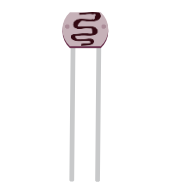
(1) x Photoresistor (Photocell)
(16) x M-M wires (Male to Male jumper wires)
¶ Component Introduction
PHOTOCELL:
The photocell used, is a type call a light dependent resistor. Also known as an LDR. As the name suggests, these components act just like a resistor, except that the resistance changes in response to how much light is falling on them.
This one has a resistance of about 50 kΩ in near darkness and 500 Ω in bright light.
To convert this varying value of resistance into something we can measure on an UNO board's analog input, it needs to be converted into a voltage.
The simplest way to do that is to combine it with a fixed resistor.
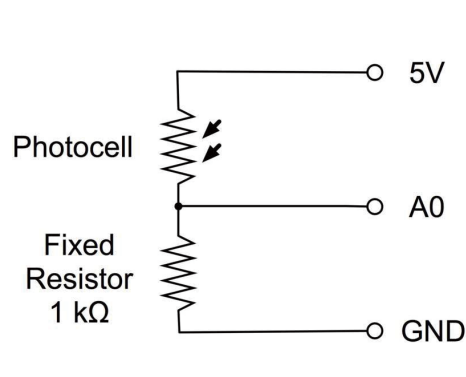
Load up the sketch given in the next section and try covering the photocell with your finger, and then holding it near a light source.
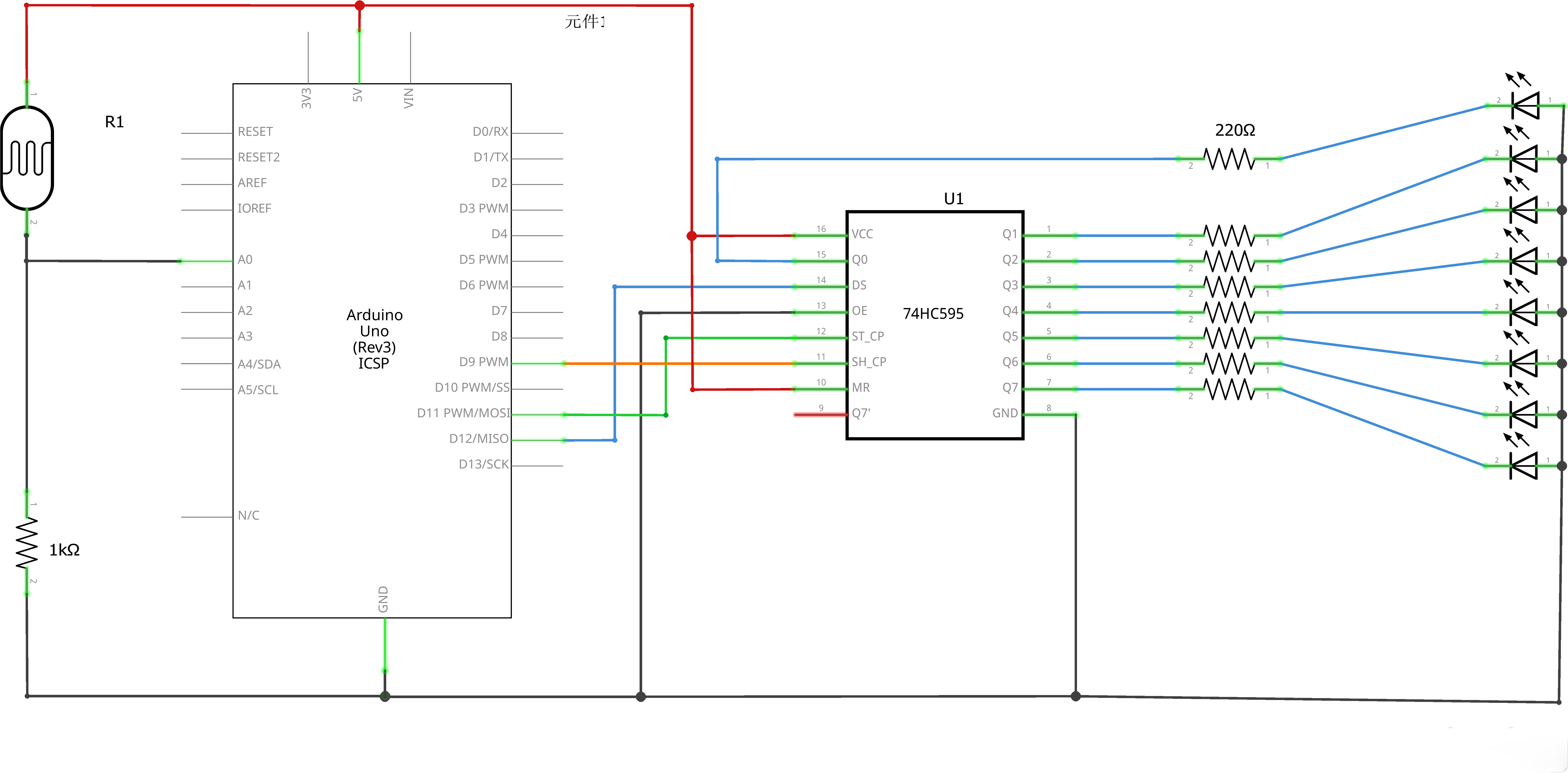
¶ Connection Schematic
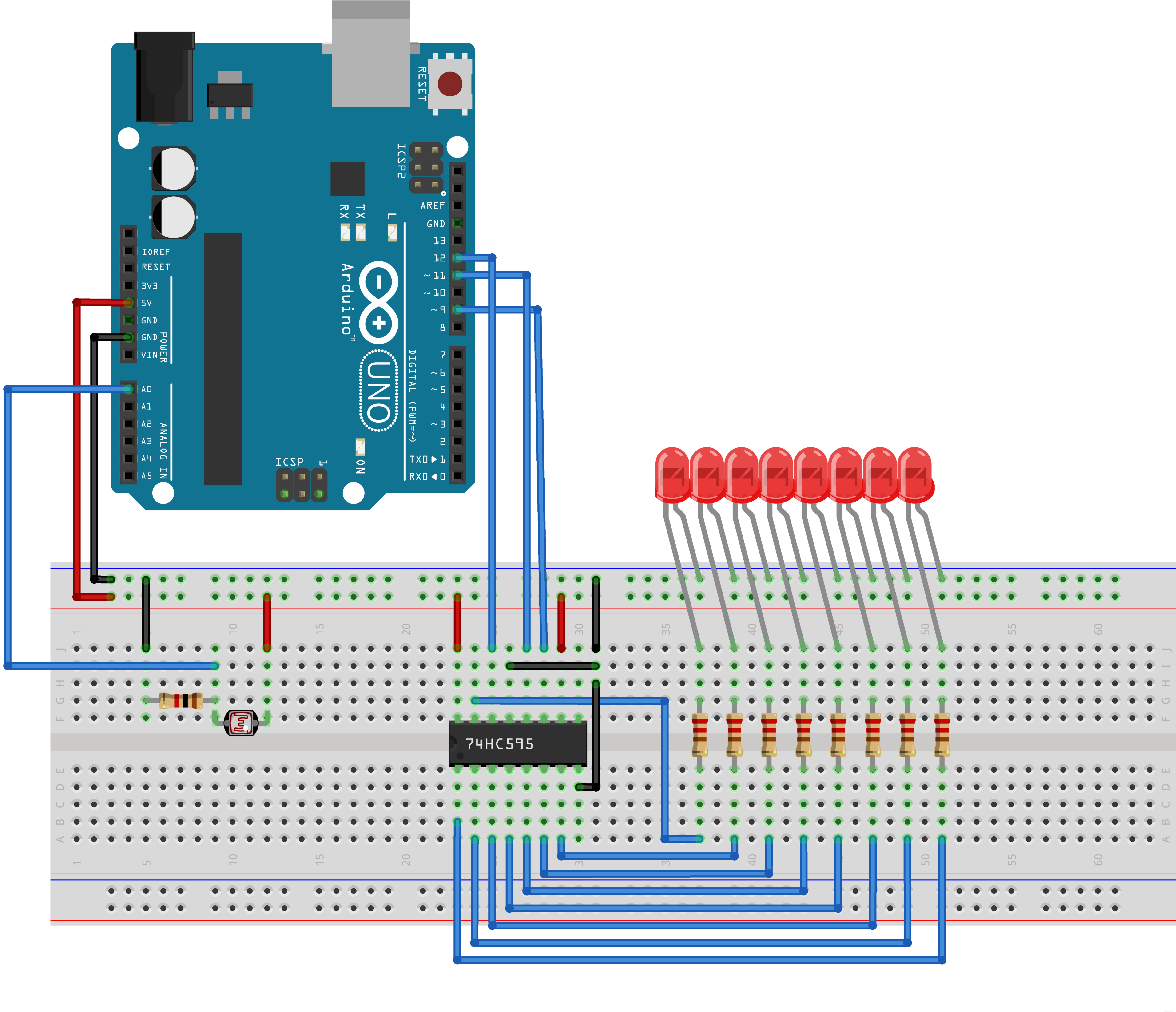
¶ Wiring diagram
¶ Code
You can click the blue text link to download the program file to your local device, and double-click the file to open it after the download is complete. Please note: Before opening the file, ensure that you have installed the Arduino IDE development environment and completed the installation of relevant components such as the board support package and driver corresponding to the UNO R3. If you have any questions about this operation process, you can refer to the "part 1" chapter of the document for detailed guidance.
Click the Serial Monitor button to turn on the serial monitor. The basics about the serial monitor are introduced in details in tutorial 4 in part 2.
int lightPin = 0;
int latchPin = 11;
int clockPin = 9;
int dataPin = 12;int leds = 0;
Pin Definitions and Variables:
int lightPin = 0;:Analog input pin for the light sensor (A0)int latchPin = 11;:Arduino digital pin 11 connected to ST_CP of 74HC595 (latch pin)int clockPin = 9;:Arduino digital pin 9 connected to SH_CP of 74HC595 (clock pin)int dataPin = 12;:Arduino digital pin 12 connected to DS of 74HC595 (data pin)int leds = 0;:Variable to store the LED state (bit pattern)
void setup()
{
pinMode(latchPin, OUTPUT);
pinMode(dataPin, OUTPUT);
pinMode(clockPin, OUTPUT);
}
Setup Function:
pinMode(latchPin, OUTPUT);:Sets the latch pin as outputpinMode(dataPin, OUTPUT);:Sets the data pin as outputpinMode(clockPin, OUTPUT);:Sets the clock pin as output
/* The most common method of using 74CH595
- lctchPin->LOW : Begin transmitting signals.
- shiftOut(dataPin, clockPin, bitOrder, value)
- dataPin: the pin on which to output each bit. Allowed data types: int.
- clockPin: the pin to toggle once the dataPin has been set to the correct value. Allowed data types: int.
- bitOrder: which order to shift out the bits; either MSBFIRST or LSBFIRST. (Most Significant Bit First, or, Least Significant Bit First).
- value: the data to shift out. Allowed data types: byte.
- lctchPin->HIch : The end of the transmission signal.
*/
void updateShiftRegister()
{
digitalWrite(latchPin, LOW);
shiftOut(dataPin, clockPin, LSBFIRST, leds);
digitalWrite(latchPin, HIGH);
}
updateShiftRegister() Function:
void updateShiftRegister():Function to update the shift register with the current LED statedigitalWrite(latchPin, LOW);:Sets latch pin low to prepare for data transfershiftOut(dataPin, clockPin, LSBFIRST, leds);:Shifts out the LED statedataPin:Pin to send data throughclockPin:Pin to clock the dataLSBFIRST:Send least significant bit firstleds:Bit pattern representing which LEDs to light
digitalWrite(latchPin, HIGH);:Sets latch pin high to update the output
void loop()
{
int reading = analogRead(lightPin);
int numLEDSLit = reading / 57; //1023 / 9 / 2
if (numLEDSLit > 8) numLEDSLit = 8;
leds = 0; // no LEDs lit to start
for (int i = 0; i < numLEDSLit; i++)
{
leds = leds + (1 << i); // sets the i'th bit
}
updateShiftRegister();
}
Loop Function:
int reading = analogRead(lightPin);:Reads the analog value from the light sensorint numLEDSLit = reading / 57;:Calculates the number of LEDs to light based on the sensor reading- 1023 (max analog value) / 57 ≈ 18, but limited to 8 LEDs
if (numLEDSLit > 8) numLEDSLit = 8;:Limits the number of LEDs to 8leds = 0;:Resets the LED state to all offfor (int i = 0; i < numLEDSLit; i++) { ... }:Turns on the appropriate number of LEDsleds = leds + (1 << i);:Sets the i-th bit to 1 (turns on the i-th LED)updateShiftRegister();:Updates the shift register to reflect the new LED state
Notes:
If the LED(s) do not light up initially, please check whether the wiring is correct.
If the wiring is confirmed to be normal, use a flashlight or other light source to approach the photoresistor:
- If the LED module lights up at this time, it indicates the circuit itself is functioning properly, and only the proportional coefficient for the number of lit LEDs is deviated.
- You only need to manually adjust the proportional function and reflash the program. Specifically, modify the value in the code line: int numLEDSLit = reading / 57; //1023 / 9 / 2:
- If too few LEDs light up, appropriately lower the value;
- If too many LEDs light up initially, appropriately increase the value.
¶ Troubleshooting
- LEDs Not Responding:Check connections between Arduino, 74HC595, and LEDs
- Incorrect LED Count:Verify the light sensor is properly connected and calibrated
- Shift Register Issues:Check that the 74HC595 is receiving proper clock and data signals
- Light Sensor Calibration:Adjust the division factor (57) based on your specific light sensor
- Wiring:Double-check the connections according to the pin definitions