¶ Fan Locations and Names:
¶ Heat Break Fan
.jpg)
¶ Part Cooling Fan
.jpg)
¶ Auxiliary Fan
.jpg)
¶ Motherboard Fan
.jpg)
¶ Power Supply Fan
.jpg)
¶ Fan Operating Principles:
¶ Heat Break Fan and Motherboard Fan:
The heat break fan and motherboard fan are connected in parallel. They will automatically start rotating when the nozzle temperature reaches 50°C and will automatically turn off when the nozzle temperature drops below 50°C. They cannot be manually turned on or off.
¶ Part Cooling Fan:
After the first layer is printed, the part cooling fan will start rotating.
This fan can be turned on or off via Touchscreen → Settings → Fan Control, or through Fluidd.
¶ Auxiliary Fan:
The auxiliary fan is connected in parallel with the part cooling fan. There is a physical switch button on the top side of the auxiliary fan, which can be used to turn it on or off.
¶ Power Supply Fan:
It automatically starts rotating when the power supply is turned on and cannot be manually controlled.
¶ Troubleshooting Steps:
¶ 1. Heat Break Fan is not spinning
Please refer to the instructions below for further troubleshooting:
https://wiki.elegoo.com/en/neptune/heat-break-cooling-fan-cannot-work
¶ 2. Part Cooling Fan is not spinning
¶ Steps1-Re-plug the heat break fan connector / extruder ribbon cable connector
a. Turn off the power switch and unplug the power cord
.jpg)
.jpg)
b. Ensure the ribbon cable is properly seated in the bracket, check for bent pins, and re-plug the ribbon cable connector
.jpg)
¶ Steps2-Swap the part cooling fan and heat break fan connectors for testing
a. Turn off the printer power switch and unplug the power cord
b. Unplug the auxiliary fan connector
.jpg)
d. Remove the four screws securing the auxiliary fan and take it off
.jpg)
e. Remove the three screws securing the back of the extruder
.jpg)
.jpg)
f. Remove the two screws securing the front side of the extruder. Do not unplug the extruder ribbon cable
.jpg)
When removing the last screw, support the extruder with your hand to prevent it from falling
.jpg)
g. Swap the part cooling fan and heat break fan connectors
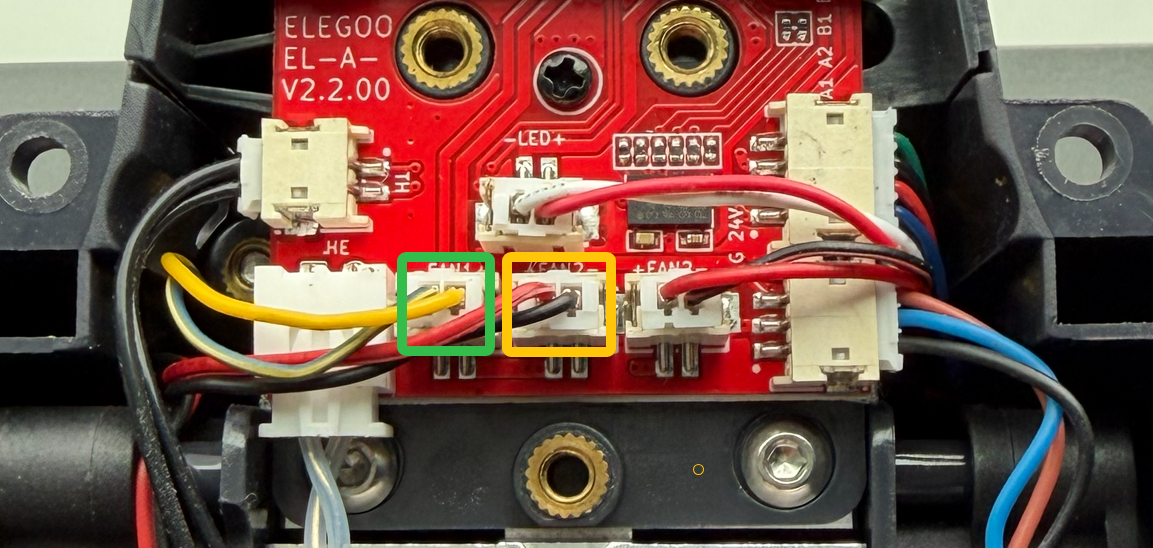
h. Turn on the printer power switch and set the nozzle temperature to 200°C. Wait until the nozzle temperature reaches 50°C, then check whether the part cooling fan spins normally
- If the part cooling fan spins normally, one of the following components is damaged: motherboard / extruder ribbon cable / extruder adapter board. It is recommended to replace all three components at the same time
- If the part cooling fan does not spin normally, the part cooling fan itself is damaged and needs to be replaced
¶ 3. Auxiliary Fan is not spinning
a. Confirm that the auxiliary fan button is switched to ON
.jpg)
b. Turn off the power switch and unplug the power cord
c. Check whether the auxiliary fan connector is damaged, and re-plug the auxiliary fan connector
d. Plug in the power cord and turn on the printer power switch
e. Turn on the part cooling fan via the touchscreen and check whether the part cooling fan spins
- If the part cooling fan spins but the auxiliary fan does not, one of the following components is damaged: the auxiliary fan or the extruder ribbon cable. Replace both the auxiliary fan and the extruder ribbon cable at the same time
- Print Head Cable Replacement
- If the part cooling fan does not spin, the motherboard is likely damaged. The motherboard needs to be replaced
- Motherboard Replacement(B0N3C1)
¶ 4. Motherboard Fan is not spinning
a. Set the nozzle temperature to 200°C via the touchscreen
b. Wait until the nozzle temperature reaches above 50°C, then check whether the heat break fan spins
- If the heat break fan spins normally, the motherboard fan is damaged and needs to be replaced
- If the heat break fan does not spin, the motherboard is damaged and needs to be replaced
- Motherboard Replacement(B0N3C1)
¶ 5. Power Supply Fan is not spinning
It is not recommended to disassemble the power supply for inspection. It is recommended to replace the power supply directly.