¶ Issue Description
The leveling process fails.
¶ Reasons
-
The Z axis homing fails.
-
The printer is located in an area that is either subject to significant vibration or at a considerable angle of inclination.
-
The build plate is tilted.
-
The pressure sensor or the adapter board of the strain gauge is damaged.
¶ Troubleshooting Steps
-
If the printer homing fails, the error code may occur. Refer to Error Code 304 | ELEGOO WIKI for troubleshooting.
-
Place the printer on a flat surface and re-level the printer.
-
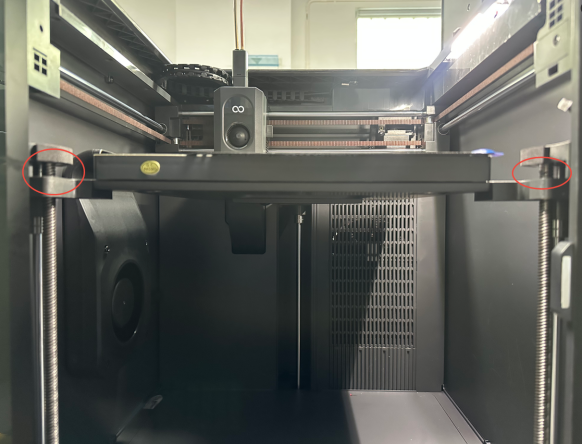
Control the printer to the homing position. Check whether the height of the Z-axis lead screws is consistent with each other.
-
If the height is not consistent, refer to How to Adjust the Tilting Hotbed | ELEGOO WIKI and adjust the heated bed inclination.
-
If the height is consistent, refer to Step 4 for further troubleshooting.
-
Check the printer status.
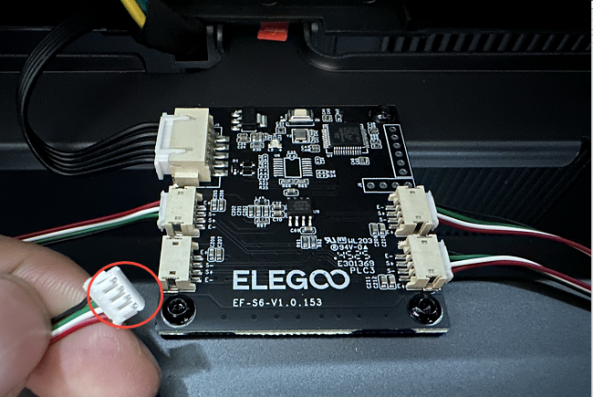
If the nozzle remains stationary at a specific position or exert sustained downward pressure on the build plate, it indicates that the strain gauge at that location may be damaged. It is necessary to reinsert the pressure sensor cable and check the condition of the pins.
-
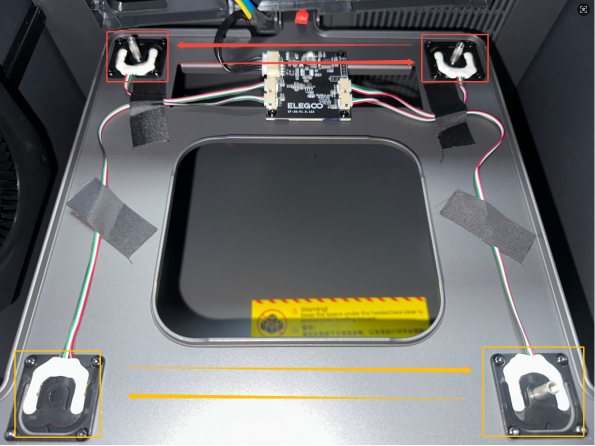
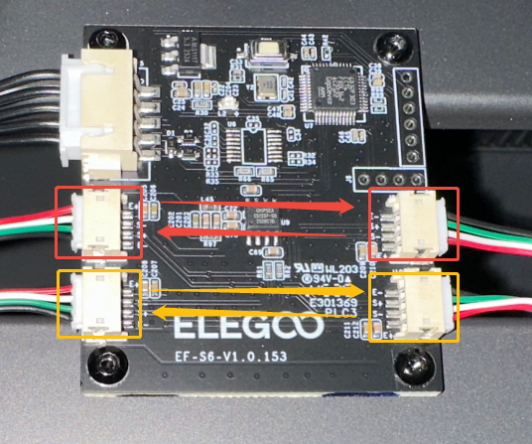
Swap the pressure sensor and its cable with the adjacent sensor and its cable on the same side.
Note: The four pressure sensors are positioned corresponding with their respective cable ports. -
Re-level the printer.
-
If the position where the nozzle stays and presses down on the build plate does not change, it indicates that the pressure sensor is damaged and the pressure sensor needs to be replaced.
-
If the position where the nozzle stays and presses down on the build plate changes, it indicates that the adapter board of the strain gauge is damaged and the adapter board of the strain gauge needs to be replaced.