¶ Show BMP Image
This example program demonstrates how to read BMP image files from an SD card and display them on a TFT LCD screen. It showcases BMP file header parsing, RGB color format conversion, and efficient pixel drawing techniques.
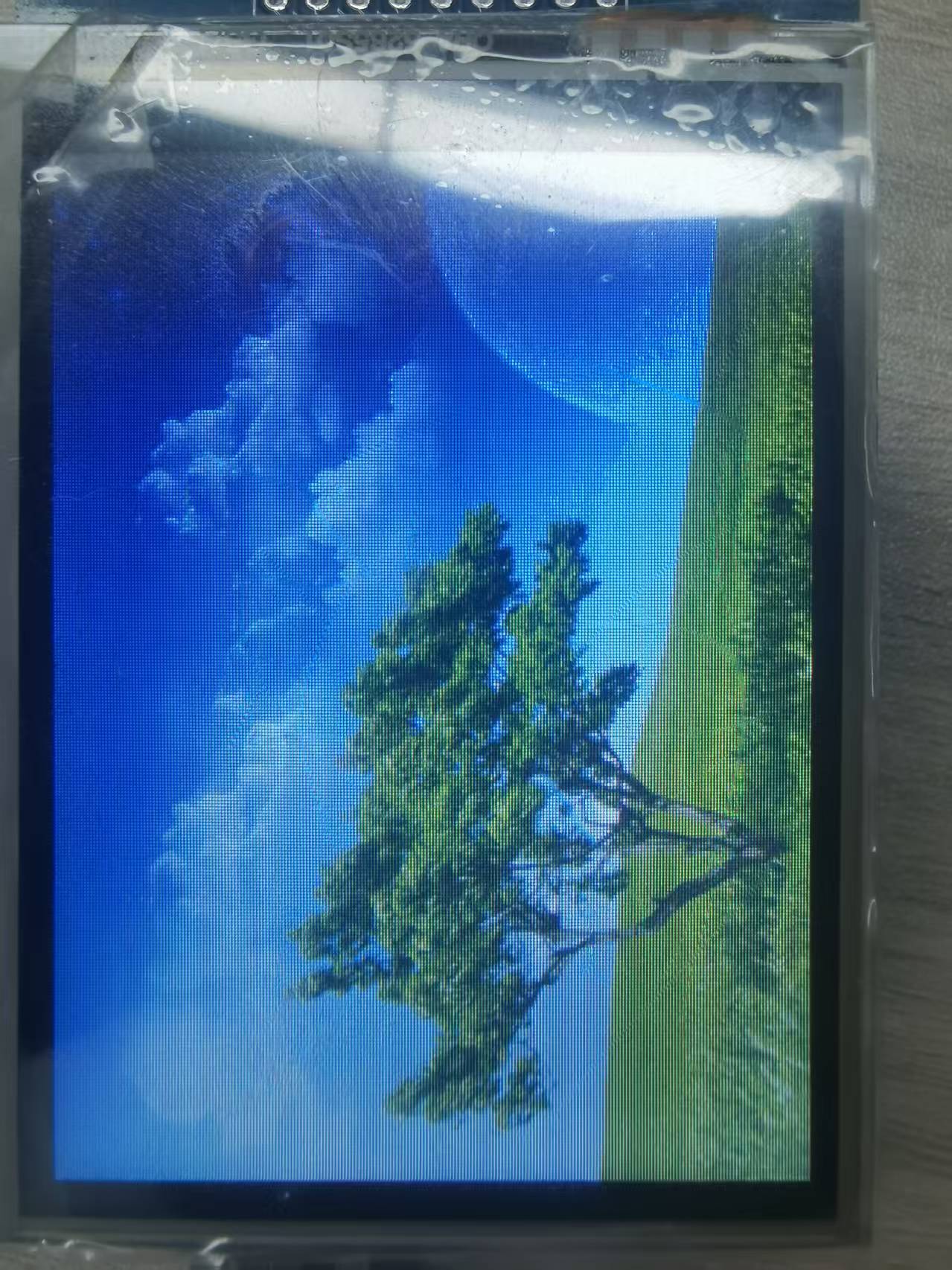
¶ Code Explanation
This example code is based on Arduino UNO R3. The operation logic is similar for other microcontrollers.
¶ Basic Configuration
¶ Library Inclusion
#include <SD.h>
#include <SPI.h>
#include <Elegoo_GFX.h>    // Core graphics library
#include <Elegoo_TFTLCD.h> // Hardware-specific library
SD.h: SD card operation library for reading BMP files from SD cardSPI.h: SPI communication library for high-speed data transfer with SD card and LCDElegoo_GFX.h: Core graphics library providing basic graphics drawing functionsElegoo_TFTLCD.h: Hardware driver library providing low-level LCD screen drivers
¶ Pin Definitions
#define LCD_CS A3 // Chip Select goes to Analog 3
#define LCD_CD A2 // Command/Data goes to Analog 2
#define LCD_WR A1 // LCD Write goes to Analog 1
#define LCD_RD A0 // LCD Read goes to Analog 0
#define PIN_SD_CS 10 // Elegoo SD shields and modules: pin 10
#define LCD_RESET A4 // Can alternately just connect to Arduino's reset pin
LCD_CS,LCD_CD,LCD_WR,LCD_RD,LCD_RESET: LCD screen control pinsPIN_SD_CS: SD card module chip select pin, fixed as digital pin 10
¶ Color Definitions
#define	BLACK   0x0000
#define	BLUE    0x001F
#define	RED     0xF800
#define	GREEN   0x07E0
#define CYAN    0x07FF
#define MAGENTA 0xF81F
#define YELLOW  0xFFE0
#define WHITE   0xFFFF
Defines eight common RGB565 color values for direct use in code. RGB565 format uses 16 bits to represent color, with 5 bits for red, 6 bits for green, and 5 bits for blue.
¶ Object Instantiation
Elegoo_TFTLCD tft(LCD_CS, LCD_CD, LCD_WR, LCD_RD, LCD_RESET);
Creates an Elegoo_TFTLCD object as the entry point for all subsequent screen operations.
¶ Image Configuration
#define MAX_BMP         10                      // bmp file num
#define FILENAME_LEN    20                      // max file name length

const int __Gnbmp_height = 320;                 // bmp hight
const int __Gnbmp_width  = 240;                 // bmp width

unsigned char __Gnbmp_image_offset  = 0;        // offset

int __Gnfile_num = 5;                           // num of file

char __Gsbmp_files[5][FILENAME_LEN] =           // add file name here
{
"flower.bmp",
"tiger.bmp",
"tree.bmp",
"RedRose.bmp",
"Penguins.bmp"
};
File bmpFile;
¶ Configuration Description
MAX_BMP: Maximum number of BMP files supported (10)FILENAME_LEN: Maximum filename length (20 characters)__Gnbmp_height: BMP image height (320 pixels)__Gnbmp_width: BMP image width (240 pixels)__Gnbmp_image_offset: Offset position of BMP image data in the file__Gnfile_num: Actual number of BMP files to display (5)__Gsbmp_files: BMP filename array storing image filenames to displaybmpFile: SD card file object
¶ bmpdraw() Function Details
The bmpdraw() function is the core function for image drawing, responsible for reading BMP image data from SD card and displaying it on the screen.
#define BUFFPIXEL       60                      // must be a divisor of 240
#define BUFFPIXEL_X3    180                     // BUFFPIXELx3

void bmpdraw(File f, int x, int y)
{
    bmpFile.seek(__Gnbmp_image_offset);

    uint32_t time = millis();

    uint8_t sdbuffer[BUFFPIXEL_X3];                 // 3 * pixels to buffer

    for (int i=0; i< __Gnbmp_height; i++) {
        for(int j=0; j<(240/BUFFPIXEL); j++) {
            bmpFile.read(sdbuffer, BUFFPIXEL_X3);

            uint8_t buffidx = 0;
            int offset_x = j*BUFFPIXEL;
            unsigned int __color[BUFFPIXEL];

            for(int k=0; k<BUFFPIXEL; k++) {
                __color[k] = sdbuffer[buffidx+2]>>3;                        // red
                __color[k] = __color[k]<<6 | (sdbuffer[buffidx+1]>>2);      // green
                __color[k] = __color[k]<<5 | (sdbuffer[buffidx+0]>>3);      // blue

                buffidx += 3;
            }

        for (int m = 0; m < BUFFPIXEL; m ++) {
              tft.drawPixel(m+offset_x, i,__color[m]);
        }
        }
    }

    Serial.print(millis() - time, DEC);
    Serial.println(" ms");
}
¶ Buffer Configuration
BUFFPIXEL: Number of pixels read at a time (60), must be a divisor of 240BUFFPIXEL_X3: Buffer size (180 bytes), since each pixel requires 3 bytes (1 byte each for RGB)
¶ Image Drawing Process
-
Locate Image Data:
bmpFile.seek(__Gnbmp_image_offset);
Move the file pointer to the starting position of BMP image data. -
Start Timing:
uint32_t time = millis();
Record the start time for measuring drawing duration. -
Draw Line by Line: Outer loop iterates through image height (320 lines)
-
Read in Chunks: Inner loop divides each line into multiple chunks (240/60=4 chunks), reading 60 pixels at a time
-
RGB to RGB565 Conversion:
__color[k] = sdbuffer[buffidx+2]>>3; // red __color[k] = __color[k]<<6 | (sdbuffer[buffidx+1]>>2); // green __color[k] = __color[k]<<5 | (sdbuffer[buffidx+0]>>3); // blueColor in BMP files is stored in BGR (Blue-Green-Red) order and needs to be converted to RGB565 format:
- Red: Take high 5 bits (shift right by 3)
- Green: Take high 6 bits (shift right by 2)
- Blue: Take high 5 bits (shift right by 3)
-
Draw Pixel:
tft.drawPixel(m+offset_x, i, __color[m]);
Draw a single pixel on the screen. -
Output Duration: Output total drawing time (milliseconds) after completion.
¶ bmpReadHeader() Function Details
The bmpReadHeader() function is responsible for parsing the BMP file header and verifying if the file format is correct.
boolean bmpReadHeader(File f)
{
    uint32_t tmp;
    uint8_t bmpDepth;

    if (read16(f) != 0x4D42) {
        // magic bytes missing
        return false;
    }

    tmp = read32(f);
    Serial.print("size 0x");
    Serial.println(tmp, HEX);

    read32(f);

    __Gnbmp_image_offset = read32(f);
    Serial.print("offset ");
    Serial.println(__Gnbmp_image_offset, DEC);

    tmp = read32(f);
    Serial.print("header size ");
    Serial.println(tmp, DEC);

    int bmp_width = read32(f);
    int bmp_height = read32(f);

    if(bmp_width != __Gnbmp_width || bmp_height != __Gnbmp_height)  {    // if image is not 320x240, return false
        return false;
    }

    if (read16(f) != 1)
    return false;

    bmpDepth = read16(f);
    Serial.print("bitdepth ");
    Serial.println(bmpDepth, DEC);

    if (read32(f) != 0) {
        // compression not supported!
        return false;
    }

    Serial.print("compression ");
    Serial.println(tmp, DEC);

    return true;
}
¶ BMP File Header Parsing Steps
-
Verify Magic Number:
read16(f) != 0x4D42
BMP files start with0x4D42("BM"), which is the identifier for BMP format. -
Read File Size:
tmp = read32(f);
Read the size of the entire BMP file. -
Skip Reserved Fields:
read32(f);
Read and ignore the reserved fields in the file header. -
Read Image Data Offset:
__Gnbmp_image_offset = read32(f);
Get the starting position of image data in the file. -
Read DIB Header Size:
tmp = read32(f);
Read the size of the DIB (Device Independent Bitmap) header. -
Verify Image Dimensions:
int bmp_width = read32(f); int bmp_height = read32(f); if(bmp_width != __Gnbmp_width || bmp_height != __Gnbmp_height) { return false; }Verify if the image dimensions are 320x240, return false if not matching.
-
Verify Image Planes:
read16(f) != 1
BMP format requires image planes to be 1. -
Read Bit Depth:
bmpDepth = read16(f);
Read the bit depth of the image (usually 24 bits). -
Verify Compression:
read32(f) != 0
This example does not support compressed BMP files, must be uncompressed (value 0).
¶ Little Endian Read Functions
¶ read16() - Read 16-bit Little Endian Data
uint16_t read16(File f)
{
    uint16_t d;
    uint8_t b;
    b = f.read();
    d = f.read();
    d <<= 8;
    d |= b;
    return d;
}
BMP files use Little Endian for data storage, while Arduino uses Big Endian. This function reads the low byte first, then the high byte, and combines them into the correct 16-bit value.
¶ read32() - Read 32-bit Little Endian Data
uint32_t read32(File f)
{
    uint32_t d;
    uint16_t b;

    b = read16(f);
    d = read16(f);
    d <<= 16;
    d |= b;
    return d;
}
Similarly, this function reads two 16-bit little-endian values and combines them into a 32-bit value.
¶ setup() Function Details
The setup() function completes the initialization of serial communication, LCD screen, and SD card.
void setup(void) {
  Serial.begin(9600);
  Serial.println(F("TFT LCD test"));
  Serial.println(F("Elegoo 2.8\" TFT Screen"));

  Serial.print("TFT size is "); Serial.print(tft.width()); Serial.print("x"); Serial.println(tft.height());

  tft.reset();

  uint16_t identifier = tft.readID();

  if(identifier == 0x9325) {
    Serial.println(F("Found ILI9325 LCD driver"));
  } else if(identifier == 0x9328) {
    Serial.println(F("Found ILI9328 LCD driver"));
  } else if(identifier == 0x4535) {
    Serial.println(F("Found LGDP4535 LCD driver"));
  }else if(identifier == 0x7575) {
    Serial.println(F("Found HX8347G LCD driver"));
  } else if(identifier == 0x9341) {
    Serial.println(F("Found ILI9341 LCD driver"));
  } else if(identifier == 0x8357) {
    Serial.println(F("Found HX8357D LCD driver"));
  } else if(identifier==0x0101)
  {
      identifier=0x9341;
       Serial.println(F("Found 0x9341 LCD driver"));
  }else {
    Serial.print(F("Unknown LCD driver chip: "));
    Serial.println(identifier, HEX);
    identifier=0x9341;
  }

  tft.begin(identifier);
  tft.fillScreen(BLUE);

  //Init SD_Card
  pinMode(10, OUTPUT);

  if (!SD.begin(10)) {
    Serial.println("initialization failed!");
    tft.setCursor(0, 0);
    tft.setTextColor(WHITE);
    tft.setTextSize(1);
    tft.println("SD Card Init fail.");
  }else
  Serial.println("initialization done.");
}
¶ Initialization Process
-
Serial Initialization:
Serial.begin(9600);
Set serial baud rate to 9600 for debugging output. -
Screen Size Detection:
tft.width()andtft.height()
Get screen resolution and print to serial. -
LCD Reset:
tft.reset();
Send reset signal to LCD screen. -
LCD Driver Chip Identification:
Read driver chip ID viareadID()and match with known models, defaulting to ILI9341 driver. -
Screen Initialization:
tft.begin(identifier);
Initialize LCD screen using the identified driver ID. -
Fill Screen:
tft.fillScreen(BLUE);
Fill the entire screen with blue as initial background. -
SD Card Initialization:
pinMode(10, OUTPUT); if (!SD.begin(10)) { Serial.println("initialization failed!"); tft.setTextColor(WHITE); tft.setTextSize(1); tft.println("SD Card Init fail."); } else Serial.println("initialization done.");Initialize SD card module, display error message on screen if failed.
¶ loop() Function Details
The loop() function is the main loop of the Arduino program, displaying all BMP image files sequentially.
void loop(void) {
     for(unsigned char i=0; i<__Gnfile_num; i++) {
        bmpFile = SD.open(__Gsbmp_files[i]);
        if (! bmpFile) {
            Serial.println("didnt find image");
            tft.setTextColor(WHITE);    tft.setTextSize(1);
            tft.println("didnt find BMPimage");
            while (1);
        }

        if(! bmpReadHeader(bmpFile)) {
            Serial.println("bad bmp");
            tft.setTextColor(WHITE);    tft.setTextSize(1);
            tft.println("bad bmp");
            return;
        }

        bmpdraw(bmpFile, 0, 0);
        bmpFile.close();
        delay(1000);
        delay(1000);
    }

}
¶ Image Display Process
-
Iterate Through Image Files:
for(unsigned char i=0; i<__Gnfile_num; i++)
Loop through all BMP files. -
Open File:
bmpFile = SD.open(__Gsbmp_files[i]);
Open the specified BMP file from SD card. -
File Existence Check:
if (! bmpFile) { Serial.println("didnt find image"); tft.setTextColor(WHITE); tft.setTextSize(1); tft.println("didnt find BMPimage"); while (1); }If file doesn't exist, display error message on screen and serial, then enter infinite loop.
-
Parse File Header:
bmpReadHeader(bmpFile)
CallbmpReadHeader()to parse BMP file header, display error and return if format is incorrect. -
Draw Image:
bmpdraw(bmpFile, 0, 0);
Callbmpdraw()function to display image on screen. -
Close File:
bmpFile.close();
Close the opened BMP file. -
Delay:
delay(1000); delay(1000);
Pause for 2 seconds (two 1-second delays) to allow user to view current image.
After displaying all images, the loop restarts.
¶ Summary
This example program implements BMP image display functionality through the following steps:
- Initialization: Include libraries, define pins and colors, create LCD object, initialize SD card module.
- File Header Parsing: Read and verify BMP file header information, get image data offset position.
- Image Drawing: Read BMP image data line by line, convert RGB format to RGB565 format, then draw on screen.
- Loop Display: Sequentially display all predefined BMP image files.
Key functions used in the program include:
SD.begin(): Initialize SD card moduleSD.open(): Open file on SD cardbmpFile.seek(): Position file pointer to specified locationbmpFile.read(): Read data from filebmpFile.close(): Close filebmpReadHeader(): Parse BMP file headerbmpdraw(): Draw BMP imageread16(): Read 16-bit little-endian dataread32(): Read 32-bit little-endian datatft.drawPixel(): Draw single pixel
¶ Modification Guide
If you need to modify the code for different display effects, you can refer to the following aspects:
-
Replace Display Images:
Follow these steps to replace or add new display images:
Step 1: Prepare BMP Image Files
- Image dimensions must be 320×240 pixels (width × height)
- Image bit depth must be 24-bit (RGB888 format)
- Image must be uncompressed (compression field in BMP header is 0)
- Recommended to use image editing software (such as Photoshop, GIMP, etc.) to save images in BMP format
Step 2: Copy Images to SD Card
- Insert the formatted SD card into your computer
- Copy the prepared BMP image files to the root directory of the SD card
- Ensure filenames meet the following requirements:
- Filename length does not exceed 20 characters (excluding extension)
- Filename contains only English letters, numbers, and underscores
- File extension must be
.bmp(lowercase)
Step 3: Modify Filename Array in Code
- Open the
ShowBMP.inofile - Find the
__Gsbmp_filesarray definition (around lines 46-53):char __Gsbmp_files[5][FILENAME_LEN] = // add file name here { "flower.bmp", "tiger.bmp", "tree.bmp", "RedRose.bmp", "Penguins.bmp" }; - Replace the filenames in the array with the new filenames on the SD card
- Each filename must be enclosed in double quotes with a comma at the end
Step 4: Update Image Count
- Find the
__Gnfile_numvariable definition (around line 44):int __Gnfile_num = 5; // num of file - Change the value to the actual number of image files
Step 5: Upload and Test
- Insert the SD card into the SD card slot of the Elegoo TFT LCD module
- Upload the modified code to Arduino
- Open the serial monitor to view debug information
- Observe if the screen correctly displays the new images
-
Modify Image Count:
- Change the value of
__Gnfile_numvariable
- Change the value of
-
Modify Image Dimensions:
- Change
__Gnbmp_heightand__Gnbmp_widthvariables (note: the code hardcodes a 240-width loop)
- Change
-
Modify Display Delay:
- Change the
delay()values in theloop()function
- Change the
-
Modify Buffer Size:
- Change the
BUFFPIXELconstant (must be a divisor of 240)
- Change the
-
Modify Initial Background Color:
- Change the color parameter in
fillScreen()in thesetup()function
- Change the color parameter in