¶ DHT Temperature and humidity
¶ Overview
In this tutorial we will learn how to use a DHT11 Temperature and Humidity Sensor.
It's accurate enough for most projects that need to keep track of humidity and temperature readings.
Again we will be using a Library specifically designed for these sensors that will make our code short and easy to write.
¶ Component Required:
(1) x Elegoo ESP32
(1) x DHT11 Temperature and Humidity module
(2) x 400 Tie Points Breadboard
(4) x F-M wires (Female to Male DuPont wires)
¶ Component Introduction
¶ Temp and humidity sensor:
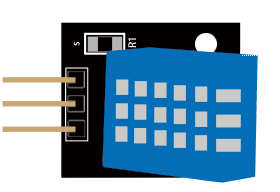
DHT11 digital temperature and humidity sensor is a composite Sensor which contains a calibrated digital signal output of the temperature and humidity. The dedicated digital modules collection technology and the temperature and humidity sensing technology are applied to ensure that the product has high reliability and excellent long-term stability. The sensor includes a resistive moisture sensor and a NTC temperature measurement devices, and connects with a high-performance 8-bit microcontroller.
Applications:HVAC, dehumidifier, testing and inspection equipment, consumer goods, automotive, automatic control, data loggers, weather stations, home appliances, humidity regulator, medical and other humidity measurement and control.
Product parameters
| Humidity Parameters | |
|---|---|
| Parameter | Specification |
| Relative humidity | 1m / s air 6s Hysteresis: |
| Resolution | 8Bit |
| Repeatability | ±1% RH |
| Accuracy | At 25°C ±5% RH |
| Long-term stability | < ±0.5% RH / yr in |
| Interchangeability | fully interchangeable |
| Response time | 1 / e (63%) of 25°C 6s |
| Temperature Parameters | |
|---|---|
| Parameter | Specification |
| Response time | 1 / e (63%) 10S |
| Resolution | 8Bit |
| Repeatability | ±0.2°C |
| Range | At 0°C ±50°C |
| Power supply | DC 3.5~5.5V |
| Supply Current | measurement 0.3mA standby 60μA |
| Sampling period | more than 2 seconds |
Pin Description:
- the VDD power supply 3.5~5.5V DC.
- DATA serial data, a single bus.
- GND ground, the negative power.
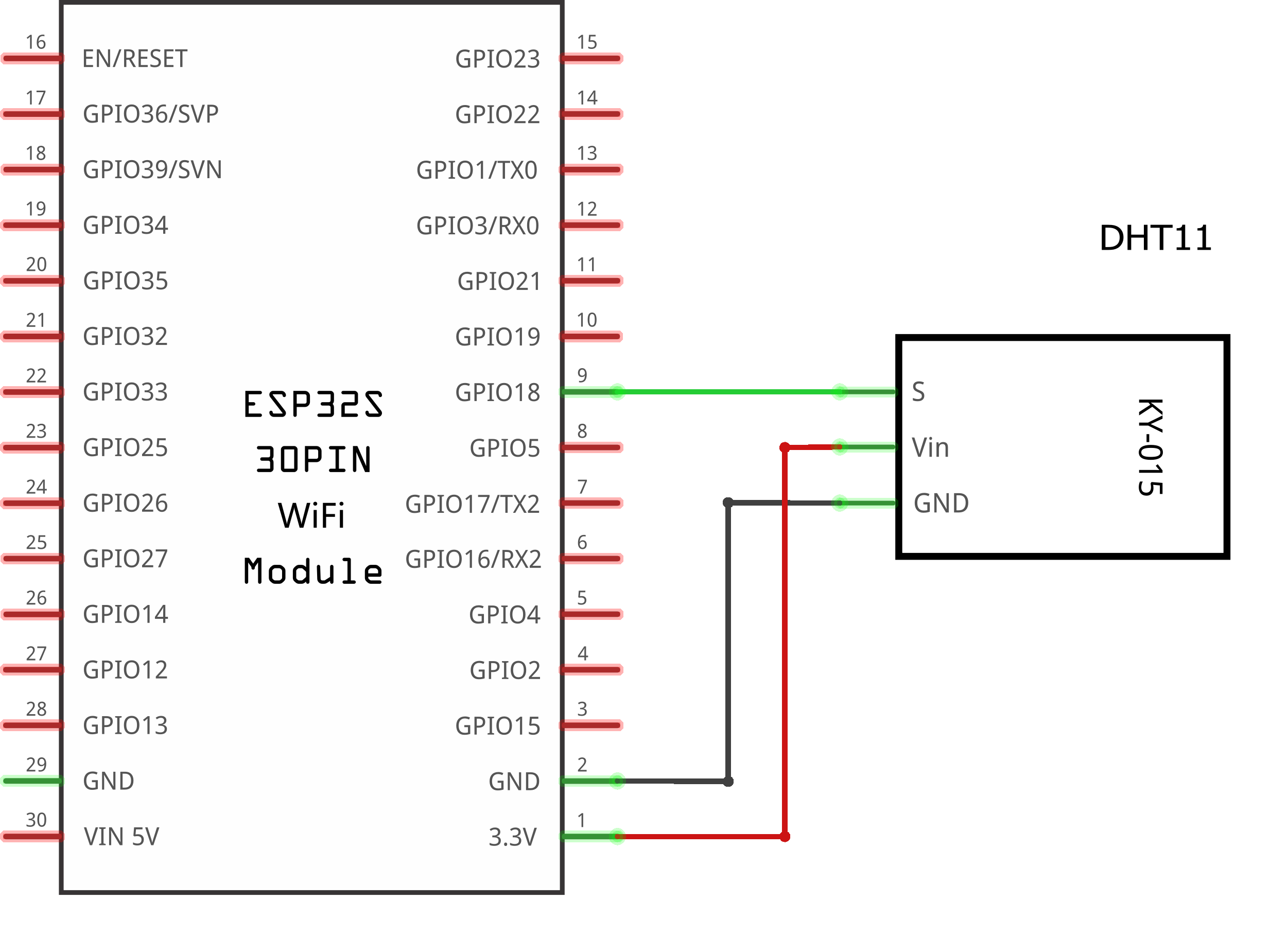
¶ Connection Schematic
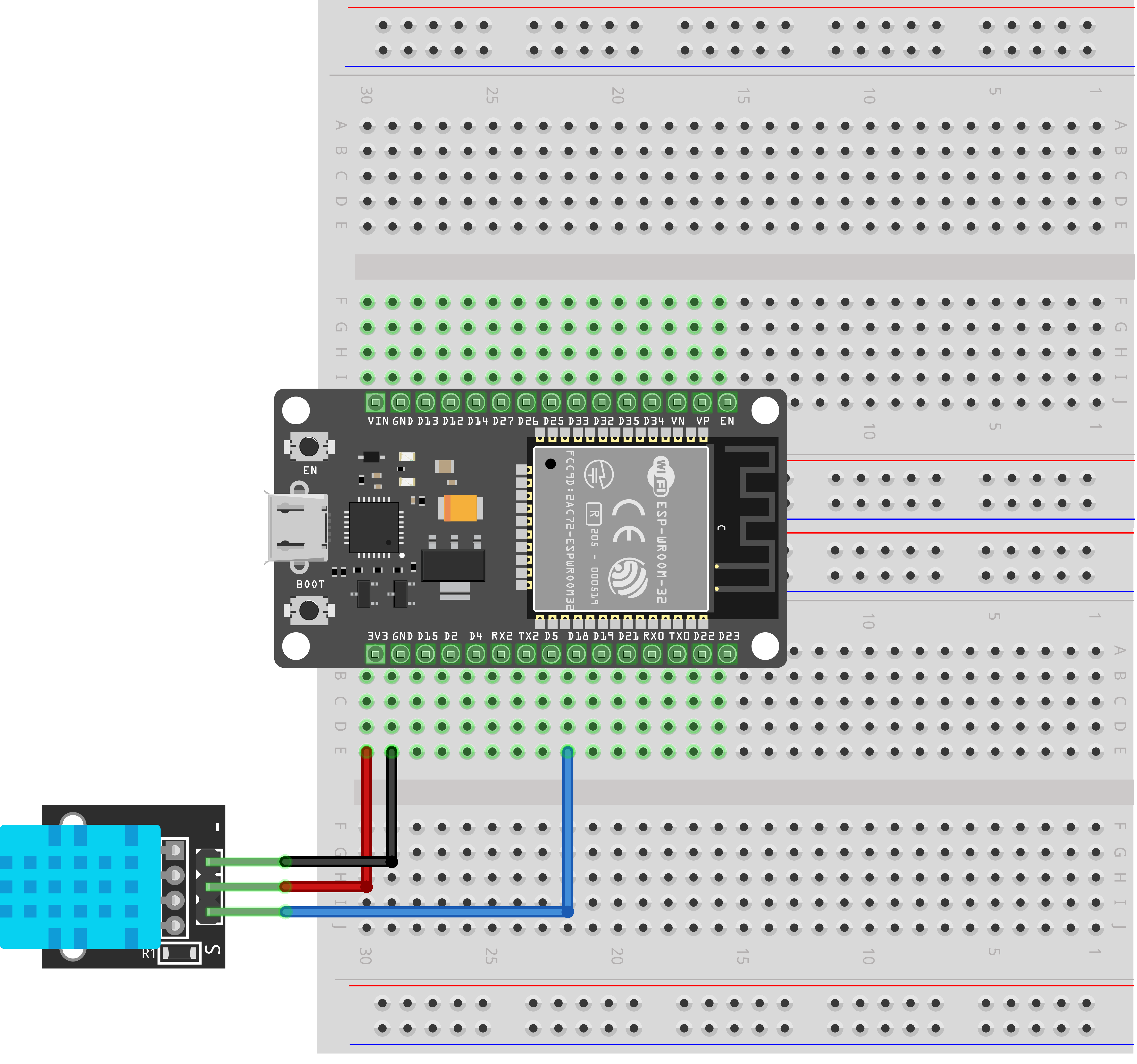
¶ Wiring diagram
¶ Code
You can click the blue text link to download the program file to your local device, and double-click the file to open it after the download is complete. Please note: Before opening the file, ensure that you have installed the Arduino IDE development environment and completed the installation of relevant components such as the board support package and driver corresponding to the ESP32 development board. If you have any questions about this operation process, you can refer to the "part 1" chapter of the document for detailed guidance.
Before you can run this, make sure that you have installed the <dht_nonblocking> library or re-install it, if necessary. Otherwise, your code won't work.
With this code, the ESP32 board will read temperature and humidity data from a DHT11 sensor every 3 seconds and display the results on the serial monitor of the Arduino software once the code is compiled and uploaded to the ESP32 board.
Click the Serial Monitor button to turn on the serial monitor. The basics about the serial monitor are introduced in details in tutorial 4 in part 2.
#include <dht_nonblocking.h>
#define DHT_SENSOR_TYPE DHT_TYPE_11
static const int DHT_SENSOR_PIN = 18;
DHT_nonblocking dht_sensor( DHT_SENSOR_PIN, DHT_SENSOR_TYPE );
Library and Sensor Configuration:
#include <dht_nonblocking.h>: Includes the non-blocking DHT sensor library for ESP32#define DHT_SENSOR_TYPE DHT_TYPE_11: Defines the sensor type as DHT11static const int DHT_SENSOR_PIN = 18: Sets the GPIO pin (18) where the DHT sensor is connectedDHT_nonblocking dht_sensor( DHT_SENSOR_PIN, DHT_SENSOR_TYPE ): Creates a DHT sensor object using the specified pin and sensor type
void setup( )
{
Serial.begin( 9600);
}
setup() Function:Initializes the serial communication with a baud rate of 9600 to allow communication with the computer's serial monitor.
static bool measure_environment( float *temperature, float *humidity )
{
static unsigned long measurement_timestamp = millis( );if( millis( ) - measurement_timestamp > 3000ul )
{
if( dht_sensor.measure( temperature, humidity ) == true )
{
measurement_timestamp = millis( );
return( true );
}
}return( false );
}
measure_environment() Function:A static helper function that measures temperature and humidity in a non-blocking manner.
static unsigned long measurement_timestamp: Tracks the time of the last successful measurementmillis() - measurement_timestamp > 3000ul: Checks if at least 3 seconds have passed since the last measurementdht_sensor.measure( temperature, humidity ): Attempts to read sensor data- Returns
trueif a valid measurement was successfully taken
Pointer Usage:
In the function definition static bool measure_environment( float *temperature, float *humidity ), the parameters float *temperature and float *humidity are pointers to float variables. This means they store the memory addresses of variables rather than their actual values.
- Pointers allow the function to modify variables outside of its scope
- In this case, the
dht_sensor.measure()method uses the pointers to store the measured temperature and humidity values directly in the variables provided by the caller - This avoids the need to use global variables or return complex data structures
void loop( )
{
float temperature;
float humidity;if( measure_environment( &temperature, &humidity ) == true )
{
Serial.print( "T = " );
Serial.print( temperature, 1 );
Serial.print( " deg. C, H = " );
Serial.print( humidity, 1 );
Serial.println( "%" );
}
}
loop() Function:The main loop that continuously checks and displays sensor data.
float temperature, humidity: Variables to store the measured values&temperature, &humidity: The&operator takes the memory address of a variable, converting it to a pointer for use in the function callSerial.print( temperature, 1 ): Prints the float value with 1 decimal place for readabilitySerial.println( "%" ): Prints a percentage sign and moves to the next line on the serial monitor
float Data Type:
The float data type is a single-precision floating-point type that can represent decimal numbers (numbers with fractional parts). In this code:
- It is used to store temperature readings (e.g., 25.5°C)
- It is used to store humidity readings (e.g., 65.3%)
- It provides greater precision than integer types (like int) for sensor measurements
- The
floattype uses 4 bytes of memory and can represent numbers from approximately ±1.4E-45 to ±3.4E38 with about 6 decimal digits of precision
Non-blocking Measurement Approach:
This code uses a non-blocking approach to sensor measurements:
- The
measure_environment()function checks the time since the last measurement - It only performs a new measurement if at least 3 seconds have passed
- This allows other code (if added) to continue running without delays
- The
statickeyword used withmeasurement_timestampensures the variable retains its value between function calls
millis() Function:
The millis() function returns the number of milliseconds since the Arduino board started running the current program. It is used here for timekeeping:
static unsigned long measurement_timestamp = millis();Records the time when the function is first calledmillis() - measurement_timestamp > 3000ulChecks if 3000 milliseconds (3 seconds) have elapsed- The
ulsuffix indicates that 3000 is an unsigned long constant
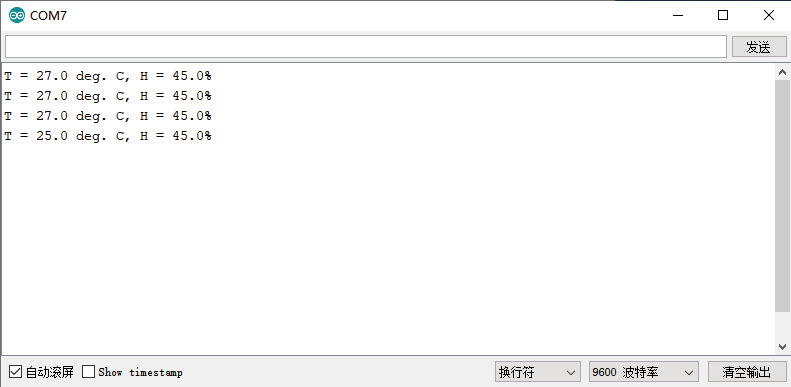
Upload the program then open the monitor, we can see the data as below:
(It shows the temperature of the environment, we can see it is 27 to 25 degrees with 45.0% humidity)!