¶ Ultrasonic sensor
¶ Overview
The ultrasonic sensor is great for all kinds of projects that need distance measurements or avoiding obstacles for example. The HC-SR04 is inexpensive and easy to use since we will be using a Library specifically designed for these sensor.
¶ Component Required:
(1) x Elegoo Uno R3
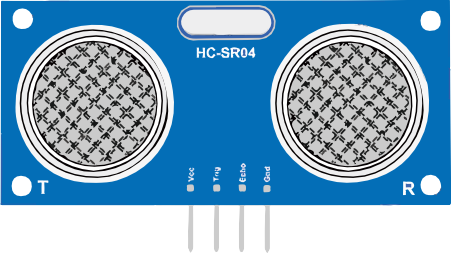
(1) x Ultrasonic sensor module
(4) x F-M wires (Female to Male DuPont wires)
¶ Component Introduction
¶ Ultrasonic sensor
Ultrasonic sensor module HC-SR04 provides 2cm-400cm non-contact measurement function, the ranging accuracy can reach to 3mm. The modules includes ultrasonic transmitters, receiver and control circuit. The basic principle of work:
- Using IO trigger for at least 10us high level signal,
- The Module automatically sends eight 40 kHz and detect whether there is a pulse signal back.
- IF the signal back, through high level , time of high output IO duration is the time from sending ultrasonic tore turning.
Test distance =(high level time × velocity of sound (340m/s) /2
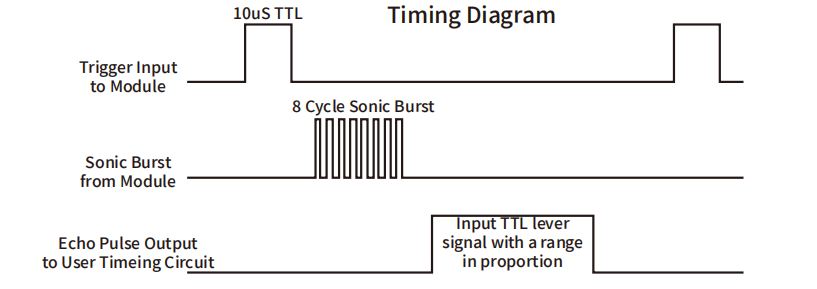
The Timing diagram is shown below. You only need to supply a short 10us pulse to the trigger input to start the ranging, and then the module will send out an 8 cycle burst of ultrasound at 40 kHz and raise its echo.
The Echo pulse width is proportional to the distance of the object, or range.
You can calculate through the time interval between sending trigger signal and receiving echo signal. Formula: us / 58 = centimeters or us / 148 =inch; or:the range = high level time * velocity (340M/S) / 2; we suggest to use over 60ms measurement cycle, in order to prevent trigger signal to the echo signal.
¶ Connection Schematic
¶ Wiring diagram
¶ Code
You can click the blue text link to download the program file to your local device, and double-click the file to open it after the download is complete. Please note: Before opening the file, ensure that you have installed the Arduino IDE development environment and completed the installation of relevant components such as the board support package and driver corresponding to the UNO development board. If you have any questions about this operation process, you can refer to the "part 1" chapter of the document for detailed guidance.
Before you can run this, make sure that you have installed the < SR04> library or re-install it, if necessary. Otherwise, your code won't work.
#include "SR04.h"
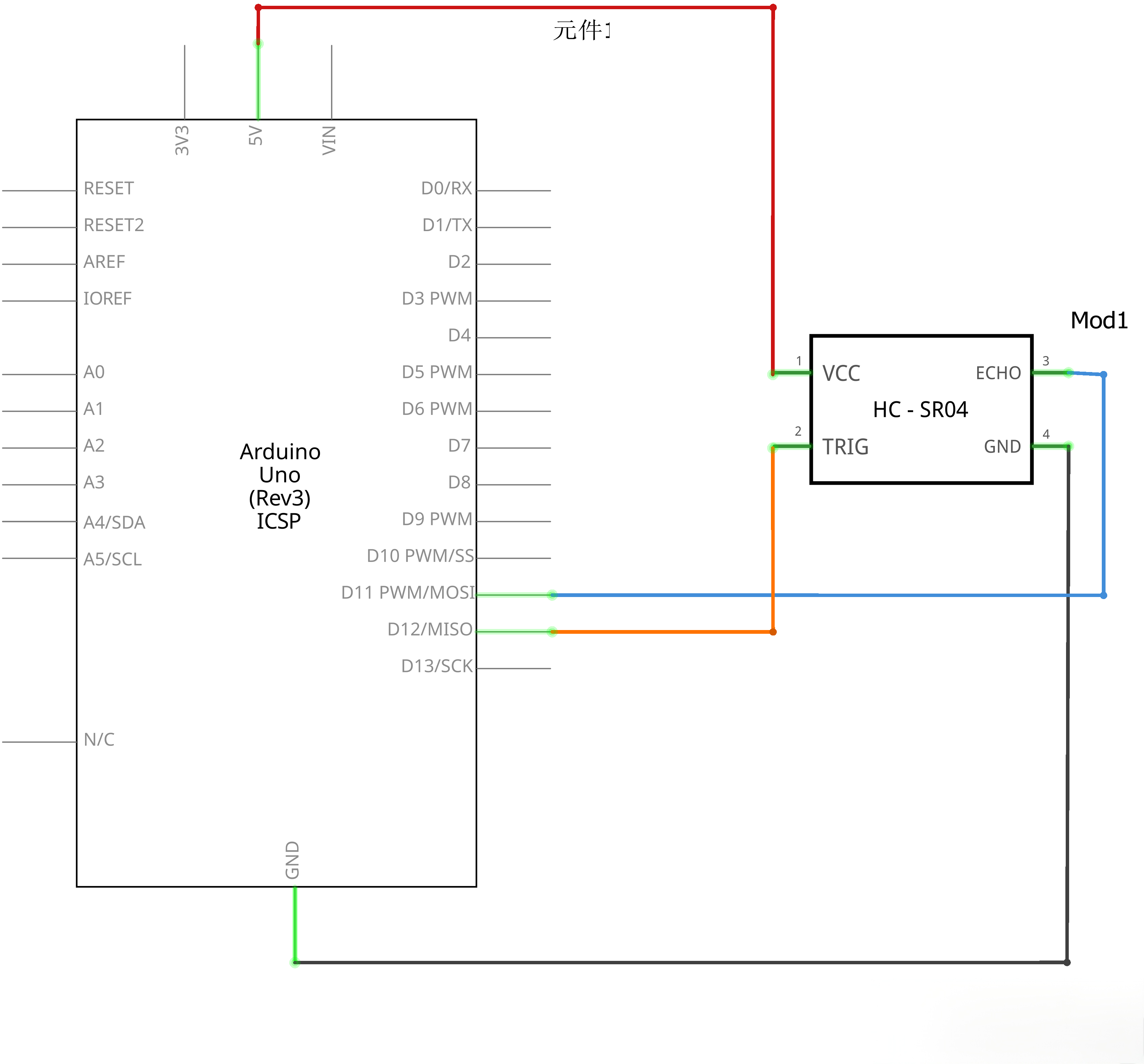
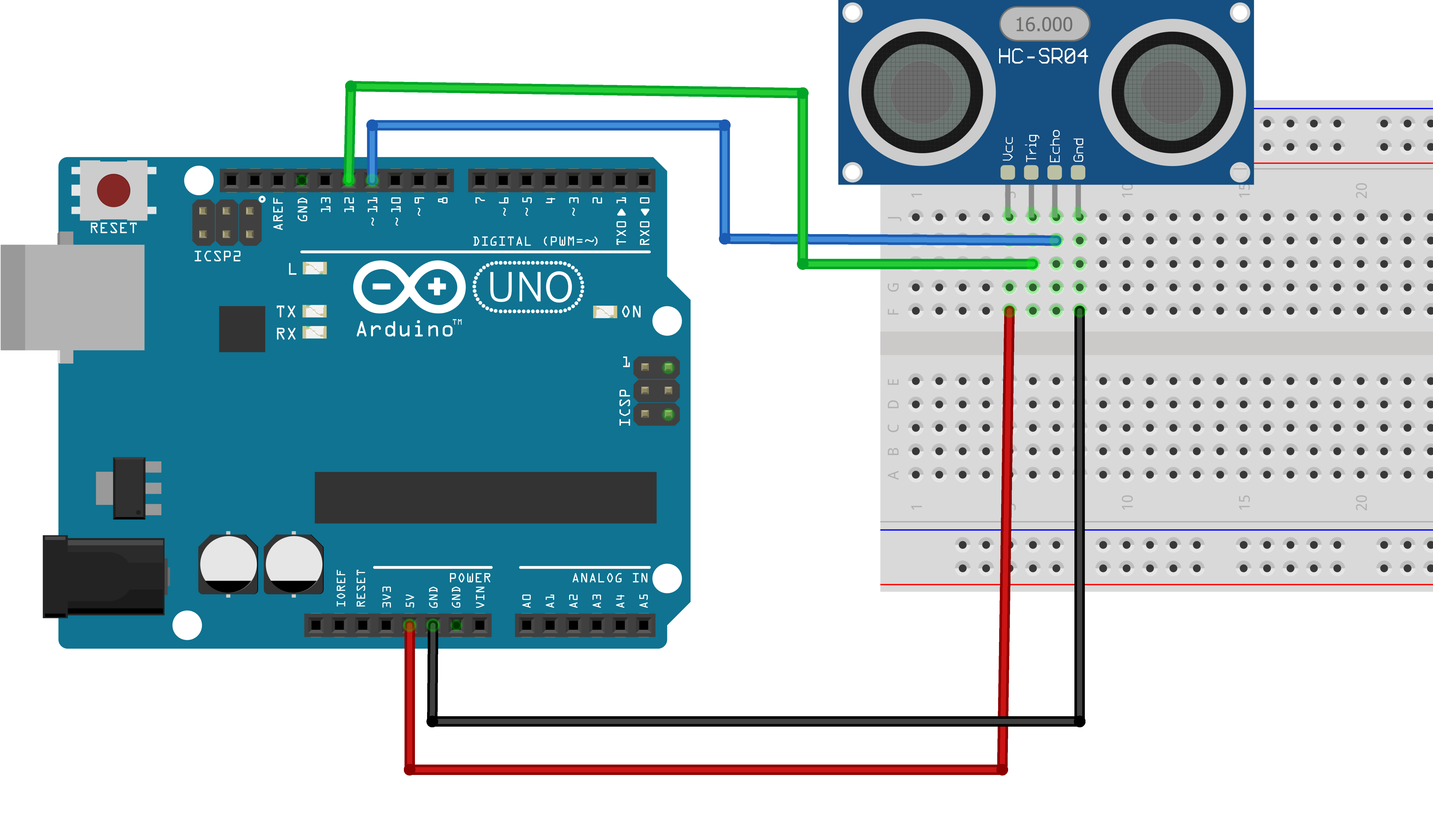
#define TRIG_PIN 11
#define ECHO_PIN 12SR04 sr04 = SR04(ECHO_PIN,TRIG_PIN);
long a;
Library and Hardware Configuration:
#include "SR04.h": Includes the SR04 library for HC-SR04 ultrasonic sensor control#define TRIG_PIN 11: Defines the trigger pin (GPIO 11) for the ultrasonic sensor#define ECHO_PIN 12: Defines the echo pin (GPIO 12) for the ultrasonic sensorSR04 sr04 = SR04(ECHO_PIN,TRIG_PIN): Creates an SR04 object with the specified echo and trigger pinslong a: Declares a long integer variable to store the measured distance
void setup() {
Serial.begin(9600);//Initialization of Serial Port
delay(1000);
}
setup() Function:Initializes the system and serial communication.
Serial.begin(9600): Initializes serial communication at 9600 baud ratedelay(1000): 1-second delay to allow the system to stabilize after startup
Serial Communication:
- Used to output distance measurements to the serial monitor
- 9600 baud rate is a standard communication speed for Arduino/ESP32
- The delay gives time for the serial connection to establish before measurements begin
void loop() {
a=sr04.Distance();
Serial.print(a);
Serial.println("cm");//The difference between "Serial.print" and "Serial.println"
//is that "Serial.println" can change lines.
delay(1000);
}
loop() Function Overview:The main loop that continuously measures distance and displays results.
1. Distance Measurement Module:
a=sr04.Distance();
sr04.Distance(): Calls the library function to measure distance- Returns the distance in centimeters as a long integer
- Stores the result in variable
a
2. Serial Output Module:
Serial.print(a);
Serial.println("cm");//The difference between "Serial.print" and "Serial.println"
//is that "Serial.println" can change lines.
delay(1000);
Serial.print(a): Prints the measured distance valueSerial.println("cm"): Prints "cm" and moves to a new linedelay(1000): 1-second delay between measurements
Ultrasonic Measurement Principle:
- The trigger pin sends a 10μs pulse to activate the sensor
- The sensor emits 8 ultrasonic pulses at 40kHz
- The echo pin goes HIGH when ultrasonic waves are emitted
- The echo pin goes LOW when the echo returns
- The time between HIGH and LOW is used to calculate distance
Distance Calculation:
- Distance (cm) = (Time (μs) × Speed of Sound (340 m/s)) / 2 / 10000
- Speed of sound is approximately 340 meters per second
- Divided by 2 because the sound travels to the object and back
Serial Monitor Output:
- The serial monitor will display distance measurements like:
25cm,12cm,45cm - Each measurement appears on a new line due to
Serial.println()
Temperature Compensation:
- The speed of sound changes with temperature:
- Speed (m/s) = 331.5 + 0.6 × Temperature (°C)
- For more accurate measurements, consider adding temperature compensation
Troubleshooting:
- No output: Check power supply, wiring, and serial monitor settings
- Inconsistent readings: Ensure the sensor is stable and not facing reflective surfaces
- Max distance (400cm) always shown: Check trigger/echo wiring (often reversed)
- 0cm or random values: Verify proper voltage (5V recommended) and pin connections