¶ Fault Symptom
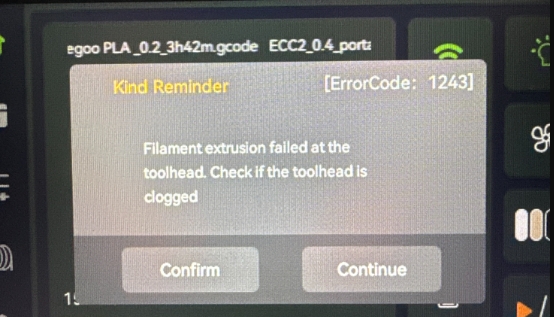
Filament extrusion failed at the toolhead. Check if the toolhead is clogged
¶ Possible Causes
- Incorrect hotend installed
- Incorrect slicing software setting enabled
- Filament spool tangling or knotting
- Insufficient meshing of the extruder gears
- Hotend clog
¶ Required Tools
- 2.0 mm Allen key
- 2.5 mm Allen key
- Heat-resistant gloves
- Unclogging needle
¶ Troubleshooting Steps
¶ Confirm the Hotend Specification
The Centauri Carbon 2 series printers and the Centauri Carbon use different hotends.These hotends are not interchangeable. Please make sure the correct hotend is installed for your printer model.
¶ Check the Slicing Software Settings
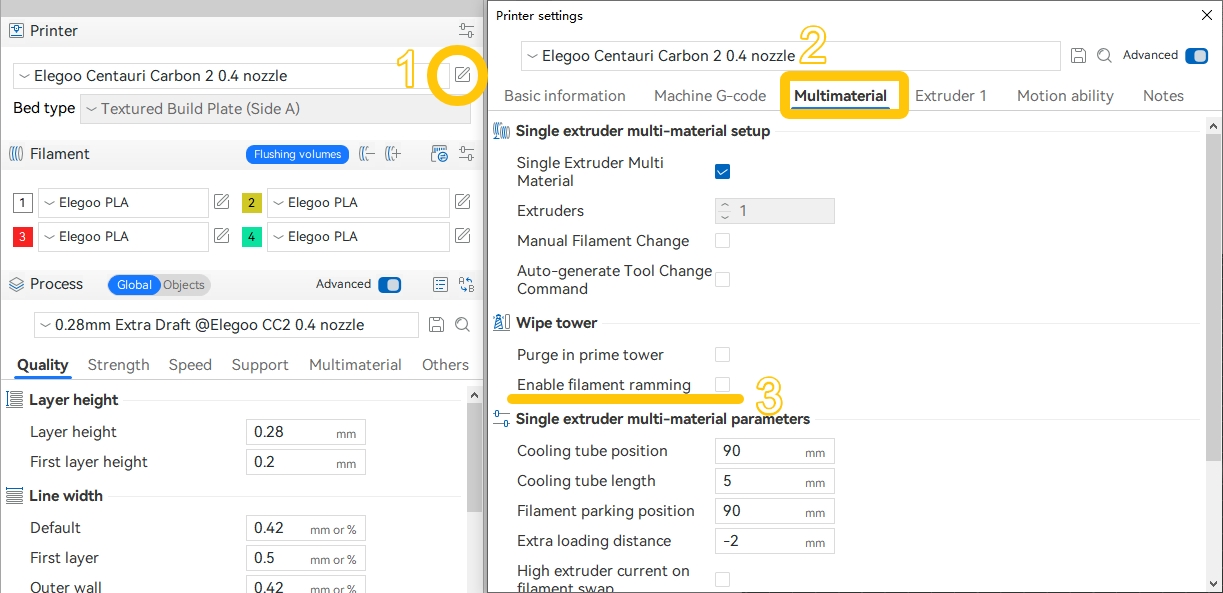
In ELEGOO Slicer, Filament Ramming is disabled by default. If Filament Ramming is enabled, Error 1243 may occur. Please uncheck or disable this setting, then re-slice the file and try printing again.
¶ Check for filament tangling
If filament tangling or knotting is found, cut off the deformed section of the filament. Then reload the filament into the CANVAS channel.
To prevent recurrence, always hold the end of the filament firmly when loading or unloading to avoid loosening and tangling.
.png)
¶ Check extruder Gear box meshing
-
Refer to the video below (00:00–00:45) to disassemble the 4-in-1 hub / Tool head front cover / Tool head housing:
https://www.youtube.com/watch?v=0XCBpwRAjXE -
Use a 2.5 mm Allen key to remove the two screws securing the hotend.
.png)
-
Pull the hotend downward but do not disconnect the hotend connector.
.png)
-
Insert a filament into the upper hole of the Gear box.
.png)
-
On the touchscreen, go to Control → Prepare, set the nozzle temperature to 170 °C, and tap the ▽ button.
Do not load filament through the CANVAS menu. Loading via the CANVAS menu will trigger a homing operation. Because the hotend is not secured at this stage, this may damage the hotend and heated bed.
.png)
- Check whether the filament can be fed out from the bottom of the Gear box.
.png)
.png)
-
If the filament cannot be fed out, turn the screw at the top-right corner of the Gear box counterclockwise to tighten the gears.
.png)
-
If the filament feeds out normally, proceed to check the hotend.
¶ Check the hotend
To avoid burns, wear heat-resistant gloves before performing this operation.
-
Set the nozzle temperature to 250 °C via the touchscreen.
-
Gently insert the unclogging needle into the nozzle hole and push to clear the jammed filament.
.png)
- If the filament remains stuck and cannot be cleared with the unclogging needle, replace the hotend with a new one.
How to Replace the Hotend Kit(B0C241)
If the issue remains unresolved after completing all the above steps, please contact technical support.Technical Support Email: 3dp@elegoo.com
- If the filament remains stuck and cannot be cleared with the unclogging needle, replace the hotend with a new one.