¶ Fault Symptom
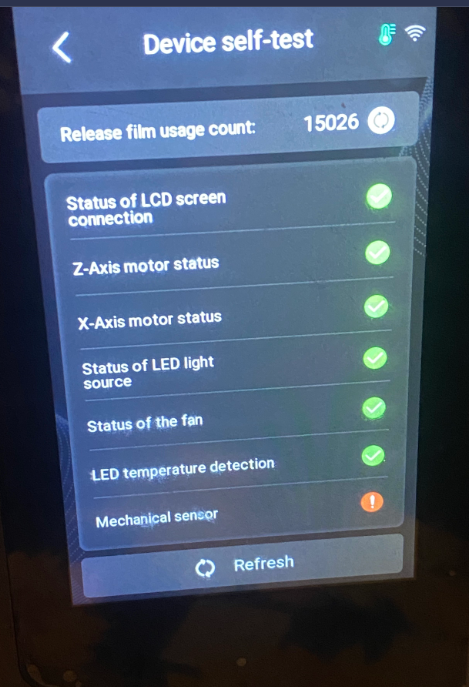
During the self-test, the printer reports an error related to the mechanical sensor.
¶ Possible Causes
- The printer is placed on an unstable surface.
- The printer is placed too close to other printers or equipment that may generate vibration.
- Vibration causes abnormal mechanical sensor detection.
- The mechanical sensor cable is loose or damaged.
- The spring wire is tangled or entangled.
- The adapter board is damaged.
¶ Required Tools
- Disposable gloves
- 2.0 mm hex key, if disassembly is required
- Tweezers, if cable adjustment is required
¶ Troubleshooting Steps
¶ 1. Check the Printer Placement
Place the printer on a stable and level surface.
Keep the printer away from other printers or equipment that may generate vibration. Vibration may cause abnormal detection during the self-test.
Note: You can place the printer directly on the ground for testing.
¶ 2. Check the Wiring Between the Mechanical Sensor and the Adapter Board
Check whether the cable between the mechanical sensor and the adapter board is loose, damaged, or disconnected.
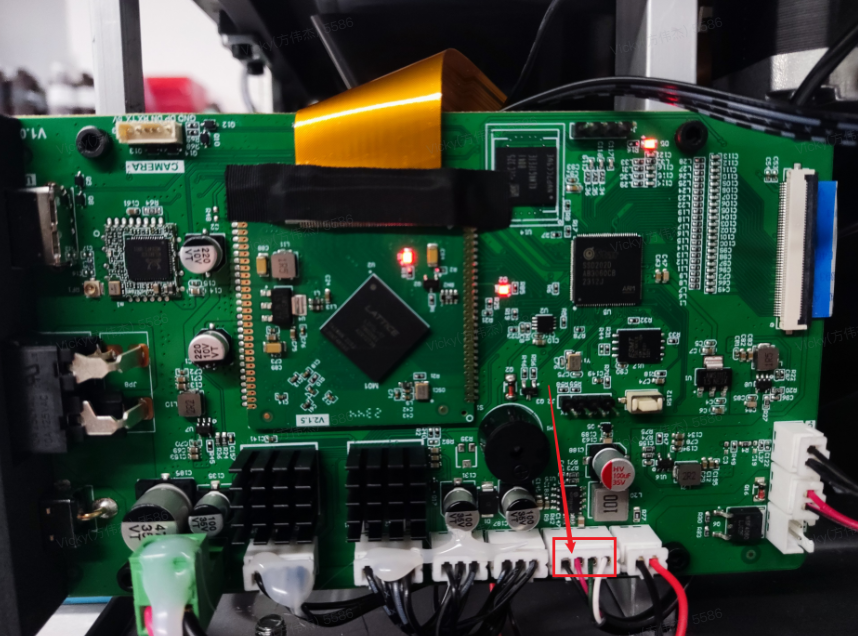
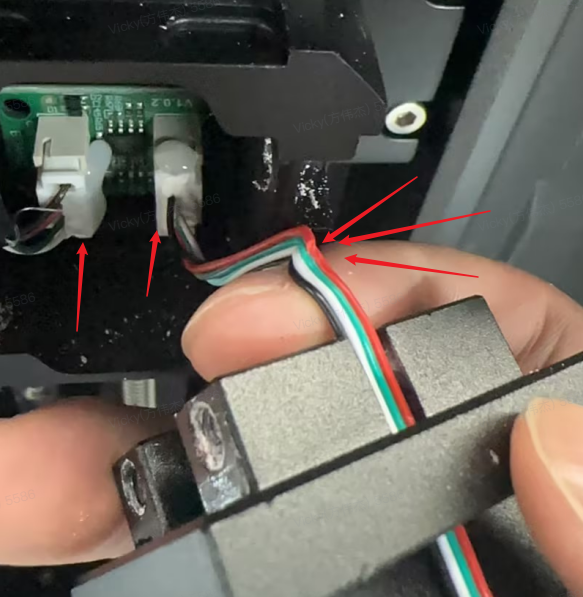
Make sure the wiring is firmly connected and in good condition.
If the cable is loose, reconnect it properly. If the cable is damaged, replace it with a new one.
¶ 3. Check the Spring Wire
Check whether the spring wire is tangled, twisted, or entangled with other parts.
If the spring wire is tangled, rearrange it according to the corresponding video guide below.
Saturn 4 Series
https://youtu.be/9Xh4VSeqhSY
Mars 5 Series
https://youtu.be/vU9wIxWRZmE
After rearranging the spring wire, run the self-test again.
If the issue is not fixed after rearranging the spring wire, replace the spring wire with a new one.
¶ 4. Contact ELEGOO Support
If the issue persists after completing the steps above, please contact the ELEGOO after-sales technical team through the official support channel:
When contacting ELEGOO Support, please provide the following information:
- Printer model
- A clear photo of the error message
- Clear photos of the mechanical sensor wiring
- Clear photos of the adapter board or motherboard
- The troubleshooting steps you have already completed
- The test results after each troubleshooting step
The ELEGOO technical team will provide further troubleshooting suggestions or a replacement solution based on the information provided.