¶ Fault Symptom
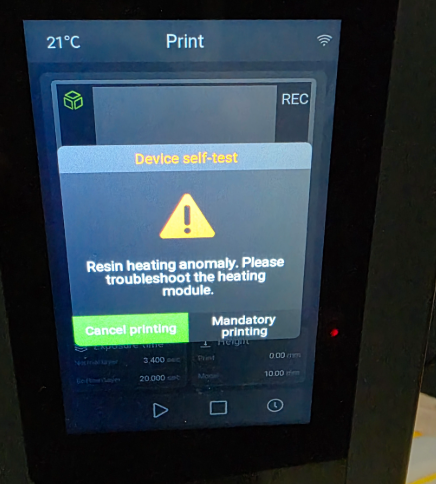
After starting a print, the printer reports the following error message:
“Resin heating anomaly.”
¶ Possible Causes
- The dispensing tips are deformed, bent, or detached due to impact or vibration.
- The dispensing tips are worn, causing dimensional deviation.
- The dispensing tips are covered by the release film.
- The dispensing tips are pressed or blocked by wrinkles in the release film.
- The connection between the adapter board and the contact points is poor.
- The contact points are oxidized, dirty, or contaminated.
- The resin tank circuit is open or damaged.
- The heating adapter board circuit is open or damaged.
¶ Required Tools
- Disposable gloves
- Lint-free cloth
- Alcohol
- Calipers
- Multimeter
- Fine sandpaper
- Conductive paste
- Suitable tool for correcting slight deformation
- Replacement resin tank, if required
- Replacement heating adapter board, if required
¶ Troubleshooting Steps
¶ 1. Check the Dispensing Tips for Physical Damage
Check whether the dispensing tips are deformed, bent, worn, or detached.
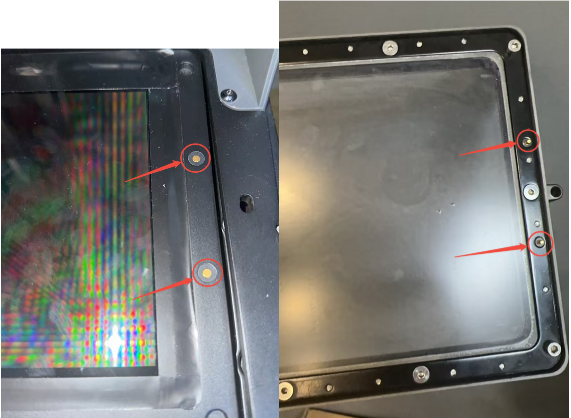
If the dispensing tips are slightly deformed, carefully correct the deformation using suitable tools.
If the deformation is severe, replace the resin tank with a new one.
¶ 2. Check the Dispensing Tip Length
Measure the length of the dispensing tips with calipers.
If the measured value exceeds the acceptable range, replace the resin tank with a new one.
If the length is within the acceptable range, fine adjustments can be made to the resin tank installation position.
¶ 3. Check Whether the Dispensing Tips Are Blocked by the Release Film
Check whether the dispensing tips are covered or pressed by the release film.
- If the dispensing tips are covered by the release film, puncture a hole above the dispensing tips.
- If the release film is wrinkled, offset, or pressing against the dispensing tips, reinstall the release film or replace it with a new one.
¶ 4. Reconnect the Adapter Board and Contact Points
Power off the printer before checking the wiring and contact points.
Check whether the connection between the adapter board and the contact points is loose, misaligned, or damaged.
If the connection is loose, reconnect it properly and make sure it is firmly secured.
If the contact area is oxidized, lightly sand the oxidized area, apply conductive paste, and reconnect it.
If the contact points are severely damaged, replace the adapter board with a new one.
¶ 5. Clean the Contact Points
Power off the printer.
Wipe the contact points with a lint-free cloth soaked with alcohol.
Wait until the alcohol has fully evaporated, then power on the printer and test again.
¶ 6. Check the Circuit Continuity
Use a multimeter to check whether the resin tank circuit and heating adapter board circuit are open.
- Set the multimeter to continuity mode.
- Power off the printer.
- Place the red and black probes on both ends of the circuit path for the dispensing tips and heating adapter board.
- Check the multimeter reading and buzzer response.
If the multimeter does not beep and displays OL or Open Loop, the circuit is open.
- If the resin tank circuit is open, replace the resin tank with a new one.
- If the heating adapter board circuit is open, replace the heating adapter board with a new one.
¶ 7. Contact ELEGOO Support
If the issue persists after completing the steps above, please contact ELEGOO Support through the official channel:
When contacting ELEGOO Support, please provide the following information:
- Printer model
- A clear photo of the error message
- Clear photos of the dispensing tips
- Clear photos of the contact points and adapter board
- The troubleshooting steps you have already completed
- The test results after each troubleshooting step