¶ Phonecal Dialer Interface Example
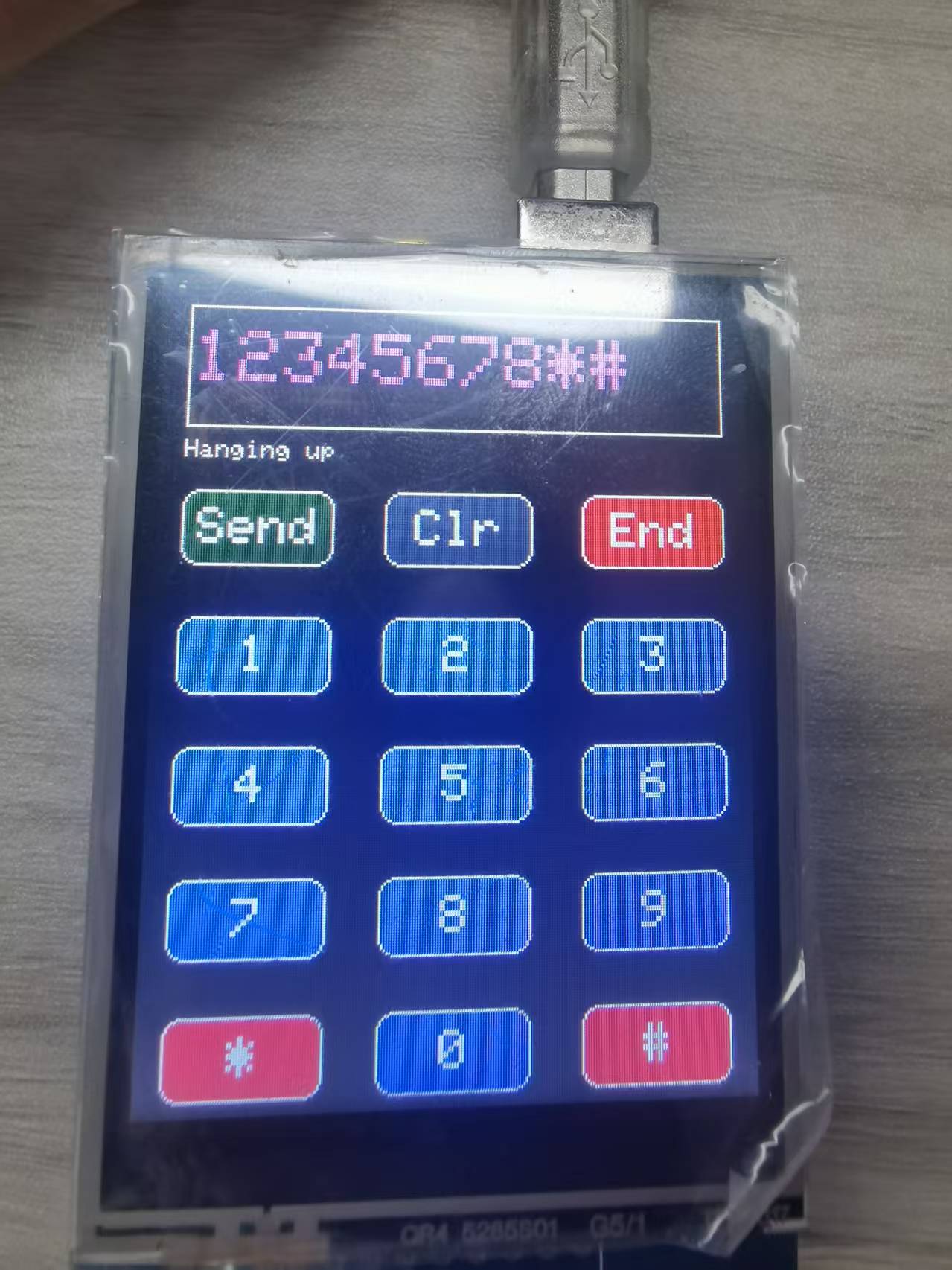
This example demonstrates a phone dialer interface application based on the TFT LCD touch screen. It implements a classic mobile phone keypad interface, allowing users to input phone numbers by touching the screen, and simulates making calls and hanging up operations.
¶ Code Explanation
This example code is based on Arduino UNO R3. The logic is similar for other microcontrollers.
¶ Library Inclusion
#include <Elegoo_GFX.h>    // Core graphics library
#include <Elegoo_TFTLCD.h> // Hardware-specific library
#include <TouchScreen.h>
Elegoo_GFX.h: Core graphics library providing basic graphics drawing functionsElegoo_TFTLCD.h: Hardware driver library implementing low-level control for the LCD screenTouchScreen.h: Touch screen driver library for handling touch input
¶ Pin Definitions
¶ LCD Control Pins
#define LCD_CS A3 // Chip Select goes to Analog 3
#define LCD_CD A2 // Command/Data goes to Analog 2
#define LCD_WR A1 // LCD Write goes to Analog 1
#define LCD_RD A0 // LCD Read goes to Analog 0
#define LCD_RESET A4 // Can alternately just connect to Arduino's reset pin
Analog pins are used as LCD control pins, which allows pin sharing with the touch screen, saving digital pin resources.
¶ Touch Screen Pins
#define YP A3  // must be an analog pin, use "An" notation!
#define XM A2  // must be an analog pin, use "An" notation!
#define YM 9   // can be a digital pin
#define XP 8   // can be a digital pin
The touch screen uses four pins (XP, YP, XM, YM) for touch detection. YP and XM must be analog pins.
¶ Color Definitions
The code defines two sets of colors:
¶ Basic Colors
#define	BLACK   0x0000
#define	BLUE    0x001F
#define	RED     0xF800
#define	GREEN   0x07E0
#define CYAN    0x07FF
#define MAGENTA 0xF81F
#define YELLOW  0xFFE0
#define WHITE   0xFFFF
¶ ILI9341 Extended Colors
#define ILI9341_BLACK       0x0000      /*   0,   0,   0 */
#define ILI9341_NAVY        0x000F      /*   0,   0, 128 */
#define ILI9341_DARKGREEN   0x03E0      /*   0, 128,   0 */
#define ILI9341_DARKCYAN    0x03EF      /*   0, 128, 128 */
#define ILI9341_MAROON      0x7800      /* 128,   0,   0 */
#define ILI9341_PURPLE      0x780F      /* 128,   0, 128 */
#define ILI9341_OLIVE       0x7BE0      /* 128, 128,   0 */
#define ILI9341_LIGHTGREY   0xC618      /* 192, 192, 192 */
#define ILI9341_DARKGREY    0x7BEF      /* 128, 128, 128 */
#define ILI9341_BLUE        0x001F      /*   0,   0, 255 */
#define ILI9341_GREEN       0x07E0      /*   0, 255,   0 */
#define ILI9341_CYAN        0x07FF      /*   0, 255, 255 */
#define ILI9341_RED         0xF800      /* 255,   0,   0 */
#define ILI9341_MAGENTA     0xF81F      /* 255,   0, 255 */
#define ILI9341_YELLOW      0xFFE0      /* 255, 255,   0 */
#define ILI9341_WHITE       0xFFFF      /* 255, 255, 255 */
#define ILI9341_ORANGE      0xFD20      /* 255, 165,   0 */
#define ILI9341_GREENYELLOW 0xAFE5      /* 173, 255,  47 */
#define ILI9341_PINK        0xF81F
Extended colors provide more visual effect options for different UI elements.
¶ UI Layout Definitions
¶ Button Layout Parameters
#define BUTTON_X 40
#define BUTTON_Y 100
#define BUTTON_W 60
#define BUTTON_H 30
#define BUTTON_SPACING_X 20
#define BUTTON_SPACING_Y 20
#define BUTTON_TEXTSIZE 2
Defines the position, size, and spacing of dialer keypad buttons:
BUTTON_X/Y: Starting coordinates of the first buttonBUTTON_W/H: Button width and heightBUTTON_SPACING_X/Y: Horizontal and vertical spacing between buttonsBUTTON_TEXTSIZE: Font size of button text
¶ Text Input Field Parameters
#define TEXT_X 10
#define TEXT_Y 10
#define TEXT_W 220
#define TEXT_H 50
#define TEXT_TSIZE 3
#define TEXT_TCOLOR ILI9341_MAGENTA
#define TEXT_LEN 12
char textfield[TEXT_LEN+1] = "";
uint8_t textfield_i=0;
Defines the text area for displaying phone numbers:
TEXT_X/Y: Top-left corner coordinates of the text fieldTEXT_W/H: Text field width and heightTEXT_TSIZE: Display font sizeTEXT_TCOLOR: Text color (magenta)TEXT_LEN: Maximum input length (12 digits)textfield: Character array storing the phone numbertextfield_i: Current input position index
¶ Touch Screen Calibration Parameters
#define TS_MINX 120
#define TS_MAXX 900

#define TS_MINY 70
#define TS_MAXY 920
These parameters map the raw touch screen coordinates (0-1023) to screen pixel coordinates. Different touch screens may require adjusting these values for accurate touch response.
¶ Status Bar Parameters
#define STATUS_X 10
#define STATUS_Y 65
Defines the position of the status message display area.
¶ Object Instantiation
Elegoo_TFTLCD tft(LCD_CS, LCD_CD, LCD_WR, LCD_RD, LCD_RESET);
TouchScreen ts = TouchScreen(XP, YP, XM, YM, 300);
Elegoo_GFX_Button buttons[15];
tft: LCD screen object for all screen operationsts: Touch screen object with four pins and resistance value (300 ohms)buttons: Button object array with 15 buttons
¶ Button Configuration Data
¶ Button Labels
char buttonlabels[15][5] = {"Send", "Clr", "End", "1", "2", "3", "4", "5", "6", "7", "8", "9", "*", "0", "#" };
Defines the display text for 15 buttons, following the classic mobile phone keypad layout:
- Row 0: Send, Clr (Clear), End
- Row 1: 1, 2, 3
- Row 2: 4, 5, 6
- Row 3: 7, 8, 9
- Row 4: *, 0, #
¶ Button Colors
uint16_t buttoncolors[15] = {ILI9341_DARKGREEN, ILI9341_DARKGREY, ILI9341_RED,
                             ILI9341_BLUE, ILI9341_BLUE, ILI9341_BLUE,
                             ILI9341_BLUE, ILI9341_BLUE, ILI9341_BLUE,
                             ILI9341_BLUE, ILI9341_BLUE, ILI9341_BLUE,
                             ILI9341_ORANGE, ILI9341_BLUE, ILI9341_ORANGE};
Defines the background color for each button:
- Send: Dark Green
- Clr (Clear): Dark Grey
- End: Red
- Number buttons: Blue
-
- and #: Orange
¶ setup() Function Details
The setup() function completes serial port initialization, LCD screen initialization, button creation, and interface drawing.
void setup(void) {
  Serial.begin(9600);
  Serial.println(F("TFT LCD test"));
  Serial.println(F("Elegoo 2.8\" TFT Screen"));

  Serial.print("TFT size is "); Serial.print(tft.width()); Serial.print("x"); Serial.println(tft.height());

  tft.reset();

  uint16_t identifier = tft.readID();
  if(identifier == 0x9325) {
    Serial.println(F("Found ILI9325 LCD driver"));
  } else if(identifier == 0x9328) {
    Serial.println(F("Found ILI9328 LCD driver"));
  } else if(identifier == 0x4535) {
    Serial.println(F("Found LGDP4535 LCD driver"));
  }else if(identifier == 0x7575) {
    Serial.println(F("Found HX8347G LCD driver"));
  } else if(identifier == 0x9341) {
    Serial.println(F("Found ILI9341 LCD driver"));
  } else if(identifier == 0x8357) {
    Serial.println(F("Found HX8357D LCD driver"));
  } else if(identifier==0x0101)
  {
      identifier=0x9341;
       Serial.println(F("Found 0x9341 LCD driver"));
  }else {
    Serial.print(F("Unknown LCD driver chip: "));
    Serial.println(identifier, HEX);
    identifier=0x9341;
  }

  tft.begin(identifier);
  tft.setRotation(2);
  tft.fillScreen(BLACK);

  // create buttons
  for (uint8_t row=0; row<5; row++) {
    for (uint8_t col=0; col<3; col++) {
      buttons[col + row*3].initButton(&tft, BUTTON_X+col*(BUTTON_W+BUTTON_SPACING_X),
                 BUTTON_Y+row*(BUTTON_H+BUTTON_SPACING_Y),    // x, y, w, h, outline, fill, text
                  BUTTON_W, BUTTON_H, ILI9341_WHITE, buttoncolors[col+row*3], ILI9341_WHITE,
                  buttonlabels[col + row*3], BUTTON_TEXTSIZE);
      buttons[col + row*3].drawButton();
    }
  }

  // create 'text field'
  tft.drawRect(TEXT_X, TEXT_Y, TEXT_W, TEXT_H, ILI9341_WHITE);
}
¶ Serial Port Initialization
Serial.begin(9600);
Serial.println(F("TFT LCD test"));
Sets the serial port baud rate to 9600 for debug information output.
¶ LCD Driver Chip Identification
The code reads the driver chip ID via tft.readID() and matches it against known IDs. This logic is identical to the graphicstest example, supporting multiple common LCD driver chips.
¶ Screen Initialization
tft.begin(identifier);
tft.setRotation(2);
tft.fillScreen(BLACK);
tft.begin(identifier): Initializes the screen using the identified driver IDtft.setRotation(2): Sets screen rotation to 180° for better usabilitytft.fillScreen(BLACK): Fills the entire screen with black
¶ Button Creation
for (uint8_t row=0; row<5; row++) {
  for (uint8_t col=0; col<3; col++) {
    buttons[col + row*3].initButton(&tft, BUTTON_X+col*(BUTTON_W+BUTTON_SPACING_X),
               BUTTON_Y+row*(BUTTON_H+BUTTON_SPACING_Y),    // x, y, w, h, outline, fill, text
                BUTTON_W, BUTTON_H, ILI9341_WHITE, buttoncolors[col+row*3], ILI9341_WHITE,
                buttonlabels[col + row*3], BUTTON_TEXTSIZE);
    buttons[col + row*3].drawButton();
  }
}
Creates 15 buttons using nested loops:
- Outer loop iterates through 5 rows
- Inner loop iterates through 3 buttons per row
initButton(): Initializes button object with position, size, border color, fill color, text color, and text contentdrawButton(): Draws the button on the screen
¶ Text Input Field Drawing
tft.drawRect(TEXT_X, TEXT_Y, TEXT_W, TEXT_H, ILI9341_WHITE);
Draws a white bordered rectangle at the top of the screen for displaying the entered phone number.
¶ status() Function Details
The status() function displays status messages in the status bar with two overloaded versions.
¶ Version 1: Flash String Parameter
void status(const __FlashStringHelper *msg) {
  tft.fillRect(STATUS_X, STATUS_Y, 240, 8, ILI9341_BLACK);
  tft.setCursor(STATUS_X, STATUS_Y);
  tft.setTextColor(ILI9341_WHITE);
  tft.setTextSize(1);
  tft.print(msg);
}
¶ Version 2: Character Array Parameter
void status(char *msg) {
  tft.fillRect(STATUS_X, STATUS_Y, 240, 8, ILI9341_BLACK);
  tft.setCursor(STATUS_X, STATUS_Y);
  tft.setTextColor(ILI9341_WHITE);
  tft.setTextSize(1);
  tft.print(msg);
}
Both versions have identical functionality, differing only in parameter type. The function executes as follows:
- Fills the status bar area with black to clear previous messages
- Sets cursor position to the top-left corner of the status bar
- Sets text color to white and font size to 1
- Outputs the status message
¶ loop() Function Details
The loop() function is the main loop responsible for handling touch input, button state detection, and dialing logic.
void loop(void) {
  digitalWrite(13, HIGH);
  TSPoint p = ts.getPoint();
  digitalWrite(13, LOW);

  pinMode(XM, OUTPUT);
  pinMode(YP, OUTPUT);

   if (p.z > MINPRESSURE && p.z < MAXPRESSURE) {
    // scale from 0->1023 to tft.width
    p.x = map(p.x, TS_MINX, TS_MAXX, tft.width(), 0);
    p.y = (tft.height()-map(p.y, TS_MINY, TS_MAXY, tft.height(), 0));
   }

  // go thru all the buttons, checking if they were pressed
  for (uint8_t b=0; b<15; b++) {
    if (buttons[b].contains(p.x, p.y)) {
      buttons[b].press(true);
    } else {
      buttons[b].press(false);
    }
  }

  // now we can ask the buttons if their state has changed
  for (uint8_t b=0; b<15; b++) {
    if (buttons[b].justReleased()) {
      buttons[b].drawButton();
    }

    if (buttons[b].justPressed()) {
        buttons[b].drawButton(true);

        if (b >= 3) {
          if (textfield_i < TEXT_LEN) {
            textfield[textfield_i] = buttonlabels[b][0];
            textfield_i++;
            textfield[textfield_i] = 0;
          }
        }

        if (b == 1) {
          textfield[textfield_i] = 0;
          if (textfield > 0) {
            textfield_i--;
            textfield[textfield_i] = ' ';
          }
        }

        Serial.println(textfield);
        tft.setCursor(TEXT_X + 2, TEXT_Y+10);
        tft.setTextColor(TEXT_TCOLOR, ILI9341_BLACK);
        tft.setTextSize(TEXT_TSIZE);
        tft.print(textfield);

        if (b == 2) {
          status(F("Hanging up"));
        }

        if (b == 0) {
          status(F("Calling"));
          Serial.print("Calling "); Serial.print(textfield);
        }

      delay(100);
    }
  }
}
¶ Touch Detection
digitalWrite(13, HIGH);
TSPoint p = ts.getPoint();
digitalWrite(13, LOW);
Reads the touch point coordinates. Digital pin 13 indicates touch detection status (HIGH = detecting).
¶ Pin Direction Setting
pinMode(XM, OUTPUT);
pinMode(YP, OUTPUT);
Sets touch screen pin directions, necessary when sharing pins.
¶ Pressure Judgment and Coordinate Mapping
if (p.z > MINPRESSURE && p.z < MAXPRESSURE) {
  p.x = map(p.x, TS_MINX, TS_MAXX, tft.width(), 0);
  p.y = (tft.height()-map(p.y, TS_MINY, TS_MAXY, tft.height(), 0));
}
p.zrepresents touch pressure, which must be betweenMINPRESSURE(10) andMAXPRESSURE(1000) for valid touchmap()function converts raw touch screen coordinates to screen pixel coordinates- X coordinate is inverted (right to left), Y coordinate is adjusted accordingly to match screen orientation
¶ Button State Update
for (uint8_t b=0; b<15; b++) {
  if (buttons[b].contains(p.x, p.y)) {
    buttons[b].press(true);
  } else {
    buttons[b].press(false);
  }
}
Iterates through all buttons, checks if the touch point is within the button area, and updates button press state.
¶ Button Event Handling
for (uint8_t b=0; b<15; b++) {
  if (buttons[b].justReleased()) {
    buttons[b].drawButton();
  }

  if (buttons[b].justPressed()) {
    buttons[b].drawButton(true);
    // ... handle button functions
  }
}
Detects button press and release events:
justReleased(): Button was just released, restore normal display statejustPressed(): Button was just pressed, invert display state
¶ Number Input Handling
if (b >= 3) {
  if (textfield_i < TEXT_LEN) {
    textfield[textfield_i] = buttonlabels[b][0];
    textfield_i++;
    textfield[textfield_i] = 0;
  }
}
When a number button is pressed (indices 3-14), the corresponding character is added to the text field. b >= 3 skips the first three function buttons (Send, Clr, End).
¶ Clear Button Handling
if (b == 1) {
  textfield[textfield_i] = 0;
  if (textfield > 0) {
    textfield_i--;
    textfield[textfield_i] = ' ';
  }
}
When the Clr (Clear) button is pressed, the last entered character is deleted.
¶ Text Field Update
tft.setCursor(TEXT_X + 2, TEXT_Y+10);
tft.setTextColor(TEXT_TCOLOR, ILI9341_BLACK);
tft.setTextSize(TEXT_TSIZE);
tft.print(textfield);
Displays the current phone number in the text field. Uses ILI9341_BLACK as background color parameter to achieve text background erasure effect.
¶ End Call Button Handling
if (b == 2) {
  status(F("Hanging up"));
}
When the End button is pressed, displays "Hanging up" status message.
¶ Send Button Handling
if (b == 0) {
  status(F("Calling"));
  Serial.print("Calling "); Serial.print(textfield);
}
When the Send button is pressed, displays "Calling" status message and prints the dialed number to serial port.
¶ Debounce Delay
delay(100);
100ms delay for UI debouncing, preventing single touch from being recognized as multiple clicks.
¶ Summary
This example implements a complete phone dialer interface with the following main features:
- Interface Layout: Classic 5x3 mobile phone keypad layout with number keys, function keys, and text display area
- Touch Interaction: Supports touch screen input with accurate button recognition
- Number Input: Supports up to 12-digit phone number input
- Clear Function: Supports deleting entered digits one by one
- Status Display: Real-time operation status display (calling, hanging up)
Key functions used in the program:
ts.getPoint(): Get touch point coordinatesbuttons[b].contains(x, y): Check if point is within button areabuttons[b].press(state): Set button press statebuttons[b].justPressed(): Detect button just pressedbuttons[b].justReleased(): Detect button just releasedbuttons[b].drawButton(invert): Draw button (optional inverted display)map(value, fromLow, fromHigh, toLow, toHigh): Coordinate mappingstatus(msg): Display status message
¶ Modification Guide
If you need to modify the code display effect, you can adjust the following aspects:
-
Modify Button Layout:
- Adjust
BUTTON_X,BUTTON_Y,BUTTON_W,BUTTON_H,BUTTON_SPACING_X,BUTTON_SPACING_Yparameters - Change button position, size, and spacing
- Adjust
-
Modify Button Colors:
- Change color values in the
buttoncolorsarray
- Change color values in the
-
Modify Text Field Style:
- Adjust
TEXT_X,TEXT_Y,TEXT_W,TEXT_Hto change text field position and size - Modify
TEXT_TCOLORto change text color - Modify
TEXT_TSIZEto change text size
- Adjust
-
Modify Maximum Input Length:
- Change the
TEXT_LENparameter
- Change the
-
Modify Touch Sensitivity:
- Adjust
MINPRESSUREandMAXPRESSUREparameters - Modify
TS_MINX,TS_MAXX,TS_MINY,TS_MAXYcalibration parameters
- Adjust
-
Modify Screen Orientation:
- Change the parameter of
tft.setRotation()(0-3)
- Change the parameter of
-
Add Actual Phone Functionality:
- Uncomment
fona.playDTMF()andfona.callPhone()calls in the code - Requires connecting a FONA module and adding related libraries
- Uncomment