¶ SD Card JPEG Image
This sample program demonstrates how to read JPEG files from an SD card and display them on a TFT LCD screen using an ESP32. It uses the TJpg_Decoder library to decode JPEG images, communicates with the SD card via the SPI bus, and renders the output on a 2.8-inch ILI9341 LCD screen.
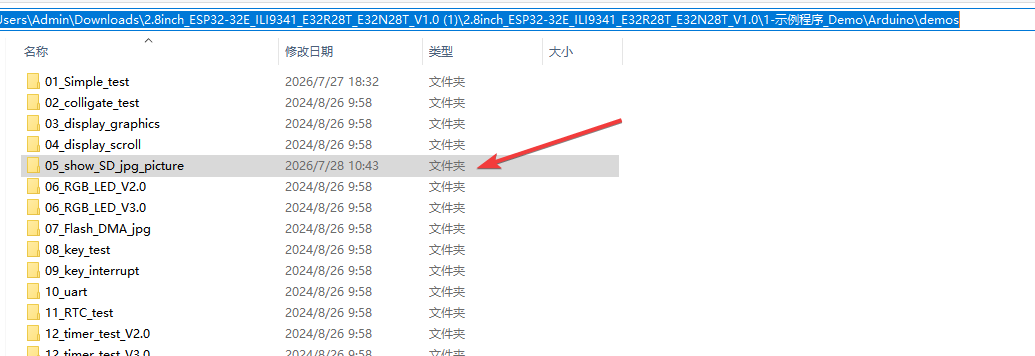
¶ Code Explanation
This sample code is based on the ESP32-WROOM-32E microcontroller. It drives both the SD card and TFT LCD screen through the SPI interface to achieve JPEG image reading and display.
¶ Basic Configuration (Brief)
¶ Library Inclusion
#include <TJpg_Decoder.h>
#define FS_NO_GLOBALS
#include <FS.h>
#ifdef ESP32
  #include "SPIFFS.h"
#endif
#include "SPI.h"
#include <TFT_eSPI.h>
- TJpg_Decoder.h: JPEG decoding library that handles parsing JPEG files and outputs decoded pixel data to the display
- FS.h: File system library providing SD card file read/write functionality
- SPIFFS.h: ESP32-specific internal Flash file system
- SPI.h: SPI communication library for communicating with the SD card and TFT screen
- TFT_eSPI.h: TFT driver library designed specifically for ESP32, used to control the LCD screen
¶ Pin Definition
#define SD_CS   5
#define SD_SCK  18
#define SD_MISO 19
#define SD_MOSI 23
Defines the SPI pins used by the SD card:
- SD_CS (GPIO 5): Chip select signal for selecting the SD card device
- SD_SCK (GPIO 18): SPI clock line
- SD_MISO (GPIO 19): Master In Slave Out data line (SD card → ESP32)
- SD_MOSI (GPIO 23): Master Out Slave In data line (ESP32 → SD card)
ESP32-WROOM-32E Pin Connection Table:
| Function | Pin Number | ESP32 Pin |
|---|---|---|
| LCD_CS | 15 | GPIO 15 |
| LCD_DC/RS | 2 | GPIO 2 |
| LCD_RESET | - | EN |
| LCD_SDI/MOSI | 13 | GPIO 13 |
| LCD_SCK | 14 | GPIO 14 |
| LCD_SDO/MISO | 12 | GPIO 12 |
| LCD_BL | 21 | GPIO 21 |
| SD_CS | 5 | GPIO 5 |
| SD_SCK | 18 | GPIO 18 |
| SD_MISO | 19 | GPIO 19 |
| SD_MOSI | 23 | GPIO 23 |
¶ TFT Object and SPI Instantiation
TFT_eSPI tft = TFT_eSPI();
SPIClass MySPI(HSPI);
- tft: Creates a TFT_eSPI object that encapsulates all LCD operation interfaces
- MySPI: Creates a dedicated SPI instance (using the HSPI bus) for independent management of SD card SPI communication, avoiding conflicts with the TFT screen's SPI
¶ File Name Array
#define FILE_NUMBER 4
#define FILE_NAME_SIZE_MAX 20
char file_name[FILE_NUMBER][FILE_NAME_SIZE_MAX];
- FILE_NUMBER: Defines the number of JPEG files to display (4 in this example)
- FILE_NAME_SIZE_MAX: Defines the maximum length of each file name
- file_name: Two-dimensional character array storing all JPEG file paths to be displayed
¶ Detailed Explanation of setup() Function
The setup() function completes serial initialization, file name configuration, SD card initialization, and TFT screen initialization. It runs only once when the Arduino is powered on or reset.
void setup()
{
  Serial.begin(115200);
  Serial.println("\n\n Testing TJpg_Decoder library");

  strcpy(file_name[0],"/tulip.jpg");
  strcpy(file_name[1],"/game.jpg");
  strcpy(file_name[2],"/tree.jpg");
  strcpy(file_name[3],"/flower.jpg");

  pinMode(SD_CS, OUTPUT);
  digitalWrite(SD_CS, HIGH);
  MySPI.begin(SD_SCK, SD_MISO, SD_MOSI);

  if (!SD.begin(SD_CS,MySPI)) {
    Serial.println(F("SD.begin failed!"));
    while (1) delay(0);
  }
  Serial.println("\r\nInitialisation done.");

  tft.begin();
  tft.setTextColor(0xFFFF, 0x0000);
  tft.fillScreen(TFT_BLACK);
  tft.setSwapBytes(true);

  TJpgDec.setJpgScale(1);
  TJpgDec.setCallback(tft_output);
}
¶ Serial Port Initialization
Serial.begin(115200);
Serial.println("\n\n Testing TJpg_Decoder library");
Serial.begin(115200): Sets the serial baud rate to 115200 for debugging information output- Prints a test message for confirming program running status in the serial monitor
¶ File Name Configuration
strcpy(file_name[0],"/tulip.jpg");
strcpy(file_name[1],"/game.jpg");
strcpy(file_name[2],"/tree.jpg");
strcpy(file_name[3],"/flower.jpg");
Uses strcpy() to copy 4 JPEG file paths into the file name array. These files must be copied to the SD card root directory in advance:
/tulip.jpg: Tulip image/game.jpg: Game image/tree.jpg: Tree image/flower.jpg: Flower image
Note: Before use, format the SD card as FAT16 or FAT32 and copy the corresponding JPEG files to the SD card root directory.
¶ SD Card Initialization
pinMode(SD_CS, OUTPUT);
digitalWrite(SD_CS, HIGH);
MySPI.begin(SD_SCK, SD_MISO, SD_MOSI);

if (!SD.begin(SD_CS, MySPI)) {
  Serial.println(F("SD.begin failed!"));
  while (1) delay(0);
}
Serial.println("\r\nInitialisation done.");
- Configure Chip Select Pin: Sets SD_CS to output mode and drives it high (idle state)
- Start SPI Bus: Initializes the HSPI bus using
MySPI.begin(), specifying the SCK, MISO, and MOSI pins - Mount SD Card File System: Calls
SD.begin(SD_CS, MySPI)to initialize the SD card. If initialization fails, it prints an error message and enters an infinite loop (program stops running)
¶ TFT Screen Initialization
tft.begin();
tft.setTextColor(0xFFFF, 0x0000);
tft.fillScreen(TFT_BLACK);
tft.setSwapBytes(true);
tft.begin(): Initializes the TFT screen, configuring SPI communication and display parameterstft.setTextColor(0xFFFF, 0x0000): Sets text color to white (0xFFFF) with black background (0x0000)tft.fillScreen(TFT_BLACK): Fills the entire screen with black, clearing any previous display contenttft.setSwapBytes(true): Enables byte swapping. This is necessary because the color byte order output by TJpg_Decoder differs from what TFT_eSPI expects, and swapping is required to display colors correctly
¶ JPEG Decoder Configuration
TJpgDec.setJpgScale(1);
TJpgDec.setCallback(tft_output);
TJpgDec.setJpgScale(1): Sets the JPEG image scaling factor to 1 (original size). Valid values are 1, 2, 4, or 8 — smaller values result in higher display resolutionTJpgDec.setCallback(tft_output): Registers the callback functiontft_output, which the decoder calls during decoding to output pixel data to the TFT screen
¶ Detailed Explanation of loop() Function
The loop() function is the main loop of the Arduino program, which runs repeatedly after the setup() function is executed. It sequentially reads each JPEG file from the SD card and displays it on the screen.
void loop()
{
  int i = 0;
  uint32_t t = millis();
  uint16_t w = 0, h = 0;

  for(i=0;i<FILE_NUMBER;i++)
  {
    TJpgDec.getSdJpgSize(&w, &h, file_name[i]);
    Serial.print("Width = "); Serial.print(w); Serial.print(", height = "); Serial.println(h);

    TJpgDec.drawSdJpg(0, 0, file_name[i]);

    t = millis() - t;
    Serial.print(t); Serial.println(" ms");

    delay(1500);
  }
}
¶ Timing Initialization
uint32_t t = millis();
Records the current timestamp for calculating the decoding and rendering time of each image. millis() returns the number of milliseconds elapsed since the Arduino was powered on.
¶ Loop Through JPEG Images
for(i=0; i<FILE_NUMBER; i++)
Uses a for loop to iterate through all file names, processing each image in sequence.
¶ Get Image Dimensions
uint16_t w = 0, h = 0;
TJpgDec.getSdJpgSize(&w, &h, file_name[i]);
Serial.print("Width = "); Serial.print(w); Serial.print(", height = "); Serial.println(h);
- Declares two variables
w(width) andh(height) to store the image dimensions - Calls
TJpgDec.getSdJpgSize()to obtain the pixel dimensions of the JPEG file - Prints the width and height to the serial monitor for debugging and image information confirmation
¶ Draw JPEG Image
TJpgDec.drawSdJpg(0, 0, file_name[i]);
Calls the drawSdJpg() function to read the specified JPEG file from the SD card and draw it on the screen. The parameters (0, 0) indicate that the image starts displaying from the top-left corner (column 0, row 0) of the screen.
This function automatically performs the following:
- Opens the JPEG file on the SD card
- Calls the JPEG decoder for decompression
- Renders the decoded pixel data to the TFT screen block by block via the callback function
tft_output()
¶ Rendering Time Calculation
t = millis() - t;
Serial.print(t); Serial.println(" ms");
Calculates and prints the decoding and rendering time (in milliseconds) for the current image. This is useful for performance evaluation and optimization.
¶ Image Switching Delay
delay(1500);
Delays for 1500 milliseconds (1.5 seconds) to allow the user sufficient time to view the currently displayed image. The loop then proceeds to display the next image.
¶ Detailed Explanation of Callback Function tft_output()
This is the critical function connecting the JPEG decoder to the TFT screen. The TJpg_Decoder library calls this function when decoding JPEG images to output the decoded pixel data to the display.
bool tft_output(int16_t x, int16_t y, uint16_t w, uint16_t h, uint16_t* bitmap)
{
   if ( y >= tft.height() ) return 0;
   tft.pushImage(x, y, w, h, bitmap);
   return 1;
}
¶ Parameter Description
- x: X coordinate of the current image block on the screen (top-left corner)
- y: Y coordinate of the current image block on the screen (top-left corner)
- w: Width of the current image block (in pixels)
- h: Height of the current image block (in pixels)
- bitmap: Pointer to the pixel data of the current image block (RGB565 format)
¶ Boundary Check
if ( y >= tft.height() ) return 0;
Checks whether the image block exceeds the bottom boundary of the screen. If the y coordinate is greater than or equal to the screen height, it returns 0 to notify the decoder to stop further decoding. This prevents rendering the image outside the screen boundaries.
¶ Render Image Block
tft.pushImage(x, y, w, h, bitmap);
Calls the pushImage() method to push the pixel data of the current image block to the specified position on the TFT screen. The TFT_eSPI library automatically handles the transmission and display of pixel data.
¶ Return Value Description
- Return 1: Notifies the decoder to continue decoding the next image block
- Return 0: Notifies the decoder to stop decoding (when the image exceeds the screen boundaries)
¶ Summary
This sample program implements the functionality of reading JPEG images from an SD card and displaying them on a TFT screen through the following steps:
-
Initialization Phase:
- Configure serial communication for debugging
- Set paths for 4 JPEG files to be displayed
- Initialize the SD card (SPI communication, mount file system)
- Initialize the TFT screen (configure display parameters, clear screen)
- Configure the JPEG decoder (set scaling ratio, register callback function)
-
Display Loop Phase:
- Sequentially iterate through each JPEG file in the file name array
- Obtain dimension information for each file
- Read and decode the JPEG file from the SD card
- Render the decoded pixel data to the TFT screen
- Record and display rendering time
- Wait 1.5 seconds before switching to the next image
The key functions used in the program include:
SD.begin(): Initialize the SD card file systemTJpgDec.setJpgScale(): Set the JPEG decoding scaling ratioTJpgDec.setCallback(): Register the image rendering callback functionTJpgDec.getSdJpgSize(): Get the dimensions of a JPEG file on the SD cardTJpgDec.drawSdJpg(): Read and draw a JPEG image from the SD cardtft.pushImage(): Push pixel data to the TFT screentft.setSwapBytes(): Set the color byte swap modemillis(): Get system uptime for performance timing
¶ Modification Instructions
If you need to modify the code for different use cases, you can refer to the following aspects for adjustment:
-
Change Number of Displayed Images:
- Change the value of
FILE_NUMBER - Correspondingly add or remove initialization entries in the
file_namearray
- Change the value of
-
Modify Image File Names:
- Change the file path strings in
strcpy()to point to your own JPEG files - Ensure the files are copied to the SD card root directory
- Change the file path strings in
-
Change Image Scaling Ratio:
- Change the parameter value in
TJpgDec.setJpgScale(1)(options: 1, 2, 4, 8) - Smaller scaling ratios result in smaller images but faster rendering
- Change the parameter value in
-
Change Display Delay:
- Adjust the delay value in
delay(1500)to change the display time for each image
- Adjust the delay value in
-
Change Display Position:
- Change the coordinate parameters in
TJpgDec.drawSdJpg(0, 0, file_name[i]) - For example,
drawSdJpg(20, 40, file)positions the image at screen coordinates (20, 40)
- Change the coordinate parameters in
-
Add New Images:
- Copy new JPEG files to the SD card root directory
- Add new file paths in the
file_namearray - Increase the value of
FILE_NUMBER
-
Change Background Color:
- Change the color value in
tft.fillScreen(TFT_BLACK) - Available colors: TFT_WHITE, TFT_RED, TFT_GREEN, TFT_BLUE, etc.
- Change the color value in
-
Change Text Color:
- Adjust the foreground and background colors in
tft.setTextColor(0xFFFF, 0x0000)
- Adjust the foreground and background colors in
¶ Hardware Connection Notes
- The SD card and TFT screen share the ESP32's SPI bus but use different chip select pins
- The SD card must be formatted with FAT16 or FAT32 file system
- JPEG files should be in standard format, with a recommended resolution not exceeding the screen size (240×320 pixels)
- The supply voltage is 5V, ensuring normal operation of both the SD card and TFT screen