¶ AudioPlay MP3 Audio Playback
This sample program demonstrates the complete process of reading MP3 files from an SD card and playing them back using the ESP32. It integrates TFT screen display, touch screen interaction, audio decoding, and playback control to implement a graphical MP3 player.
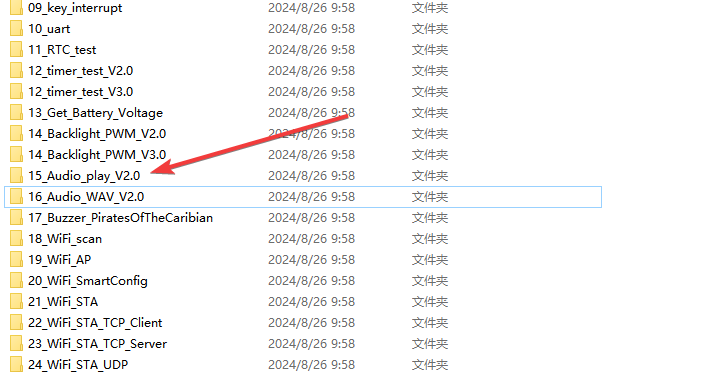
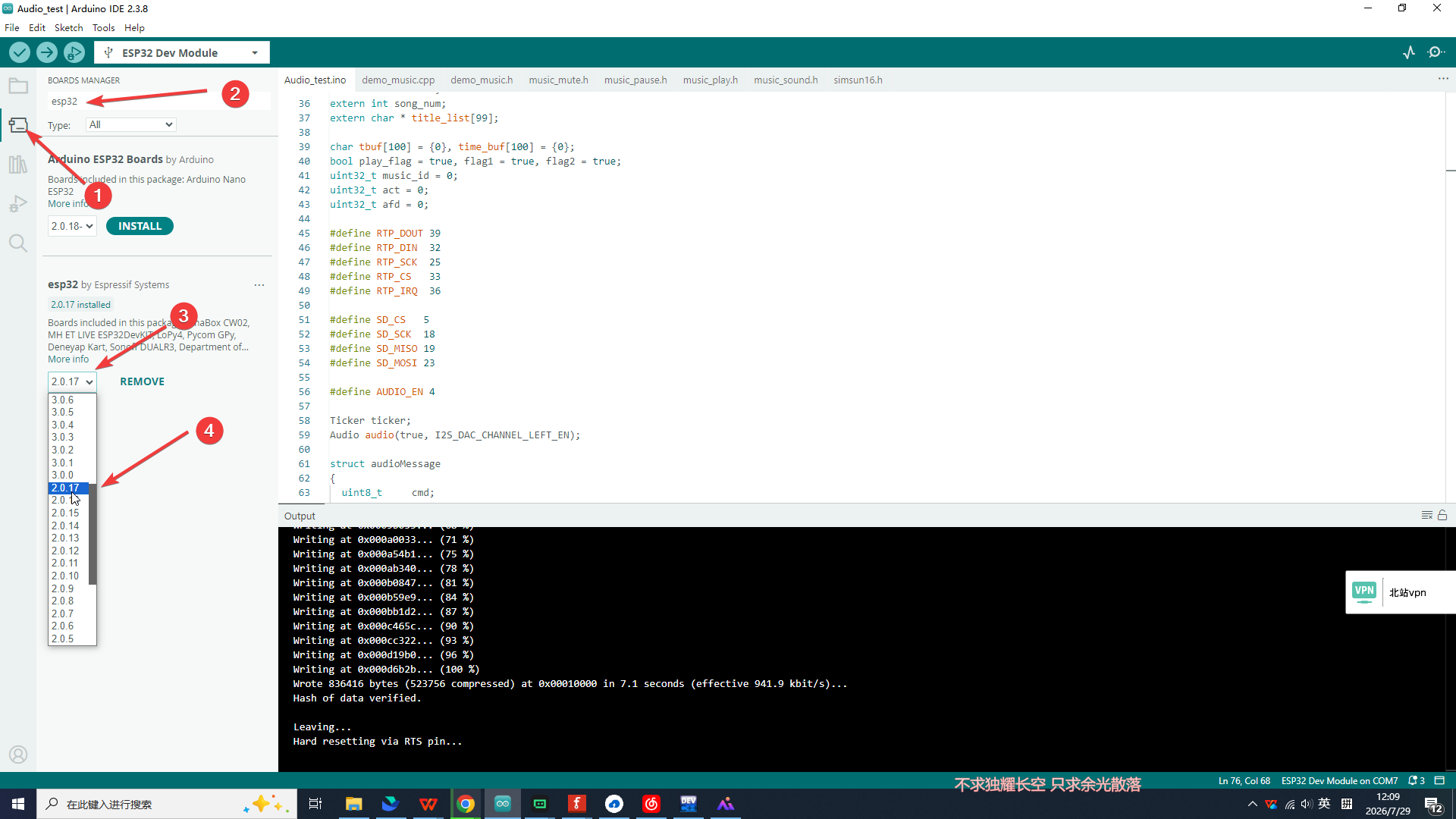
Note: The provided code may not be compatible with ESP32 Arduino Core version 3.0, which will cause errors during compilation. Please do not worry; you can resolve this issue by downgrading the ESP32 core version. The detailed operations are as follows:
Select version 2.0.17, then click the install button to finish the installation.
¶ Code Explanation
This sample code is based on the ESP32-WROOM-32E microcontroller and developed using the Arduino framework.
¶ Pin Configuration
This sample involves the following pin assignments for communication between the ESP32 and various peripheral modules:
| Function Module | Pins | Description |
|---|---|---|
| TFT Screen | CS:15, DC/RS:2, RESET:EN, SDI/MOSI:13, SCK:14, SDO/MISO:12, BL:21 | SPI interface driving the TFT display |
| Touch Screen | RTP_DOUT:39, RTP_DIN:32, RTP_SCK:25, RTP_CS:33, RTP_IRQ:36 | SPI interface driving the resistive touch screen |
| SD Card | SD_CS:5, SD_SCK:18, SD_MISO:19, SD_MOSI:23 | SPI interface driving SD card read/write |
| Audio | AUDIO_EN:4, AUDIO_DAC:26 | Audio output enable and DAC interface |
¶ Basic Configuration (Brief)
The core configuration of the code is briefly described below:
- Library Introduction: Includes
SPI.h,SD.h,FS.h,Audio.h,Ticker.h,TFT_eSPI.h,TFT_Touch.h,TJpg_Decoder.hand other libraries for SD card read/write, audio playback, screen display, touch interaction, and JPG decoding. - Pin Definition: Defines touch screen, SD card, and audio enable pins using
#define. - Object Instantiation: Creates
Audio,TFT_eSPI,TFT_eSprite,TFT_Touch,SPIClassobjects for audio playback, screen drawing, sprite buffering, touch detection, and SD card communication respectively. - FreeRTOS Queues: Creates two FreeRTOS queues,
audioSetQueueandaudioGetQueue, for command and data transfer between the main task and the audio task. - Global Variables: Defines global variables such as
song_num(total number of songs),music_id(current playing song index), andplay_flag(playback flag) to control the playback state.
¶ Header File Descriptions
This sample includes the following header files. The content and purpose of each file are described below:
¶ demo_music.h — Music Management Module Header
#ifndef DEMO_MUSIC_H
#define DEMO_MUSIC_H

#include "FS.h"
#include "Audio.h"
extern Audio audio;

bool demo_music(void);
const char * demo_music_get_title(uint32_t track_id);
void demo_music_play(uint32_t track_id);
void demo_music_pause(void);

#endif /*LV_DEMO_MUSIC_H*/
This header file declares four core functions of the music management module:
demo_music(): Initializes the music system, scans the SD card, and builds the song list.demo_music_get_title(uint32_t track_id): Retrieves the song title string based on the index.demo_music_play(uint32_t track_id): Plays the song at the specified index.demo_music_pause(): Toggles play/pause state.
It also declares the externalAudioobject viaextern Audio audio;for use by each function in the module.
¶ simsun16.h — Chinese Font Library File
#include <pgmspace.h>
const uint8_t simsun16[] PROGMEM = { ... };
This file contains the complete font bitmap data for SimSun 16-point font. The data is stored in Flash memory using the PROGMEM keyword to save precious RAM space. The program loads this font via clk.loadFont(simsun16) to correctly display Chinese song titles and prompt messages on the TFT screen.
¶ music_play.h — Play Icon
#include <pgmspace.h>
const uint8_t music_play[] PROGMEM = { ... };
This file stores the raw JPG image data (byte array format) for the "Play" button icon, stored in Flash using PROGMEM. The program decodes and draws it at the bottom-left of the screen via the TJpgDec.drawJpg() function as the initial icon for the play/pause state.
¶ music_pause.h — Pause Icon
#include <pgmspace.h>
const uint8_t music_pause[] PROGMEM = { ... };
This file stores the raw JPG image data for the "Pause" button icon. When the user taps the play/pause button to switch to pause state, the program draws this icon on the screen, replacing the original play icon.
¶ music_sound.h — Sound Icon
#include <pgmspace.h>
const uint8_t music_sound[] PROGMEM = { ... };
This file stores the raw JPG image data for the "Sound On" button icon. It is displayed as the icon when the mute function is enabled, drawn at the bottom-right of the screen.
¶ music_mute.h — Mute Icon
#include <pgmspace.h>
const uint8_t music_mute[] PROGMEM = { ... };
This file stores the raw JPG image data for the "Mute" button icon. When the user enables mute mode, the program draws this icon on the screen, replacing the sound icon.
PROGMEM Explanation: In ESP32/Arduino development, the
PROGMEMkeyword tells the compiler to store data in Flash (program memory) instead of RAM. This is important for storing large constant data such as icons and fonts, because ESP32 has limited RAM but ample Flash space. Data stored withPROGMEMrequires special access methods (such as functions defined inpgmspace.h), which theTJpg_Decoderlibrary handles internally.
¶ Detailed Explanation of setup() Function
The setup() function completes the initialization of all peripherals and runs only once when the ESP32 is powered on or reset.
void setup()
{
  Serial.begin(115200);
  pinMode(AUDIO_EN, OUTPUT);
  digitalWrite(AUDIO_EN, LOW);
  pinMode(SD_CS, OUTPUT);
  digitalWrite(SD_CS, HIGH);
  pinMode(RTP_IRQ, INPUT);
  tft.begin();
  tft.setRotation(1);
  my_touch.setCal(495, 3398, 721, 3448, 320, 240, 1);
  tft.fillScreen(TFT_WHITE);
  clk.setColorDepth(8);
  clk.loadFont(simsun16);
  TJpgDec.setJpgScale(1);
  TJpgDec.setSwapBytes(true);
  TJpgDec.setCallback(tft_output);
  MySPI.begin(SD_SCK, SD_MISO, SD_MOSI);
  while(!SD.begin(SD_CS,MySPI))
  {
    Serial.println("SD card does not exist");
    clk.createSprite(320, 60);
    clk.fillSprite(TFT_WHITE);
    clk.setTextDatum(CC_DATUM);
    clk.setTextColor(TFT_RED, TFT_WHITE);
    clk.drawString("SD card does not exist",160,16);
    clk.drawString("Please insert SD card",160,46);
    clk.pushSprite(0,tft.height()/2-30);
    clk.deleteSprite();
    delay(100);
  }
  tft.fillScreen(TFT_WHITE);
  delay(200);
  audioInit();
  audio.setVolume(21);
  ticker.attach(1, tcr1s);
  if(!demo_music())
  {
    clk.createSprite(320, 30);
    clk.fillSprite(TFT_WHITE);
    clk.setTextDatum(CC_DATUM);
    clk.setTextColor(TFT_RED, TFT_WHITE);
    clk.drawString("Not find MP3 file",160,16);
    clk.pushSprite(0,tft.height()/2-15);
    clk.deleteSprite();
    while(1);
  }
  if(song_num>8)
  {
    song_num = 8;
  }
  for(int i=0; i< song_num; i++)
  {
    clk.createSprite(310, 20);
    clk.fillSprite(TFT_WHITE);
    clk.setTextDatum(CC_DATUM);
    clk.setTextColor(TFT_BLACK, TFT_WHITE);
    sprintf(tbuf, "%d.%s",i+1,demo_music_get_title(i));
    clk.drawString(tbuf,155,10);
    clk.pushSprite(5,5+i*20);
    clk.deleteSprite();
  }
  Serial.println("Setup done");
  delay(500);
  clk.createSprite(310, 20);
  clk.fillSprite(TFT_WHITE);
  clk.setTextDatum(CC_DATUM);
  clk.setTextColor(TFT_RED, TFT_WHITE);
  sprintf(tbuf, "%d.%s",1,demo_music_get_title(0));
  clk.drawString(tbuf,155,10);
  clk.pushSprite(5,5);
  clk.deleteSprite();
  tft.drawFastHLine(0, 165, tft.width(), TFT_BLACK);
  tft.setTextColor(TFT_BLUE);
  tft.fillRect(0, 166, tft.width(),28,TFT_WHITE);
  tft.drawString("Audio time : ",10,167,2);
  tft.drawString("Total time : ",180,167,2);
  tft.drawString("00:00",266,167,2);
  tft.drawFastHLine(0, 185, tft.width(), TFT_BLACK);
  TJpgDec.drawJpg(40,tft.height()-52,music_play, sizeof(music_play));
  TJpgDec.drawJpg(200,tft.height()-52,music_sound, sizeof(music_sound));
}
¶ Serial Port and GPIO Initialization
Serial.begin(115200);
pinMode(AUDIO_EN, OUTPUT);
digitalWrite(AUDIO_EN, LOW);
pinMode(SD_CS, OUTPUT);
digitalWrite(SD_CS, HIGH);
pinMode(RTP_IRQ, INPUT);
Serial.begin(115200): Sets the serial baud rate to 115200 for debugging information output.pinMode(AUDIO_EN, OUTPUT)anddigitalWrite(AUDIO_EN, LOW): Sets the audio enable pin to output mode, initialized to LOW (disabling audio output).pinMode(SD_CS, OUTPUT)anddigitalWrite(SD_CS, HIGH): Sets the SD card chip select pin to output mode, initialized to HIGH (not selecting the SD card).pinMode(RTP_IRQ, INPUT): Sets the touch screen interrupt pin to input mode for detecting touch events.
¶ TFT Screen Initialization
tft.begin();
tft.setRotation(1);
my_touch.setCal(495, 3398, 721, 3448, 320, 240, 1);
tft.fillScreen(TFT_WHITE);
tft.begin(): Initializes the TFT screen, configuring the SPI interface and display parameters.tft.setRotation(1): Sets the screen to landscape display mode (rotated 90°).my_touch.setCal(...): Calibrates the touch screen coordinates, mapping raw touch coordinates to screen coordinates. Parameters are X-axis min, X-axis max, Y-axis min, Y-axis max, screen width, and screen height respectively.tft.fillScreen(TFT_WHITE): Fills the entire screen with white as the initialization background.
¶ Font and JPG Decoder Configuration
clk.setColorDepth(8);
clk.loadFont(simsun16);
TJpgDec.setJpgScale(1);
TJpgDec.setSwapBytes(true);
TJpgDec.setCallback(tft_output);
clk.setColorDepth(8): Sets the sprite color depth to 8 bits (256 colors) to save RAM space.clk.loadFont(simsun16): Loads the SimSun 16-point font for Chinese text display.TJpgDec.setJpgScale(1): Sets the JPG decoding scaling factor to 1 (no scaling).TJpgDec.setSwapBytes(true): Sets byte swapping to match the ESP32's byte order.TJpgDec.setCallback(tft_output): Registers the callback function after JPG decoding to push the decoded image to the screen.
¶ SD Card Initialization
MySPI.begin(SD_SCK, SD_MISO, SD_MOSI);
while(!SD.begin(SD_CS,MySPI))
{
  Serial.println("SD card does not exist");
  // Display error message on screen
  clk.createSprite(320, 60);
  clk.fillSprite(TFT_WHITE);
  clk.setTextDatum(CC_DATUM);
  clk.setTextColor(TFT_RED, TFT_WHITE);
  clk.drawString("SD card does not exist",160,16);
  clk.drawString("Please insert SD card",160,46);
  clk.pushSprite(0,tft.height()/2-30);
  clk.deleteSprite();
  delay(100);
}
MySPI.begin(SD_SCK, SD_MISO, SD_MOSI): Initializes the SPI bus, configuring the SD card's clock, master-in-slave-out, and master-out-slave-in pins.SD.begin(SD_CS, MySPI): Initializes the SD card using the specified chip select pin and SPI bus.- If SD card initialization fails, the program displays a red error message on the screen and keeps waiting until the SD card is inserted.
¶ Audio System Initialization
audioInit();
audio.setVolume(21);
ticker.attach(1, tcr1s);
audioInit(): Creates the audio processing taskaudioTask, which runs on Core 0 and is responsible for actual audio playback, volume control, and file connection operations.audio.setVolume(21): Sets the audio volume to 21 (range 0-21).ticker.attach(1, tcr1s): Creates a timer that calls thetcr1sfunction every 1 second to update the audio time display.
¶ Music File Scanning
if(!demo_music())
{
  // Display "Not find MP3 file" and halt
  while(1);
}
The demo_music() function calls listDir() to scan the SD card root directory, finds all .mp3 files, and builds a song list. If no MP3 files are found, the program displays an error message on the screen and enters an infinite loop.
¶ Song List Display
if(song_num>8) song_num = 8;
for(int i=0; i< song_num; i++)
{
  clk.createSprite(310, 20);
  clk.fillSprite(TFT_WHITE);
  clk.setTextDatum(CC_DATUM);
  clk.setTextColor(TFT_BLACK, TFT_WHITE);
  sprintf(tbuf, "%d.%s",i+1,demo_music_get_title(i));
  clk.drawString(tbuf,155,10);
  clk.pushSprite(5,5+i*20);
  clk.deleteSprite();
}
- Displays up to 8 songs maximum.
- Uses sprites to render song titles line by line, with each line formatted as "Number.Song Name".
- The song list is displayed on the left side of the screen.
¶ Playback Interface Drawing
// Highlight first song
sprintf(tbuf, "%d.%s",1,demo_music_get_title(0));
clk.drawString(tbuf,155,10);
clk.pushSprite(5,5);

// Draw separator and time display area
tft.drawFastHLine(0, 165, tft.width(), TFT_BLACK);
tft.fillRect(0, 166, tft.width(),28,TFT_WHITE);
tft.drawString("Audio time : ",10,167,2);
tft.drawString("Total time : ",180,167,2);
tft.drawString("00:00",266,167,2);
tft.drawFastHLine(0, 185, tft.width(), TFT_BLACK);

// Draw control icons
TJpgDec.drawJpg(40,tft.height()-52,music_play, sizeof(music_play));
TJpgDec.drawJpg(200,tft.height()-52,music_sound, sizeof(music_sound));
- Highlights the first song by default (red text).
- Draws a time display area in the middle of the screen, including "Audio time" (current playback time) and "Total time" (total duration).
- Draws play/pause and sound icons at the bottom of the screen.
¶ Detailed Explanation of loop() Function
The loop() function is the main loop of the Arduino program, which runs repeatedly after the setup() function is executed. It handles touch interaction and automatic playback control.
void loop()
{
  if(my_touch.Pressed()&&!digitalRead(RTP_IRQ))
  {
     t_x = my_touch.X();
     t_y = my_touch.Y();
    if((t_x>=40)&&(t_x<90)&&t_y>=(tft.height()-52)&&t_y < (tft.height()-1))
    {
      flag1 = !flag1;
      if(flag1)
      {
          TJpgDec.drawJpg(40,tft.height()-52,music_pause, sizeof(music_pause));
      }
      else
      {
          TJpgDec.drawJpg(40,tft.height()-52,music_play, sizeof(music_play));
      }
      demo_music_pause();
      while(!digitalRead(RTP_IRQ));
    }
    if((t_x>=200)&&(t_x<250)&&t_y>=(tft.height()-52)&&t_y < (tft.height()-1))
    {
      flag2 = !flag2;
      if(flag2)
      {
          TJpgDec.drawJpg(200,tft.height()-52,music_sound, sizeof(music_sound));
      }
      else
      {
          TJpgDec.drawJpg(200,tft.height()-52,music_mute, sizeof(music_mute));
      }
      digitalWrite(AUDIO_EN, !flag2);
      while(!digitalRead(RTP_IRQ));
    }
  }
  if(play_flag)
  {
    play_flag = false;
    demo_music_play(music_id);
    delay(2000);
    afd = audio.getAudioFileDuration();
    sprintf(time_buf,"%02d:%02d", (afd/60), (afd%60));
    tft.setTextColor(TFT_BLUE);
    tft.fillRect(266, 167, 40,18,TFT_WHITE);
    tft.drawString(time_buf,266,167,2);
  }
  if(act >= afd)
  {
    play_flag = true;
    clk.createSprite(310, 20);
    clk.fillSprite(TFT_WHITE);
    clk.setTextDatum(CC_DATUM);
    clk.setTextColor(TFT_BLACK, TFT_WHITE);
    sprintf(tbuf, "%d.%s",music_id+1,demo_music_get_title(music_id));
    clk.drawString(tbuf,155,10);
    clk.pushSprite(5,5+20*music_id);
    clk.deleteSprite();
    music_id++;
    if(music_id >= song_num)
    {
        music_id = 0;
    }
    clk.createSprite(310, 20);
    clk.fillSprite(TFT_WHITE);
    clk.setTextDatum(CC_DATUM);
    clk.setTextColor(TFT_RED, TFT_WHITE);
    sprintf(tbuf, "%d.%s",music_id+1,demo_music_get_title(music_id));
    clk.drawString(tbuf,155,10);
    clk.pushSprite(5,5+20*music_id);
    clk.deleteSprite();
  }
}
¶ Touch Detection and Coordinate Reading
if(my_touch.Pressed()&&!digitalRead(RTP_IRQ))
{
  t_x = my_touch.X();
  t_y = my_touch.Y();
  // ...
}
my_touch.Pressed(): Checks whether the touch screen is pressed.!digitalRead(RTP_IRQ): Confirms the touch event again via the interrupt pin.my_touch.X()andmy_touch.Y(): Reads the X and Y coordinates of the touch point.
¶ Play/Pause Control
if((t_x>=40)&&(t_x<90)&&t_y>=(tft.height()-52)&&t_y < (tft.height()-1))
{
  flag1 = !flag1;
  if(flag1)
    TJpgDec.drawJpg(40,tft.height()-52,music_pause, sizeof(music_pause));
  else
    TJpgDec.drawJpg(40,tft.height()-52,music_play, sizeof(music_play));
  demo_music_pause();
  while(!digitalRead(RTP_IRQ));
}
- Checks whether the touch position is within the play/pause icon area (X: 40-90, Y: bottom 52 pixels range).
- Toggles the
flag1state and updates the icon display (play icon ↔ pause icon). - Calls
demo_music_pause()to toggle audio play/pause state. while(!digitalRead(RTP_IRQ)): Waits for the finger to leave the screen to prevent repeated triggering.
¶ Mute Control
if((t_x>=200)&&(t_x<250)&&t_y>=(tft.height()-52)&&t_y < (tft.height()-1))
{
  flag2 = !flag2;
  if(flag2)
    TJpgDec.drawJpg(200,tft.height()-52,music_sound, sizeof(music_sound));
  else
    TJpgDec.drawJpg(200,tft.height()-52,music_mute, sizeof(music_mute));
  digitalWrite(AUDIO_EN, !flag2);
  while(!digitalRead(RTP_IRQ));
}
- Checks whether the touch position is within the sound icon area (X: 200-250, Y: bottom 52 pixels range).
- Toggles the
flag2state and updates the icon display (sound icon ↔ mute icon). - Enables/disables audio output by controlling the
AUDIO_ENpin level.
¶ Automatic Playback Control
if(play_flag)
{
  play_flag = false;
  demo_music_play(music_id);
  delay(2000);
  afd = audio.getAudioFileDuration();
  sprintf(time_buf,"%02d:%02d", (afd/60), (afd%60));
  tft.setTextColor(TFT_BLUE);
  tft.fillRect(266, 167, 40,18,TFT_WHITE);
  tft.drawString(time_buf,266,167,2);
}
play_flagis initiallytrue, ensuring the first song plays automatically.demo_music_play(music_id): Plays the song at the current index.- After a 2-second delay, retrieves the total duration of the song and displays it on the screen.
¶ Automatic Song Switching
if(act >= afd)
{
  play_flag = true;
  // Restore previous song title to normal color
  music_id++;
  if(music_id >= song_num) music_id = 0;
  // Highlight new song title in red
}
act >= afd: When the current playback time is greater than or equal to the total duration, the current song has finished playing.- Sets
play_flagtotrueto trigger automatic playback of the next song. - Restores the previous song title to black, and highlights the new song title in red.
- The playlist supports loop playback, returning to the first song after the last one finishes.
¶ Detailed Explanation of Core Functions
¶ audioTask() - Audio Processing Task
void audioTask(void *parameter)
{
  CreateQueues();
  while (true)
  {
    if (xQueueReceive(audioSetQueue, &audioRxTaskMessage, 1) == pdPASS)
    {
      if (audioRxTaskMessage.cmd == SET_VOLUME)
      {
        audio.setVolume(audioRxTaskMessage.value);
      }
      else if (audioRxTaskMessage.cmd == CONNECTTOSD)
      {
        audio.connecttoSD(audioRxTaskMessage.txt);
      }
      // ...
    }
    audio.loop();
  }
}
- This task runs on FreeRTOS Core 0 with a high priority (
2 | portPRIVILEGE_BIT). - Receives commands from the main task via FreeRTOS queues.
- Supported commands include:
SET_VOLUME(set volume),GET_VOLUME(get volume),CONNECTTOHOST(connect to online radio),CONNECTTOSD(connect to SD card file). audio.loop(): Continuously processes the audio data stream to maintain audio playback.
¶ CreateQueues() - Create Communication Queues
void CreateQueues()
{
  audioSetQueue = xQueueCreate(10, sizeof(struct audioMessage));
  audioGetQueue = xQueueCreate(10, sizeof(struct audioMessage));
}
Creates two FreeRTOS queues with a length of 10 for bidirectional communication between the main task and the audio task.
¶ transmitReceive() - Message Send/Receive
audioMessage transmitReceive(audioMessage msg)
{
  xQueueSend(audioSetQueue, &msg, portMAX_DELAY);
  if (xQueueReceive(audioGetQueue, &audioRxMessage, portMAX_DELAY) == pdPASS)
  {
    if (msg.cmd != audioRxMessage.cmd)
    {
      Serial.println("wrong reply from message queue");
    }
  }
  return audioRxMessage;
}
This is the core function for communication between the main task and the audio task:
- Sends a command message to
audioSetQueue. - Receives the response from the audio task via
audioGetQueue. - Verifies whether the response command matches the sent command.
¶ audioSetVolume() / audioGetVolume() - Volume Control
void audioSetVolume(uint8_t vol)
{
  audioTxMessage.cmd = SET_VOLUME;
  audioTxMessage.value = vol;
  audioMessage RX = transmitReceive(audioTxMessage);
}

uint8_t audioGetVolume()
{
  audioTxMessage.cmd = GET_VOLUME;
  audioMessage RX = transmitReceive(audioTxMessage);
  return RX.ret;
}
Encapsulates volume set and get operations through message queues.
¶ audioConnecttoSD() - Connect to SD Card Audio File
bool audioConnecttoSD(const char* filename)
{
  audioTxMessage.cmd = CONNECTTOSD;
  audioTxMessage.txt = filename;
  audioMessage RX = transmitReceive(audioTxMessage);
  return RX.ret;
}
Requests the audio task to connect to and play the specified audio file on the SD card.
¶ tcr1s() - Time Callback Function
void tcr1s()
{
  act = audio.getAudioCurrentTime();
  if(act)
  {
    tft.setTextColor(TFT_BLUE);
    sprintf(time_buf,"%02d:%02d", (act/60), (act%60));
    tft.fillRect(96, 167, 40,18,TFT_WHITE);
    tft.drawString(time_buf,96,167,2);
  }
}
This function is called by the Ticker timer once per second:
audio.getAudioCurrentTime(): Retrieves the current playback progress (in seconds).- Formats the time as
MM:SS. - Refreshes and displays the current playback time on the screen.
¶ Detailed Explanation of demo_music Module
The demo_music module consists of two files, demo_music.cpp and demo_music.h, responsible for scanning, storing, querying, and controlling playback of music files. The global variables and each function of this module are described in detail below.
¶ Global Variables
char * title_list[99];   // Song title pointer array, stores up to 99 songs
char * songs[99];        // Temporary song name storage array, copied to title_list via memcpy after scanning
bool read_flag = false;  // Read flag, marks whether MP3 files were successfully read
int song_num = 0;        // Total number of songs, records the count of MP3 files found
title_list[99]: This is the core data structure of the module, storing string pointers for all song filenames. The array size is 99, meaning it supports up to 99 songs.songs[99]: Temporarily stores song names during thelistDir()scanning process. After scanning is complete, it is copied totitle_listviamemcpy.read_flag: Marks whether at least one MP3 file was successfully found, used for the return judgment ofdemo_music().song_num: Records the total number of songs scanned, used by the playback logic insetup()andloop().
¶ listDir() - Directory Scanning and MP3 Search
void listDir(fs::FS &fs, const char * dirname, uint8_t levels)
{
    Serial.printf("Listing directory: %s\n", dirname);

    File root = fs.open(dirname);
    if(!root)
    {
        Serial.println("Failed to open directory");
        return;
    }
    if(!root.isDirectory())
    {
        Serial.println("Not a directory");
        return;
    }

    File file = root.openNextFile();
    int i=0;
    while(file)
    {
        if(file.isDirectory())
        {
            Serial.print("  DIR : ");
            Serial.println(file.name());
            if(levels)
            {
                listDir(fs, file.path(), levels -1);
            }
        }
        else
        {
            char *filename = (char *)file.name();
            Serial.println(filename);
            int8_t len = strlen(filename);
            if (strstr(strlwr(filename + (len - 4)), ".mp3"))
            {
                songs[i] = new char[len];
                read_flag = true;
                strcpy(songs[i], filename);
                Serial.print("out:");
                Serial.println(filename);
                Serial.print("songs:");
                Serial.println(songs[i]);
                i+=1;
            }
        }
        file = root.openNextFile();
    }
    song_num = i;
}
This is the core function for music scanning, implementing recursive directory traversal:
-
Directory Opening and Validation:
fs.open(dirname): Opens the specified directory. If opening fails, prints an error message and returns.root.isDirectory(): Confirms the path is a directory, not a file.
-
Recursive Traversal:
root.openNextFile(): Gets the next file/subdirectory in the directory.- If it is a subdirectory and
levels > 0, recursively callslistDir()to continue scanning subdirectories. - If it is a regular file, checks the file extension.
-
MP3 File Filtering:
strlen(filename): Gets the filename length.filename + (len - 4): Locates the last 4 characters of the filename (file extension position).strlwr(): Converts the extension to lowercase for case-insensitive matching.strstr(..., ".mp3"): Checks whether the extension is.mp3.
-
Dynamic Memory Allocation:
songs[i] = new char[len]: Uses thenewkeyword to dynamically allocate memory for storing the filename. Since filenames have variable lengths, dynamic allocation saves memory.strcpy(songs[i], filename): Copies the filename to the allocated memory.
-
Result Saving:
- For each MP3 file found, the
icounter increments by 1. - After scanning is complete,
song_num = isaves the final song count.
- For each MP3 file found, the
Note: Since
newis used for dynamic memory allocation, in more complex applications you should consider usingdelete[]to release memory at an appropriate time to avoid memory leaks.
¶ demo_music() - Music System Initialization
bool demo_music(void)
{
    listDir(SD,"/",0);
    if (read_flag)
    {
        memcpy(title_list,songs,sizeof(songs));
        return true;
    }
    else
    {
        Serial.println("not find MP3 file");
        return false;
    }
}
This is the entry function of the music module, called in setup():
- Calls
listDir(): Scans the SD card root directory ("/"), withlevels=0meaning no recursive entry into subdirectories. - Checks Scan Results:
- If
read_flagistrue(i.e., at least one MP3 file was found), copies the contents of thesongsarray totitle_listviamemcpy. - If no MP3 files were found, prints an error message to the serial port and returns
false.
- If
- Return Value:
trueindicates initialization was successful;falseindicates no MP3 files were found on the SD card. The main program decides whether to display an error prompt and terminate based on this return value.
¶ demo_music_get_title() - Get Song Title
const char * demo_music_get_title(uint32_t track_id)
{
    if(track_id >= sizeof(title_list) / sizeof(title_list[0]))
    {
        return NULL;
    }
    return title_list[track_id];
}
This is a song query function that returns the corresponding song title based on the index:
- Parameter:
track_idis the song index (starting from 0). - Boundary Check:
track_id >= sizeof(title_list) / sizeof(title_list[0])checks whether the index is out of array bounds (maximum 99), preventing array out-of-bounds access. - Return Value: Returns a pointer to the song title string (
const char *), orNULLif the index is invalid. - This function can be used to safely retrieve any song's title for interface display and playback control.
¶ demo_music_play() - Play a Specific Song
void demo_music_play(uint32_t track_id)
{
    char chbuf[100];
    const char *filename = demo_music_get_title(track_id);
    Serial.println(String(filename));
    sprintf(chbuf, "%s", filename);
    audio.pauseResume();
    delay(100);
    audio.connecttoFS(SD, chbuf);
}
This function encapsulates the complete process of playing a specific song:
- Get Filename: Calls
demo_music_get_title(track_id)to get the song filename. - Format Path: Uses
sprintfto copy the filename into the character bufferchbuf(100-byte stack buffer). - Cancel Pause:
audio.pauseResume()ensures the audio is in a non-paused state. If it was previously paused, this call resumes playback. - State Switch Delay:
delay(100)waits 100ms to ensure the pause state switch completes fully, preventing audio playback anomalies. - Connect File and Play:
audio.connecttoFS(SD, chbuf)establishes a connection to the specified MP3 file on the SD card and starts decoded playback.
¶ demo_music_pause() - Pause/Resume Playback
void demo_music_pause(void)
{
    audio.pauseResume();
}
This is a simple wrapper function that directly calls audio.pauseResume():
audio.pauseResume()is a toggle function from the Audio library: it pauses if currently playing, or resumes if currently paused.- This function is called by the touch button handling logic in
loop()to implement play/pause toggle control. - The benefit of wrapping this function is that it centralizes playback control logic in the
demo_musicmodule, making it easier to maintain and extend (e.g., adding fade-in/fade-out effects in the future).
¶ Summary
This sample program implements a complete MP3 player through the following steps:
- Hardware Initialization: Initializes the serial port, GPIO pins, TFT screen, touch screen, SPI bus, and SD card.
- Audio System Initialization: Creates FreeRTOS tasks and message queues, sets audio parameters.
- Music Scanning: Scans the SD card, finds MP3 files, and builds a playlist.
- Interface Drawing: Displays the song list, time information, and control button icons.
- Playback Control:
- Automatically plays the first song
- Touch buttons enable play/pause and mute control
- Automatically switches to the next song when the current one finishes
- Supports loop playback
The key functions used in the program include:
tft.begin(): Initialize the TFT screentft.setRotation(): Set screen rotation directionmy_touch.setCal(): Calibrate the touch screenSD.begin(): Initialize the SD cardaudio.setVolume(): Set audio volumeaudio.connecttoFS(): Connect to and play an audio file on the SD cardaudio.pauseResume(): Toggle play/pause stateaudio.getAudioCurrentTime(): Get current playback timeaudio.getAudioFileDuration(): Get the total duration of the audio fileTJpgDec.drawJpg(): Draw a JPG image on the screenticker.attach(): Create a timed callbackxQueueCreate(): Create a FreeRTOS queuexTaskCreatePinnedToCore(): Create a FreeRTOS task
¶ Modification Instructions
If you need to modify the code display effects, you can refer to the following aspects for adjustment:
-
Modify the Maximum Number of Playable Songs:
- Change the limit value in
if(song_num>8) song_num = 8;insetup().
- Change the limit value in
-
Modify Default Volume:
- Change the volume value in
audio.setVolume(21)(range 0-21).
- Change the volume value in
-
Modify the Timer Update Interval:
- Change the first parameter in
ticker.attach(1, tcr1s)(unit: seconds).
- Change the first parameter in
-
Modify Touch Area Coordinates:
- Adjust the coordinate ranges
(t_x>=40)&&(t_x<90)and(t_x>=200)&&(t_x<250)inloop().
- Adjust the coordinate ranges
-
Modify Font Size:
- Use
clk.loadFont()to load different fonts (requires adding font library files yourself).
- Use
-
Modify Playback Order:
- Add custom sorting logic after
music_id++.
- Add custom sorting logic after
-
Add More Control Functions:
- Reference the implementation of play/pause and mute to add previous/next track functions.
-
Modify Audio Source:
- Change
audio.connecttoFS(SD, chbuf)toaudio.connecttohost()to support online radio playback.
- Change