¶ Flash JPG DMA Display
This example demonstrates rendering a JPEG image stored in Flash memory to a TFT LCD screen using ESP32's DMA (Direct Memory Access) feature. DMA transfer allows the system to transmit image data to the screen in parallel while decoding the JPEG, significantly improving display performance.
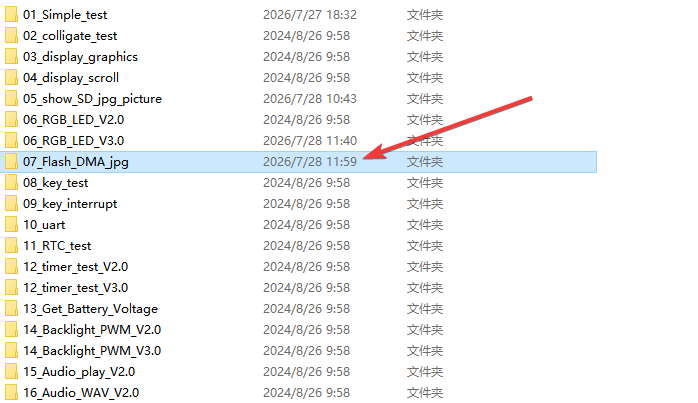
¶ Code Explanation
This example code is based on the ESP32-WROOM-32E microcontroller, using the TJpg_Decoder library and TFT_eSPI library to achieve efficient DMA-based JPEG image display.
¶ Basic Configuration (Brief)
¶ Library Includes
#include <TFT_eSPI.h>              // TFT hardware driver library
#include <TJpg_Decoder.h>          // JPEG decoder library
#include "image.h"                 // JPEG image array
TFT_eSPI.h: A TFT driver library developed by Bodmer, supporting various LCD screens and ESP32's SPI DMA functionalityTJpg_Decoder.h: A JPEG decoder library developed by Bodmer, designed to decode JPEG images on microcontrollersimage.h: Contains the JPEG image data arraywaterstored in Flash memory
¶ DMA Buffer Definition
#define USE_DMA  // Define whether to use DMA

#ifdef USE_DMA
  uint16_t  dmaBuffer1[16*16]; // Toggle buffer for 16*16 MCU block, 512bytes
  uint16_t  dmaBuffer2[16*16]; // Toggle buffer for 16*16 MCU block, 512bytes
  uint16_t* dmaBufferPtr = dmaBuffer1;
  bool dmaBufferSel = 0;
#endif
USE_DMA: Macro definition to enable DMA transfer mode. Comment it out to switch to non-DMA modedmaBuffer1anddmaBuffer2: Two 16×16 pixel uint16_t buffers (512 bytes each), used for the double buffering mechanism- Double buffering: While DMA is transmitting data from one buffer to the screen, the JPEG decoder can write new data to the other buffer, enabling parallel processing
¶ Object Instantiation
TFT_eSPI tft = TFT_eSPI();
Creates the TFT_eSPI object tft, serving as the entry point for all subsequent screen operations.
¶ Pin Configuration
The pin connections between ESP32-WROOM-32E and the LCD screen are as follows:
| ESP32 Pin | LCD Function | Description |
|---|---|---|
| GPIO 15 | CS | Chip Select signal |
| GPIO 2 | DC/RS | Data/Command selection |
| ESP32-EN | RESET | Reset signal |
| GPIO 13 | SDI/MOSI | Master Out Slave In data |
| GPIO 14 | SCK | Clock signal |
| GPIO 12 | SDO/MISO | Master In Slave Out data |
| GPIO 21 | BL | Backlight control |
| 5V | VCC | Power supply |
| GND | GND | Ground |
¶ tft_output() Callback Function详解
The tft_output() function serves as the bridge between the JPEG decoder and the TFT screen. It is called by the decoder every time a 16×16 or 8×8 pixel block (Minimum Coding Unit - MCU) is decoded, to render the image data to the screen.
bool tft_output(int16_t x, int16_t y, uint16_t w, uint16_t h, uint16_t* bitmap)
{
   if ( y >= tft.height() ) return 0;

#ifdef USE_DMA
  if (dmaBufferSel) dmaBufferPtr = dmaBuffer2;
  else dmaBufferPtr = dmaBuffer1;
  dmaBufferSel = !dmaBufferSel;
  tft.pushImageDMA(x, y, w, h, bitmap, dmaBufferPtr);
#else
  tft.pushImage(x, y, w, h, bitmap);
#endif
  return 1;
}
¶ Boundary Check
if ( y >= tft.height() ) return 0;
When the image's Y coordinate exceeds the screen height, return 0 to stop decoding and prevent the image from being displayed beyond the screen boundaries.
¶ DMA Double-Buffered Transfer (USE_DMA mode)
- Buffer Selection: Select either
dmaBuffer1ordmaBuffer2based on thedmaBufferSelflag - Toggle Flag:
dmaBufferSel = !dmaBufferSelswitches the buffer so the next call will use the other buffer - DMA Transfer:
tft.pushImageDMA()initiates DMA transfer to send bitmap data from the buffer to the TFT screen. This function is non-blocking — it will wait only if the previous DMA transfer has not completed yet
¶ Non-DMA Transfer (non USE_DMA mode)
tft.pushImage(x, y, w, h, bitmap);
Uses the traditional blocking approach to transmit image data. This function only returns after the image block has been fully drawn to the screen.
¶ Return Value
- Return
1: Continue decoding the next image block - Return
0: Stop decoding (when the image exceeds screen boundaries)
¶ setup() Function Explanation
The setup() function handles the initialization of the serial port, TFT screen, DMA engine, and JPEG decoder configuration.
void setup()
{
  Serial.begin(115200);
  Serial.println("\n\n Testing TJpg_Decoder library");

  tft.begin();
  tft.setRotation(1);
  tft.fillScreen(TFT_BLACK);

#ifdef USE_DMA
  tft.initDMA();
#endif

  TJpgDec.setJpgScale(1);
  tft.setSwapBytes(true);
  TJpgDec.setCallback(tft_output);
}
¶ Serial Initialization
Serial.begin(115200);
Serial.println("\n\n Testing TJpg_Decoder library");
Sets the serial baud rate to 115200 for debug message output.
¶ TFT Screen Initialization
tft.begin();
tft.setRotation(1);
tft.fillScreen(TFT_BLACK);
tft.begin(): Initializes the TFT screen and configures SPI communicationtft.setRotation(1): Sets screen rotation to 90° (landscape display)tft.fillScreen(TFT_BLACK): Fills the screen with black as the background color
¶ DMA Engine Initialization
#ifdef USE_DMA
  tft.initDMA();
#endif
Calls initDMA() to initialize the ESP32's DMA engine. This function MUST be called before using DMA transfers, otherwise DMA will not work properly.
¶ JPEG Decoder Configuration
TJpgDec.setJpgScale(1);
tft.setSwapBytes(true);
TJpgDec.setCallback(tft_output);
TJpgDec.setJpgScale(1): Sets the JPEG image scaling factor to 1 (no scaling, original size). Valid values are 1, 2, 4, or 8 (corresponding to 1/1, 1/2, 1/4, 1/8 scaling)tft.setSwapBytes(true): Swaps the color byte order. The JPEG decoder's output color format may differ from what the TFT screen expects;setSwapBytes(true)adjusts for thisTJpgDec.setCallback(tft_output): Registers the rendering callback function, telling the decoder to calltft_output()after decoding each image block
¶ loop() Function Explanation
The loop() function is the main loop of the Arduino program, continuously executing JPEG image display and performance timing.
void loop()
{
  tft.fillScreen(TFT_BLACK);
  delay(1000);

  uint16_t w = 0, h = 0;
  TJpgDec.getJpgSize(&w, &h, water, sizeof(water));
  Serial.print("Width = "); Serial.print(w); Serial.print(", height = "); Serial.println(h);

  uint32_t dt = millis();

  tft.startWrite();
  TJpgDec.drawJpg(0, 0, water, sizeof(water));
  tft.endWrite();

  dt = millis() - dt;
  Serial.print(dt); Serial.println(" ms");

  delay(2000);
}
¶ Screen Clear
tft.fillScreen(TFT_BLACK);
delay(1000);
Fills the screen with black as a background and waits 1 second for observation.
¶ Get JPEG Dimensions
uint16_t w = 0, h = 0;
TJpgDec.getJpgSize(&w, &h, water, sizeof(water));
Serial.print("Width = "); Serial.print(w); Serial.print(", height = "); Serial.println(h);
TJpgDec.getJpgSize(): Parses the JPEG image data to obtain its width and height (in pixels)- Prints the dimension information to the serial monitor
¶ Performance Timing
uint32_t dt = millis();
Records the start time to calculate the JPEG decoding and display duration.
¶ JPEG Image Drawing
tft.startWrite();
TJpgDec.drawJpg(0, 0, water, sizeof(water));
tft.endWrite();
This is the core step for displaying the JPEG image:
tft.startWrite(): Initiates TFT write mode, holds the CS (Chip Select) signal low and locks the SPI channel configuration. This step is critical for DMA operations because the CS signal cannot be released during DMA transfersTJpgDec.drawJpg(0, 0, water, sizeof(water)): Draws the JPEG image starting from coordinates (0, 0)- Parameter
water: JPEG image data array - Parameter
sizeof(water): Array size (in bytes) - During decoding, the
tft_output()callback is called each time a MCU block is decoded
- Parameter
tft.endWrite(): Ends TFT write mode, releases the CS signal and SPI channel
¶ Performance Result Output
dt = millis() - dt;
Serial.print(dt); Serial.println(" ms");
Calculates the total elapsed time and prints it to the serial monitor. According to test data in the code comments:
- ESP32 SPI (without DMA): ~111ms
- ESP32 SPI (with DMA): ~50-71ms
¶ Loop Delay
delay(2000);
Waits 2 seconds before restarting the loop, enabling continuous image refresh display.
¶ Performance Analysis
¶ DMA Acceleration Principle
DMA (Direct Memory Access) allows peripherals to transfer data directly between memory and the screen without CPU involvement. The workflow is as follows:
- The JPEG decoder decodes the image in MCU blocks (16×16 or 8×8 pixels)
- Decoded data is passed to
pushImageDMA()via thetft_output()callback - While the DMA engine transmits data to the screen in the background, the CPU can continue decoding the next MCU block
- The double buffering mechanism further ensures parallelization between DMA transfers and the decoding process
¶ Measured Performance (from code comments)
| Transfer Method | Time | Notes |
|---|---|---|
| SPI 54MHz (no DMA) | 71ms | Baseline speed |
| SPI 54MHz (DMA) | 50ms | ~42% improvement |
| SPI 27MHz (no DMA) | 95ms | Baseline speed |
| SPI 27MHz (DMA) | 52ms | ~83% improvement |
¶ Summary
This example program implements efficient DMA-based JPEG image display through the following steps:
- Initialization Phase: Includes libraries, configures DMA buffers, initializes the TFT screen and DMA engine, and configures the JPEG decoder
- Callback Rendering: Uses the
tft_output()callback function to bridge the JPEG decoder with the TFT screen, employing double-buffered DMA transfers for performance improvement - Main Loop Display: Clears screen → gets image dimensions → starts write session → decodes and draws JPEG → ends write session → outputs elapsed time
Key functions used in the program:
tft.initDMA(): Initializes the ESP32's DMA enginetft.pushImageDMA(): Transmits image blocks to the screen via DMAtft.pushImage(): Non-DMA image block transfer (alternative approach)TJpgDec.setJpgScale(): Sets JPEG scaling factorTJpgDec.setSwapBytes()/tft.setSwapBytes(): Swaps color byte orderTJpgDec.setCallback(): Sets the rendering callback functionTJpgDec.getJpgSize(): Gets JPEG image dimensionsTJpgDec.drawJpg(): Decodes and draws JPEG imagetft.startWrite()/tft.endWrite(): Starts/ends TFT write sessiontft.fillScreen(): Fills the entire screen with a specified color
¶ Modification Notes
If you need to modify the code for different display requirements, you can refer to the following adjustments:
-
Switch DMA Mode:
- Comment out
#define USE_DMAto switch to non-DMA mode - Non-DMA mode uses blocking transfers, which is slower but does not require DMA engine initialization
- Comment out
-
Replace Display Image:
- Convert a new JPEG image to a C array (using an online tool)
- Replace the
waterarray inimage.hwith new image data - Modify the array name (e.g.,
water→myImage) and update the reference in thedrawJpg()call
-
Adjust JPEG Scaling Factor:
- Modify the parameter in
TJpgDec.setJpgScale(1) - Valid values:
1(original),2(1/2),4(1/4),8(1/8) - Image scaling can reduce Flash space usage and display time
- Modify the parameter in
-
Adjust Screen Rotation:
- Modify the parameter in
tft.setRotation(1)(0-3) - 0: Portrait (0°), 1: Landscape (90°), 2: Portrait inverted (180°), 3: Landscape inverted (270°)
- Modify the parameter in
-
Adjust Display Position:
- Modify the coordinate parameters in
TJpgDec.drawJpg(0, 0, ...) - For example,
TJpgDec.drawJpg(10, 20, water, sizeof(water))draws the image at position (10, 20)
- Modify the coordinate parameters in
-
Adjust Refresh Interval:
- Modify the
delay(2000)value in theloop()function - Decreasing the delay increases refresh frequency but adds CPU load
- Modify the
-
Adjust Serial Baud Rate:
- Modify the baud rate in
Serial.begin(115200) - Common baud rates: 9600, 115200, etc.
- Modify the baud rate in