¶ Controlling a Stepper Motor With Remote
In this lesson, you will learn a fun and easy way to control a stepper motor from a distance, using an IR remote control.
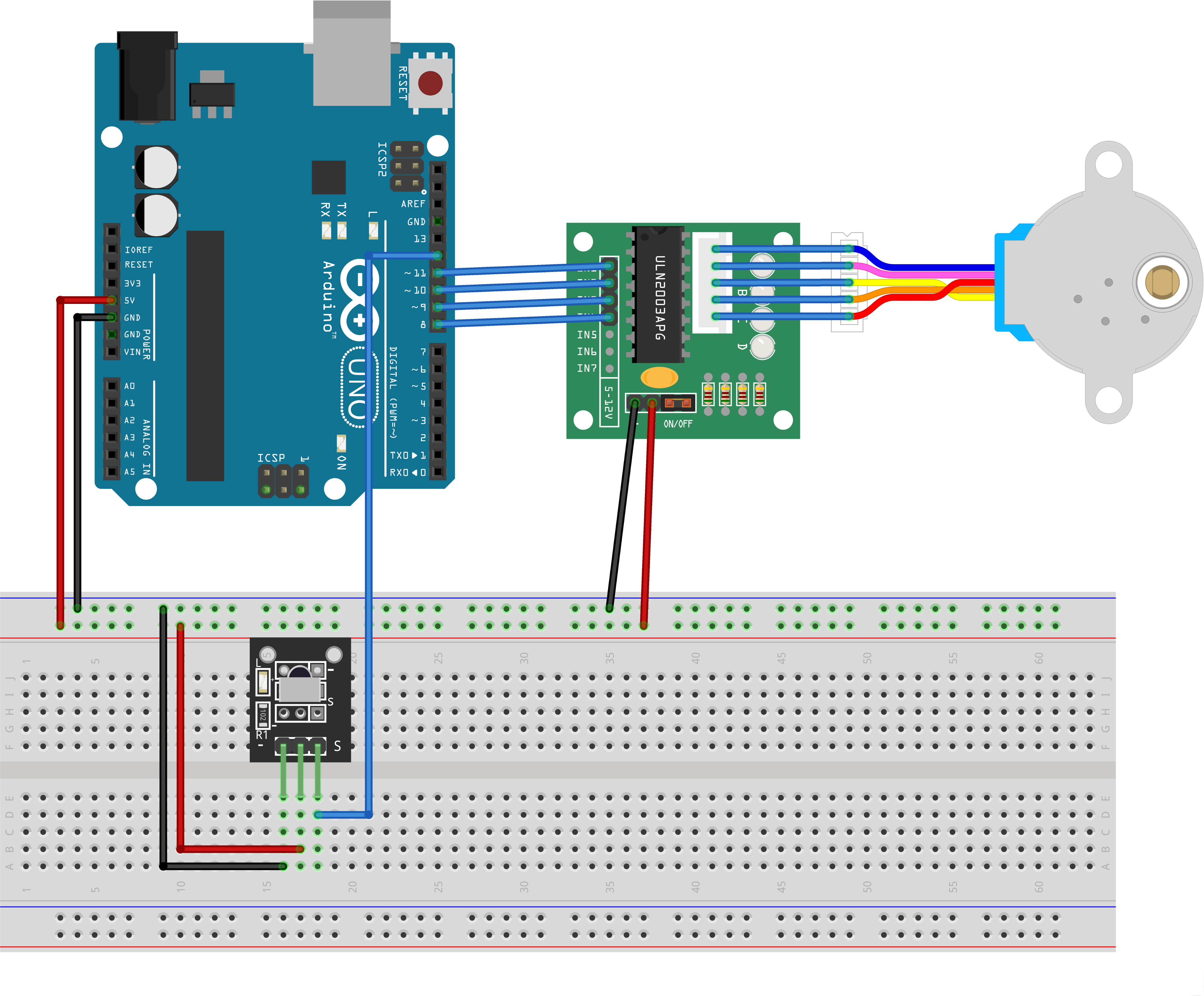
The stepper we are using comes with its own driver board making it easy to connect to our UNO.
Since we we wanna not to drive the motor directly from the UNO, we will be using an inexpensive little breadboard power supply, that plugs right into our breadboard and power it with a 9V 1 Amp power supply.
The IR sensor is connected to the UNO directly, since it uses almost no power.
¶ Component Required:
(1) x Elegoo Uno R3
(1) x 830 tie-points breadboard
(1) x IR receiver module
(1) x IR remote
(1) x ULN2003 stepper motor driver module
(1) x Stepper motor
(1) x Power supply module
(1) x 9V1A Adapter
(9) x F-M wires (Female to Male DuPont wires)
(1) x M-M wire (Male to Male jumper wire)
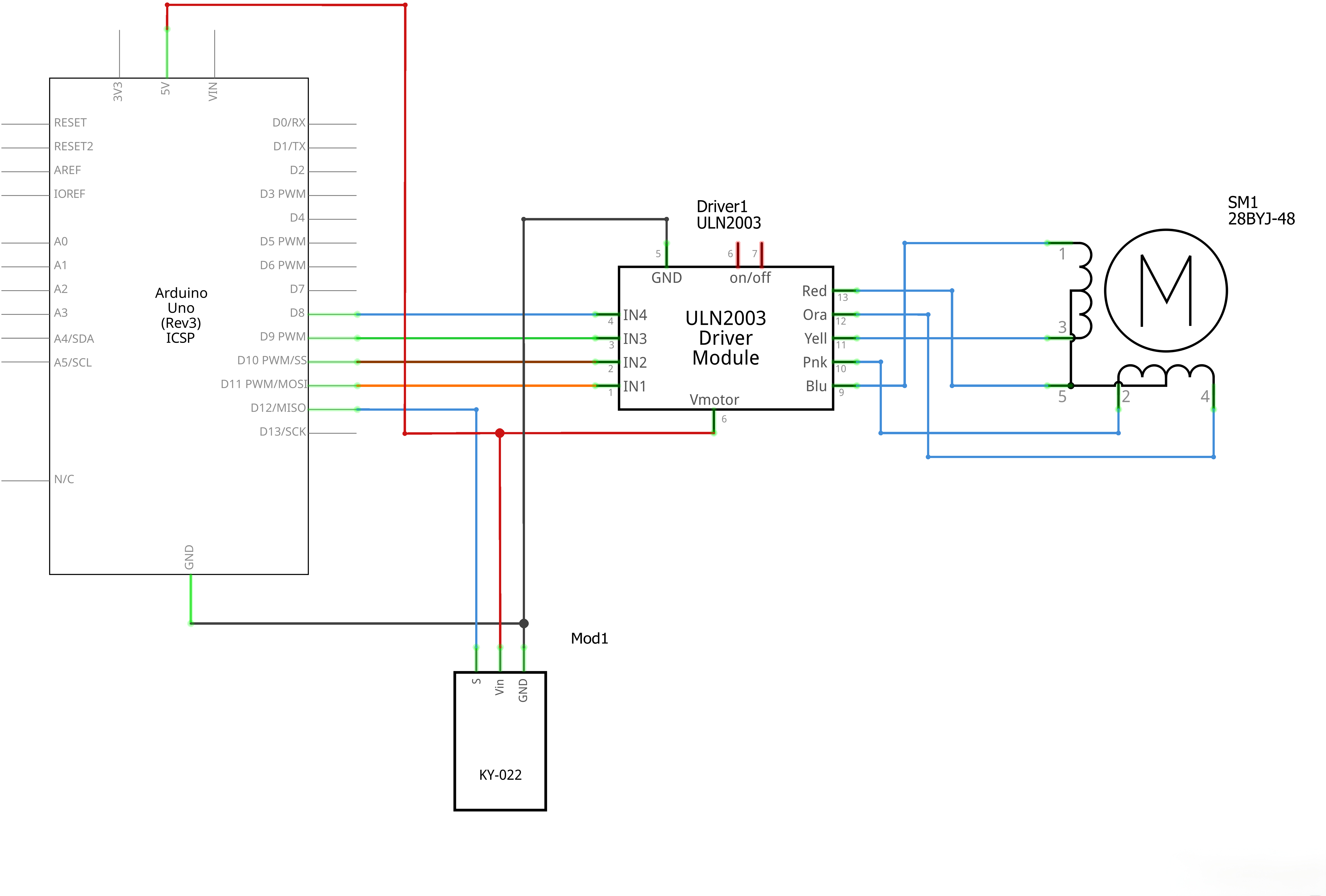
¶ Connection Schematic
¶ Wiring diagram
¶ Code
You can click the blue text link to download the program file to your local device, and double-click the file to open it after the download is complete. Please note: Before opening the file, ensure that you have installed the Arduino IDE development environment and completed the installation of relevant components such as the board support package and driver corresponding to the UNO R3. If you have any questions about this operation process, you can refer to the "part 1" chapter of the document for detailed guidance.
Click the Serial Monitor button to turn on the serial monitor. The basics about the serial monitor are introduced in details in tutorial 4 in part 2.
#include "Stepper.h"
#include "IRremote.h"/----- Variables, Pins -----/
#define STEPS 32 // Number of steps per revolution of Internal shaft
int Steps2Take; // 2048 = 1 Revolution
int receiver = 12; // Signal Pin of IR receiver to Arduino Digital Pin 6/-----( Declare objects )-----/
// Setup of proper sequencing for Motor Driver Pins
// In1, In2, In3, In4 in the sequence 1-3-2-4Stepper small_stepper(STEPS, 8, 10, 9, 11);
IRrecv irrecv(receiver); // create instance of 'irrecv'
decode_results results; // create instance of 'decode_results'
Includes and Definitions:
#include "Stepper.h":Includes the Stepper library for stepper motor control#include "IRremote.h":Includes the IRremote library for infrared remote control#define STEPS 32:Defines the number of steps per revolution of the internal shaftint Steps2Take:Variable to store the number of steps to take (2048 = 1 revolution)int receiver = 12:Pin 12 connected to the signal pin of the IR receiverStepper small_stepper(STEPS, 8, 10, 9, 11):Creates stepper motor object with specified pins (In1, In3, In2, In4)IRrecv irrecv(receiver):Creates instance of IR receiverdecode_results results:Creates instance to store IR decode results
void setup()
{
irrecv.enableIRIn(); // Start the receiver
}
Setup Function:
irrecv.enableIRIn();:Starts the IR receiver to begin listening for IR signals
void loop()
{
if (irrecv.decode(&results)) // have we received an IR signal?{
switch(results.value){ case 0xFFA857: // VOL+ button pressed small_stepper.setSpeed(500); //Max seems to be 500 Steps2Take = 2048; // Rotate CW small_stepper.step(Steps2Take); delay(2000); break; case 0xFF629D: // VOL- button pressed small_stepper.setSpeed(500); Steps2Take = -2048; // Rotate CCW small_stepper.step(Steps2Take); delay(2000); break; } irrecv.resume(); // receive the next value digitalWrite(8, LOW); digitalWrite(9, LOW); digitalWrite(10, LOW); digitalWrite(11, LOW);}
}/* --end main loop -- */
Loop Function:
if (irrecv.decode(&results)):Checks if an IR signal has been received- Switch case based on IR signal value:
case 0xFFA857:VOL+ button pressedsmall_stepper.setSpeed(500);:Sets stepper motor speed to 500Steps2Take = 2048;:Sets steps to take (1 full revolution clockwise)small_stepper.step(Steps2Take);:Moves stepper motordelay(2000);:Waits 2 seconds
case 0xFF629D:VOL- button pressedsmall_stepper.setSpeed(500);:Sets stepper motor speed to 500Steps2Take = -2048;:Sets steps to take (1 full revolution counterclockwise)small_stepper.step(Steps2Take);:Moves stepper motordelay(2000);:Waits 2 seconds
irrecv.resume();:Resumes receiving the next IR signaldigitalWrite(8, LOW);:Sets pin 8 to lowdigitalWrite(9, LOW);:Sets pin 9 to lowdigitalWrite(10, LOW);:Sets pin 10 to lowdigitalWrite(11, LOW);:Sets pin 11 to low
¶ Troubleshooting
- Stepper Motor Not Responding:Check connections between Arduino and stepper motor driver
- IR Remote Not Working:Verify IR receiver connection to pin 12
- Stepper Motor Vibrating:Check the step sequence and speed setting
- IR Signals Not Being Detected:Ensure the IR receiver is properly powered and positioned
- Library Issues:Make sure both Stepper and IRremote libraries are installed
¶ Pin Connections
| Arduino Pin | Component | Function |
|---|---|---|
| Digital 12 | IR Receiver | Signal pin for IR remote detection |
| Digital 8 | Stepper Motor Driver | In1 |
| Digital 10 | Stepper Motor Driver | In3 |
| Digital 9 | Stepper Motor Driver | In2 |
| Digital 11 | Stepper Motor Driver | In4 |
| 5V | IR Receiver, Stepper Driver | Power |
| GND | IR Receiver, Stepper Driver | Ground |
¶ How It Works
- Initialization:The setup() function enables the IR receiver to listen for signals
- IR Signal Detection:The loop() function continuously checks for IR signals
- Remote Control Handling:When an IR signal is detected, it's decoded and processed
- Motor Control:Based on the button pressed, the stepper motor rotates clockwise or counterclockwise
- Speed Control:The stepper motor speed is set to 500 RPM
- Power Management:After each operation, motor driver pins are set to low to save power
The result is a stepper motor that can be controlled by an IR remote control, rotating clockwise with the VOL+ button and counterclockwise with the VOL- button.