¶ Servo
¶ Overview
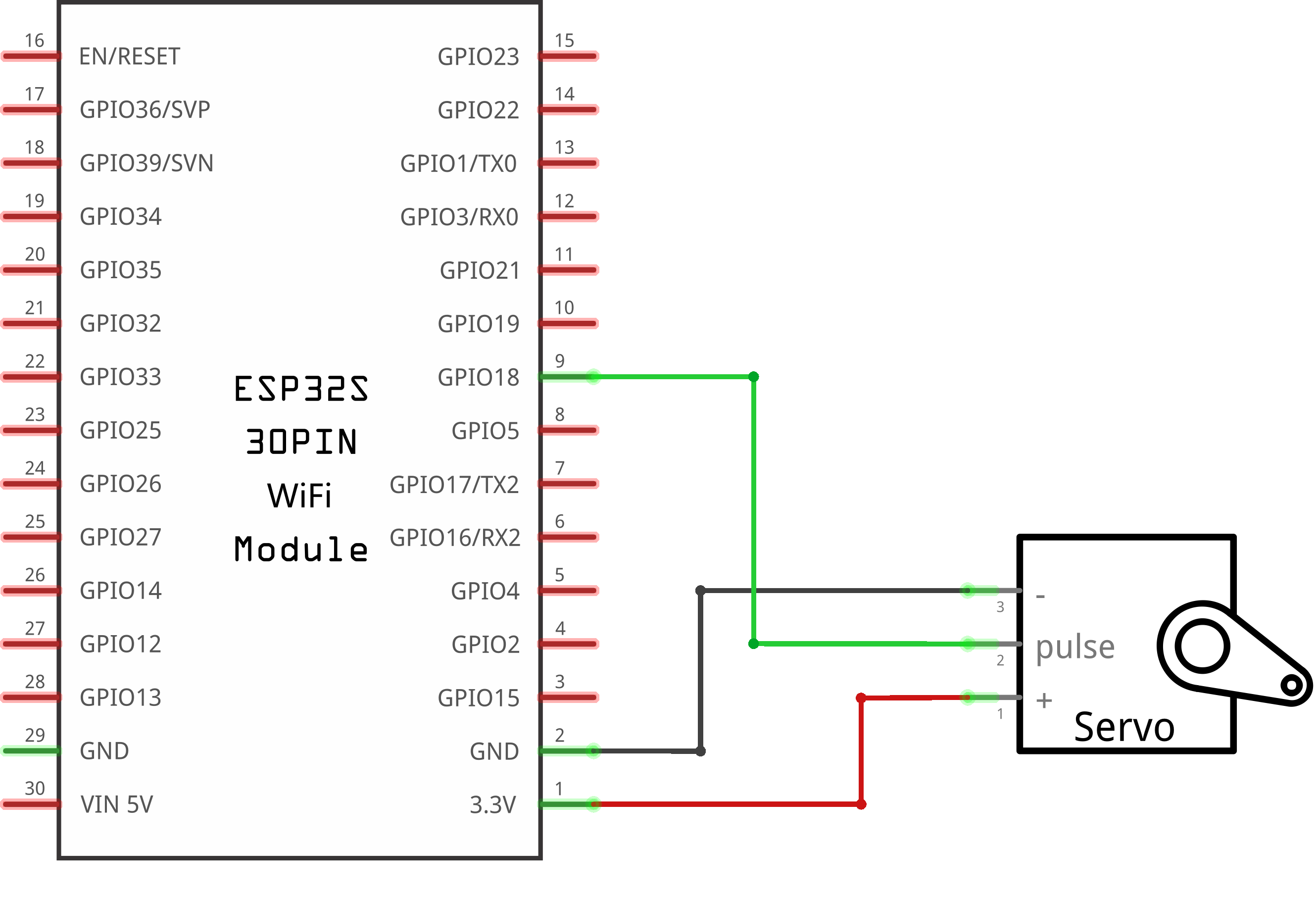
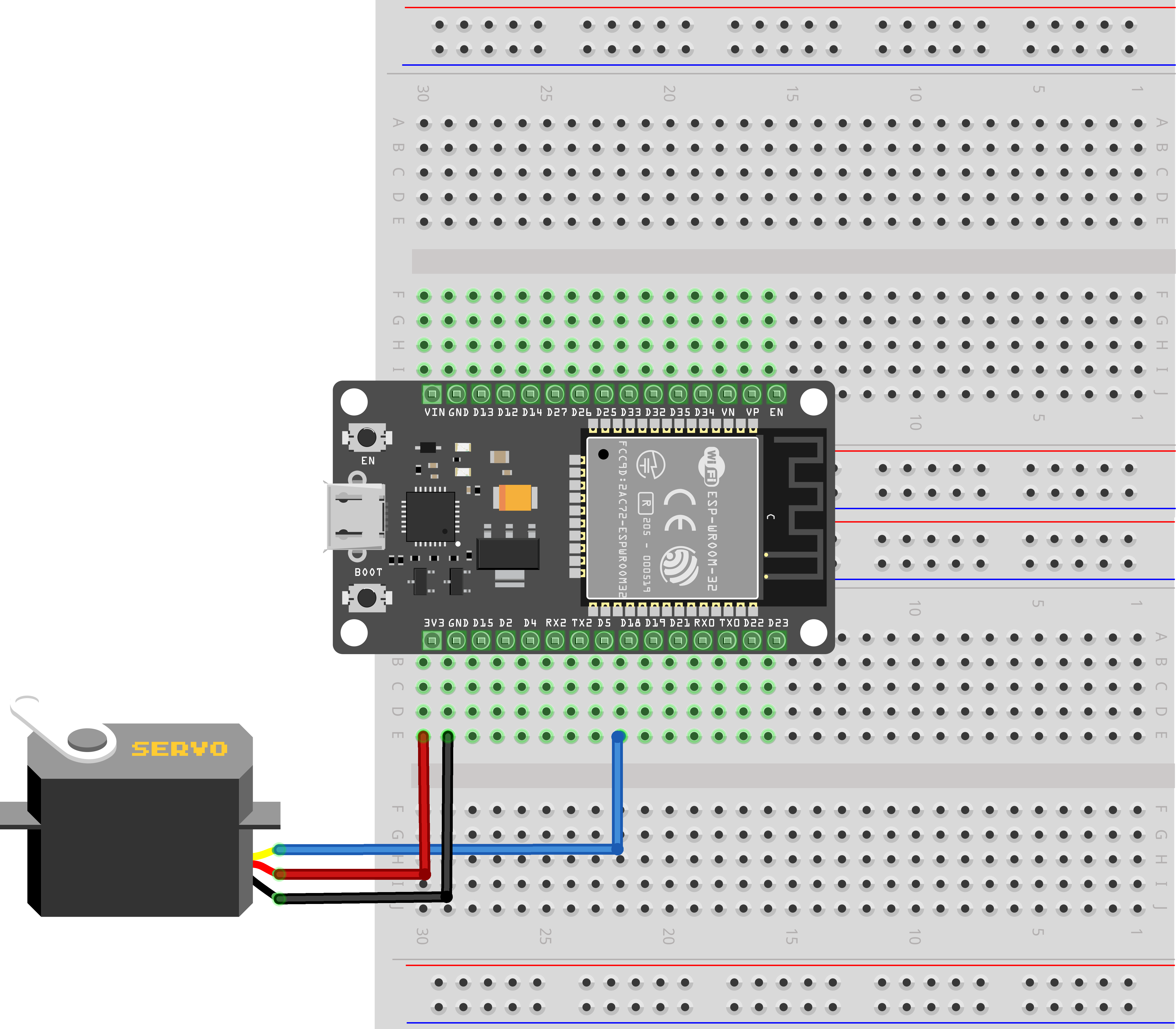
Servo is a type of geared motor that can only rotate 180 degrees. It is controlled by sending electrical pulses from your ESP32 board. These pulses tell the servo what position it should move to. The Servo has three wires, of which the brown one is the ground wire and should be connected to the GND port of ESP32, the red one is the power wire and should be connected to the 3.3V port, and the orange one is the signal wire and should be connected to the GPIO port.
¶ Component Required:
(1) x Elegoo ESP32
(1) x Servo (SG90)
(3) x M-M wires (Male to Male jumper wires)
(2) x 400 tie-points breadboard
¶ Component Introduction
¶ SG90

·Universal for JR and FP connector
·Cable length : 25cm
·No load; Operating speed: 0.12 sec / 60 degree (4.8V), 0.10 sec / 60 degree (6.0V)
·Stall torque (4.8V): 1.6kg/cm
·Temperature : -30~60'C
·Dead band width: 5us
·Working voltage: 3.5~6V
·Dimension : 1.26 in x 1.18 in x 0.47 in (3.2 cm x 3 cm x 1.2 cm)
·Weight : 4.73 oz (134 g)
¶ Connection Schematic
¶ Wiring diagram
¶ Code
You can click the blue text link to download the program file to your local device, and double-click the file to open it after the download is complete. Please note: Before opening the file, ensure that you have installed the Arduino IDE development environment and completed the installation of relevant components such as the board support package and driver corresponding to the ESP32 development board. If you have any questions about this operation process, you can refer to the "part 1" chapter of the document for detailed guidance
Before you can run this, make sure that you have installed the ESP32Servo library or re-install it, if necessary. Otherwise, your code won't work.
#include <ESP32Servo.h>
/* After including the corresponding libraries,
we can use the "class" like "Servo" created by the developer for us.
We can use the functions and variables created in the libraries by creating
objects like the following "myservo" to refer to the members in ".".*/Servo myservo;
//it created an object called myservo.
/* you can see Servo as a complex date type(Including functions and various data types)
and see myservo as variables. */
Library and Object Configuration:
#include <ESP32Servo.h>: Includes the ESP32-specific Servo library (optimized for ESP32 hardware)Servo myservo: Creates a servo object named "myservo" that allows control of a single servo motor
ESP32Servo Library Overview:
- The ESP32Servo library is a fork of the standard Arduino Servo library optimized for ESP32
- It provides a compatible interface while leveraging ESP32's hardware capabilities
- Supports more simultaneous servo motors compared to the standard library
- Handles the generation of PWM signals required for servo operation
- Each servo object controls one servo motor
Object-Oriented Programming (OOP) Concepts:
Servois a class that encapsulates servo control functionalitymyservois an instance (object) of the Servo class- The object allows access to member functions like
attach()andwrite()
void setup(){
/*"attach" and "write" are both functions,
and they are members contained in the complex structure of "Servo".
We can only use them if we create the object "myservo" for the complex structure of "Servo".
*/
myservo.attach(18);//connect pin 18 with the control line(the middle line of Servo)
myservo.write(90);// move servos to center position -> 90°
}
setup() Function:Initializes the system and configures the servo motor.
myservo.attach(18): Attaches the servo object to GPIO pin 18, which connects to the servo's control wiremyservo.write(90): Initializes the servo to the center position (90°)
Servo Wiring:
- Most servos have three wires:
- Control wire (usually yellow or orange): Connects to GPIO pin 18
- Power wire (usually red): Connects to 3.3V or 5V power supply
- Ground wire (usually brown or black): Connects to GND
Servo Initialization:
- Setting the servo to 90° at startup ensures it begins at a known position
- This prevents unexpected movement when the code starts running
void loop(){
myservo.write(90);// move servos to center position -> 90°
delay(1000);
myservo.write(60);// move servos to center position -> 60°
delay(1000);
myservo.write(90);// move servos to center position -> 90°
delay(1000);
myservo.write(150);// move servos to center position -> 150°
delay(1000);
}
loop() Function Overview:The main loop that controls the servo motor's movement sequence.
Servo Movement Sequence:
-
Center Position (90°):
myservo.write(90);// move servos to center position -> 90°
delay(1000);- Moves the servo to the center position (90°)
- Pauses for 1000 milliseconds (1 second)
-
Left Position (60°):
myservo.write(60);// move servos to center position -> 60°
delay(1000);- Moves the servo to the left position (60°)
- Pauses for 1 second
-
Center Position (90°) - Return:
myservo.write(90);// move servos to center position -> 90°
delay(1000);- Returns the servo to the center position (90°)
- Pauses for 1 second
-
Right Position (150°):
myservo.write(150);// move servos to center position -> 150°
delay(1000);- Moves the servo to the right position (150°)
- Pauses for 1 second before repeating the loop
Servo Movement Pattern:
| Sequence Step | Angle | Duration | Movement Description |
|---|---|---|---|
| 1 | 90° | 1 second | Start at center |
| 2 | 60° | 1 second | Move left |
| 3 | 90° | 1 second | Return to center |
| 4 | 150° | 1 second | Move right |
Servo Motor Fundamentals:
- PWM Control: Servos use Pulse Width Modulation (PWM) signals to determine position
- Angle Range: Most servos rotate between 0° and 180°
- Control Signal:
- 1ms pulse → 0° position
- 1.5ms pulse → 90° position (center)
- 2ms pulse → 180° position
Troubleshooting:
- Servo not moving: Check power supply, wiring, and that the servo is compatible with the library
- Jittering: Ensure stable power supply and proper grounding
- Incorrect angle: Verify the servo's actual rotation range matches the code's angle assumptions
- Limited movement: Some servos have restricted rotation ranges
ESP32Servo Library Functions:
attach(pin): Attaches the servo to a GPIO pinwrite(angle): Moves the servo to the specified angle (0-180°)writeMicroseconds(us): Controls the servo using microsecond pulse widths (alternative to angle control)read(): Returns the current servo position (in degrees)attached(): Returns true if the servo is attached to a pindetach(): Detaches the servo from its pin, releasing it for other uses