¶ Header
¶ Overview
In this tutorial you will learn how to access the real-time clock (RTC) on an Arduino UNO R4 WiFi board. The RTC is embedded in the UNO R4 WiFi 's microcontroller (RA4M1).
¶ Real-Time Clock (RTC)
The RTC on the UNO R4 WiFi can be accessed using the RTC library that is included in the UNO R4 Board Package. This library allows you to set/get the time as well as using alarms to trigger interrupts.
The UNO R4 WiFi features a VRTC pin, that is used to keep the onboard RTC running, even when the boards power supply is is cut off. In order to use this, apply a voltage in the range of 1.6 - 3.6 V to the VRTC pin.
There are many practical examples using an RTC, and the examples provided in this page will help you get started with it.
¶ essential functional functions
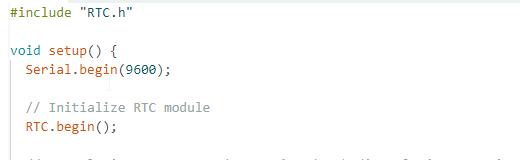
- RTC.begin(): initializes the built-in RTC (Real-Time Clock) hardware module in Arduino UNO R4 WiFi. This function must be called before any RTC operations (e.g., setup() function) to activate the RTC clock oscillator, reset time registers, and establish software-hardware communication.
-
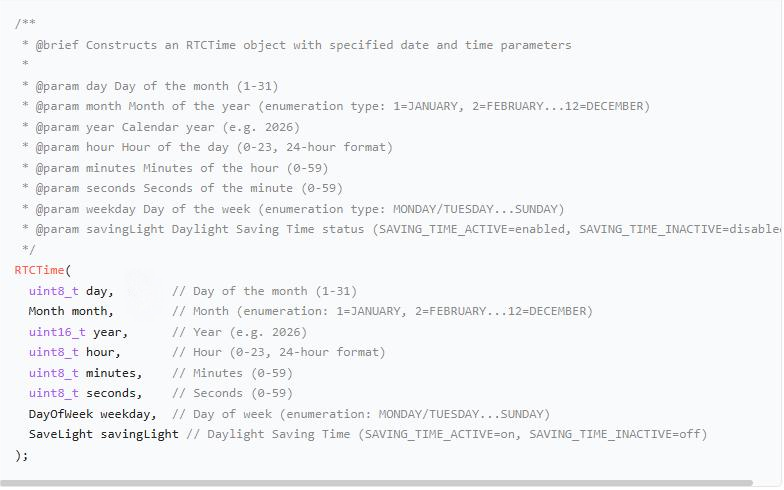
RTC Time (RTC Time): Writes custom time data into RTC hardware registers to complete the time synchronization operation. This is the core function for the RTC module to switch from the "initial value" to the "target time". It encapsulates a time object with year/month/day/hour/minute/second/weekday/summer time, which must be constructed in advance.
-
Construction method:
- usage method
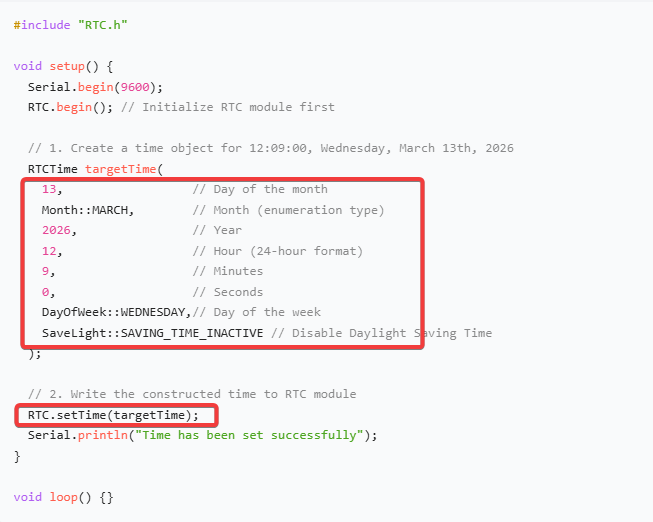
Other method:It is essentially no different from the above method, but it is more concise in terms of code readability。

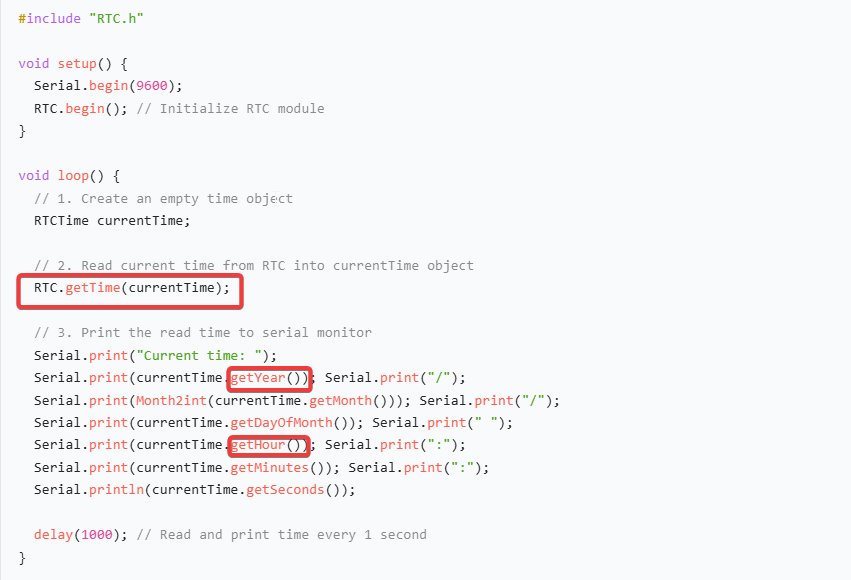
- RTC.getTime(currentTime): Reads the current real-time time from RTC hardware registers and stores the data into the incoming RTCTime object. This is the only method to obtain the current RTC time.
- Function prototype: void RTC.getTime(RTCTime& time);
- Example: Create an RTC instance and use.getTime to retrieve date and time data including year, month, day, hour, minute, and second.
¶ Code
Two Arduino RTC (Real-Time Clock) programs with consistent core functions are provided below, differing only in the time setting method:
- 1.The first program: A fixed default startup time is preset in the code. After the device is powered on, it directly uses this time to start running without additional operations;
- 2.The second program: While retaining the core timekeeping and time display functions, it adds serial port command recognition logic, supporting the modification of RTC time by inputting a custom time string through the serial port for more flexible operation.
You can click the blue text link to download the program file to your local device, and double-click the file to open it after the download is complete. Please note: Before opening the file, ensure that you have installed the Arduino IDE development environment and completed the installation of relevant components such as the board support package and driver corresponding to the development board.