¶ Controlling a Stepper Motor With Remote
In this lesson, you will learn a fun and easy way to control a stepper motor from a distance, using an IR remote control.
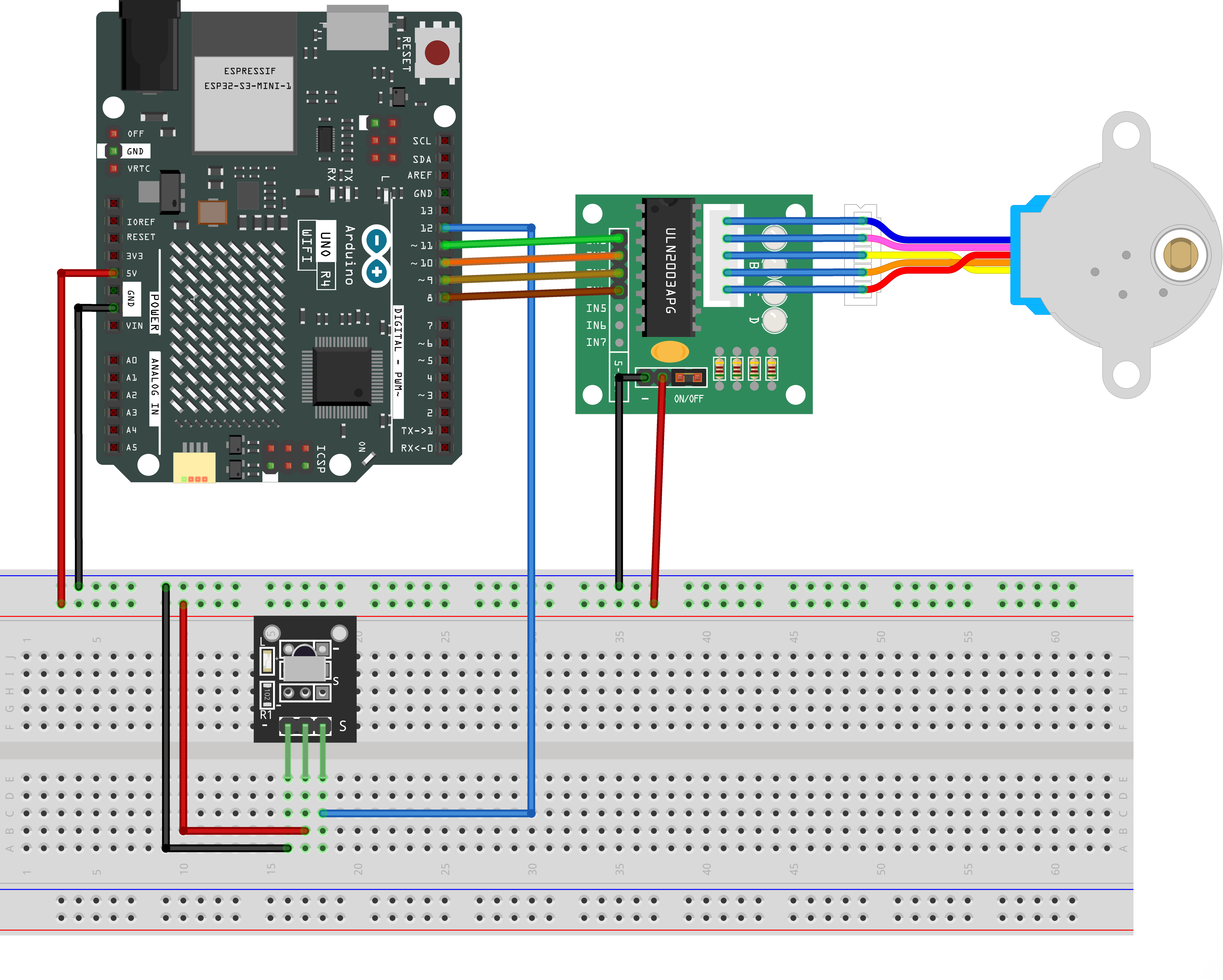
The stepper we are using comes with its own driver board making it easy to connect to our UNO R4 WIFI.
Since we we wanna not to drive the motor directly from the UNO R4 WIFI, we will be using an inexpensive little breadboard power supply, that plugs right into our breadboard and power it with a 9V 1 Amp power supply.
The IR sensor is connected to the UNO R4 WIFI directly, since it uses almost no power.
¶ Component Required:
(1) x Elegoo Uno R4 WIFI
(1) x 830 tie-points breadboard
(1) x IR receiver module
(1) x IR remote
(1) x ULN2003 stepper motor driver module
(1) x Stepper motor
¶ Connection Schematic
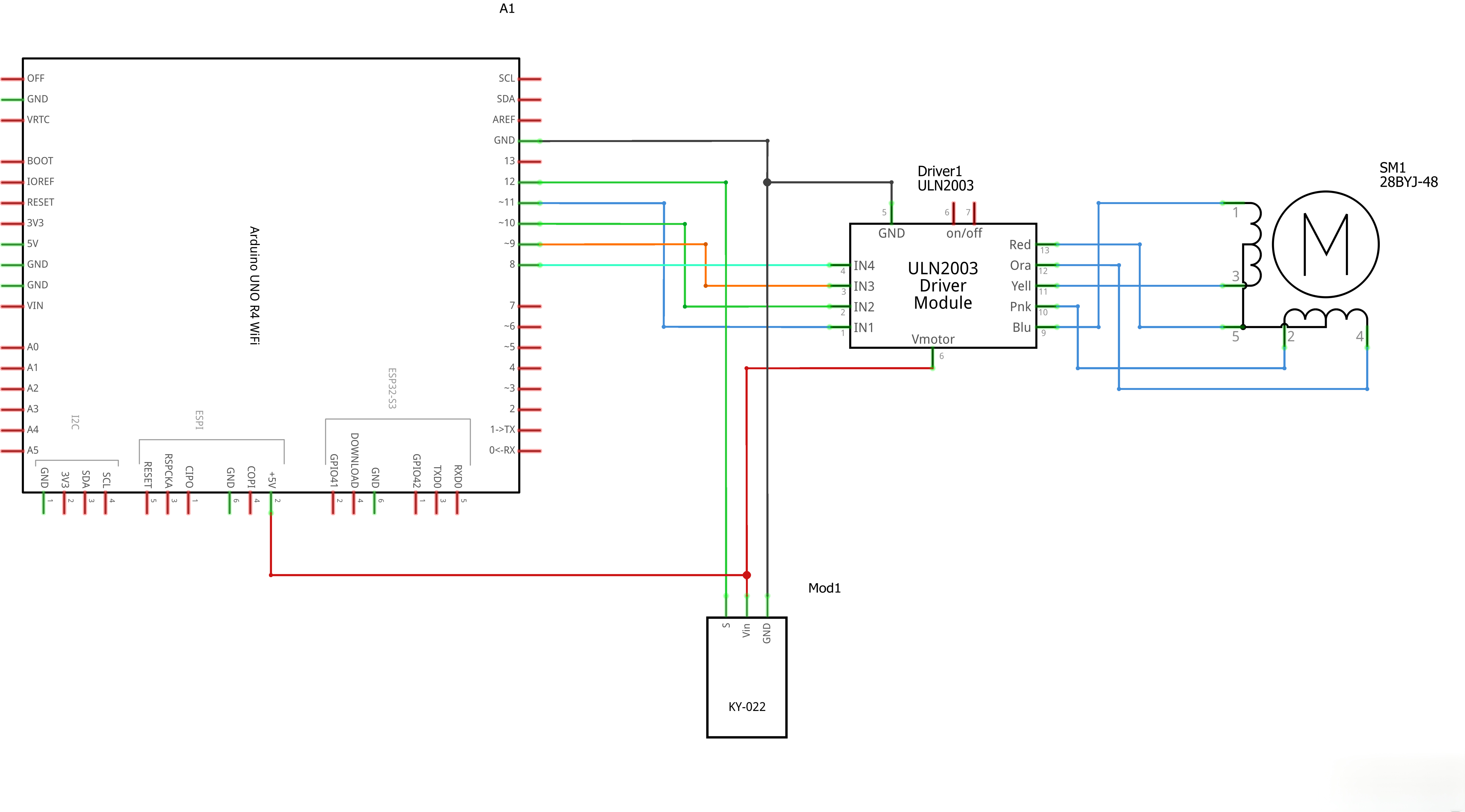
¶ Wiring diagram
¶ Code
You can click the blue text link to download the program file to your local device, and double-click the file to open it after the download is complete. Please note: Before opening the file, ensure that you have installed the Arduino IDE development environment and completed the installation of relevant components such as the board support package and driver corresponding to the UNO R4 WIFI. If you have any questions about this operation process, you can refer to the "part 1" chapter of the document for detailed guidance.
Note on IRremote Library Version
If you are using an older version of the library (such as version 2.x), please update it to version 4.7.0 or higher.
How to update: In the Arduino IDE, go to Tools > Manage Libraries... (or pressCtrl + Shift + I), search forIRremote, select version 4.7.1 (or higher), and click Update / Install.
#include "Stepper.h"
#include <IRremote.hpp> // Updated for UNO R4 compatibility/----- Variables, Pins -----/
#define STEPS 32 // Number of steps per revolution of Internal shaft
int Steps2Take; // 2048 = 1 Revolution
int receiver = 12; // Signal Pin of IR receiver to Arduino Digital Pin 12/-----( Declare objects )-----/
// Setup of proper sequencing for Motor Driver Pins
// In1, In2, In3, In4 in the sequence 1-3-2-4
Stepper small_stepper(STEPS, 11, 9, 10, 8);
Includes and Definitions:
#include "Stepper.h":Includes the Stepper library for stepper motor control#include <IRremote.hpp>:Includes the IRremote library for infrared remote control (updated header for UNO R4 compatibility)#define STEPS 32:Defines the number of steps per revolution of the internal shaftint Steps2Take:Variable to store the number of steps to take (2048 = 1 revolution)int receiver = 12:Pin 12 connected to the signal pin of the IR receiverStepper small_stepper(STEPS, 11, 9, 10, 8):Creates stepper motor object with specified pins (In1, In3, In2, In4)
void setup()
{
// Initialize serial monitor for debugging (UNO R4 requirement)
Serial.begin(9600);
while (!Serial); // Wait for serial port to initialize// Start IR receiver (new API for UNO R4)
IrReceiver.begin(receiver);// Initialize motor control pins as output (UNO R4 requirement)
pinMode(8, OUTPUT);
pinMode(9, OUTPUT);
pinMode(10, OUTPUT);
pinMode(11, OUTPUT);// Set motor pins to LOW initially to prevent false activation
digitalWrite(8, LOW);
digitalWrite(9, LOW);
digitalWrite(10, LOW);
digitalWrite(11, LOW);
}
Setup Function:
Serial.begin(9600); while (!Serial);:Initializes serial monitor for debuggingIrReceiver.begin(receiver);:Starts the IR receiver using the updated API to listen for IR signalspinMode(8, OUTPUT); ~ pinMode(11, OUTPUT);:Initializes motor control pins as outputsdigitalWrite(8, LOW); ~ digitalWrite(11, LOW);:Sets motor pins to LOW initially to prevent false activation
void loop()
{
// Check for received IR signal (new API for UNO R4)
if (IrReceiver.decode())
{
// Get raw IR value (matches original key definition format)
unsigned long irValue = IrReceiver.decodedIRData.decodedRawData;switch(irValue) { case 0xB946FF00: // VOL+ button pressed small_stepper.setSpeed(200); // Reduced speed for UNO R4 stability (max 500) Steps2Take = 2048; // Rotate CW small_stepper.step(Steps2Take); delay(2000); break; case 0xEA15FF00: // VOL- button pressed small_stepper.setSpeed(200); // Reduced speed for UNO R4 stability Steps2Take = -2048; // Rotate CCW small_stepper.step(Steps2Take); delay(2000); break; default: // Debug: print unknown IR values Serial.print("Unknown IR Value: 0x"); Serial.println(irValue, HEX); break; } IrReceiver.resume(); // Receive the next IR value // Reset motor pins to LOW after movement digitalWrite(8, LOW); digitalWrite(9, LOW); digitalWrite(10, LOW); digitalWrite(11, LOW);}
}/* --end main loop -- */
Loop Function:
if (IrReceiver.decode()):Checks if an IR signal has been receivedunsigned long irValue = IrReceiver.decodedIRData.decodedRawData;:Retrieves decoded raw data of the received IR signal- Switch case based on IR signal value:
case 0xB946FF00:VOL+ button pressedsmall_stepper.setSpeed(200);:Sets stepper motor speed to 200 for stabilitySteps2Take = 2048;:Sets steps to take (1 full revolution clockwise)small_stepper.step(Steps2Take);:Moves stepper motordelay(2000);:Waits 2 seconds
case 0xEA15FF00:VOL- button pressedsmall_stepper.setSpeed(200);:Sets stepper motor speed to 200 for stabilitySteps2Take = -2048;:Sets steps to take (1 full revolution counterclockwise)small_stepper.step(Steps2Take);:Moves stepper motordelay(2000);:Waits 2 seconds
default:Prints unknown IR values to Serial Monitor for debugging
IrReceiver.resume();:Resumes receiving the next IR signaldigitalWrite(8, LOW);:Sets pin 8 to lowdigitalWrite(9, LOW);:Sets pin 9 to lowdigitalWrite(10, LOW);:Sets pin 10 to lowdigitalWrite(11, LOW);:Sets pin 11 to low
¶ Troubleshooting
- Stepper Motor Not Responding:Check connections between Arduino and stepper motor driver
- IR Remote Not Working:Verify IR receiver connection to pin 12
- Stepper Motor Vibrating:Check the step sequence and speed setting
- IR Signals Not Being Detected:Ensure the IR receiver is properly powered and positioned
- Library Issues:Make sure both Stepper and IRremote libraries are installed. If using an older version of IRremote, update to version 4.7.0 or higher
¶ Pin Connections
| Arduino Pin | Component | Function |
|---|---|---|
| Digital 12 | IR Receiver | Signal pin for IR remote detection |
| Digital 11 | Stepper Motor Driver | In1 |
| Digital 10 | Stepper Motor Driver | In2 |
| Digital 9 | Stepper Motor Driver | In3 |
| Digital 8 | Stepper Motor Driver | In4 |
| 5V | IR Receiver, Stepper Driver | Power |
| GND | IR Receiver, Stepper Driver | Ground |
¶ How It Works
- Initialization:The setup() function enables the IR receiver to listen for signals and initializes motor control pins
- IR Signal Detection:The loop() function continuously checks for IR signals
- Remote Control Handling:When an IR signal is detected, it's decoded and processed
- Motor Control:Based on the button pressed, the stepper motor rotates clockwise or counterclockwise
- Speed Control:The stepper motor speed is set to 200 RPM
- Power Management:After each operation, motor driver pins are set to low to save power
The result is a stepper motor that can be controlled by an IR remote control, rotating clockwise with the VOL+ button and counterclockwise with the VOL- button.