¶ Snake Game
¶ Overview
This tutorial builds a classic Snake game using ESP32, OLED display (SSD1306), and joystick module. The game features snake movement controlled by joystick, food generation, score tracking, and game over detection.
¶ Component Required
(1) x Elegoo ESP32
(1) x 128x64 OLED Display (SSD1306)
(1) x Joystick Module
¶ Component Introduction
¶ Joystick
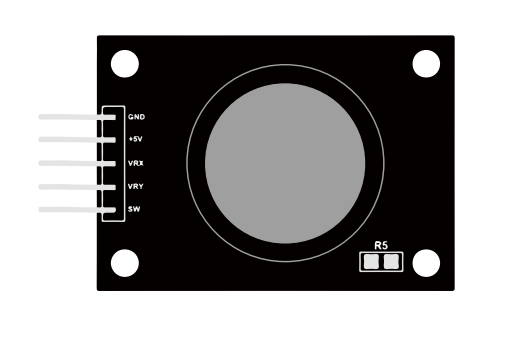
The module has 5 pins: VCC, Ground, X, Y, Key. Note that the labels on yours may be slightly different, depending on where you got the module from. The thumb stick is analog and should provide more accurate readings than simple ‘directional’ joysticks that use some forms of buttons, or mechanical switches. Additionally, you can press the joystick down (rather hard on mine) to activate a ‘press to select ’push- button.
We have to use analog Arduino pins to read the data from the X/Y pins, and a digital pin to read the button. The Key pin is connected to ground, when the joystick is pressed down, and is floating otherwise. To get stable readings from the Key /Select pin, it needs to be connected to VCC via a pull-up resistor.
The built in resistors on the Arduino digital pins can be used. For a tutorial on how to activate the pull-up resistors for Arduino pins, configured as inputs.For example: pinMode(SW_pin, INPUT);
¶ Connection Schematic
¶ Wiring diagram
¶ Connection Schematic
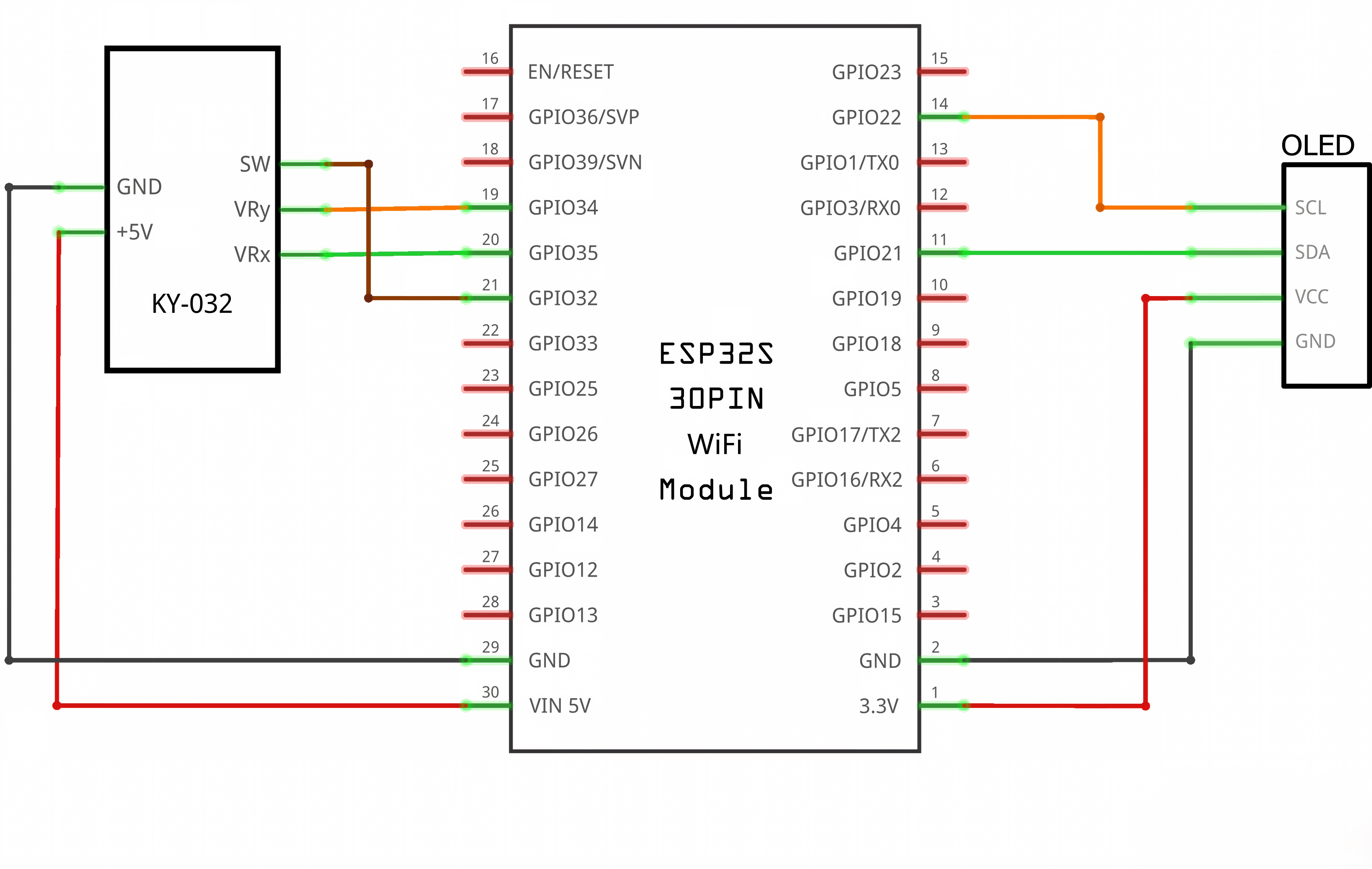
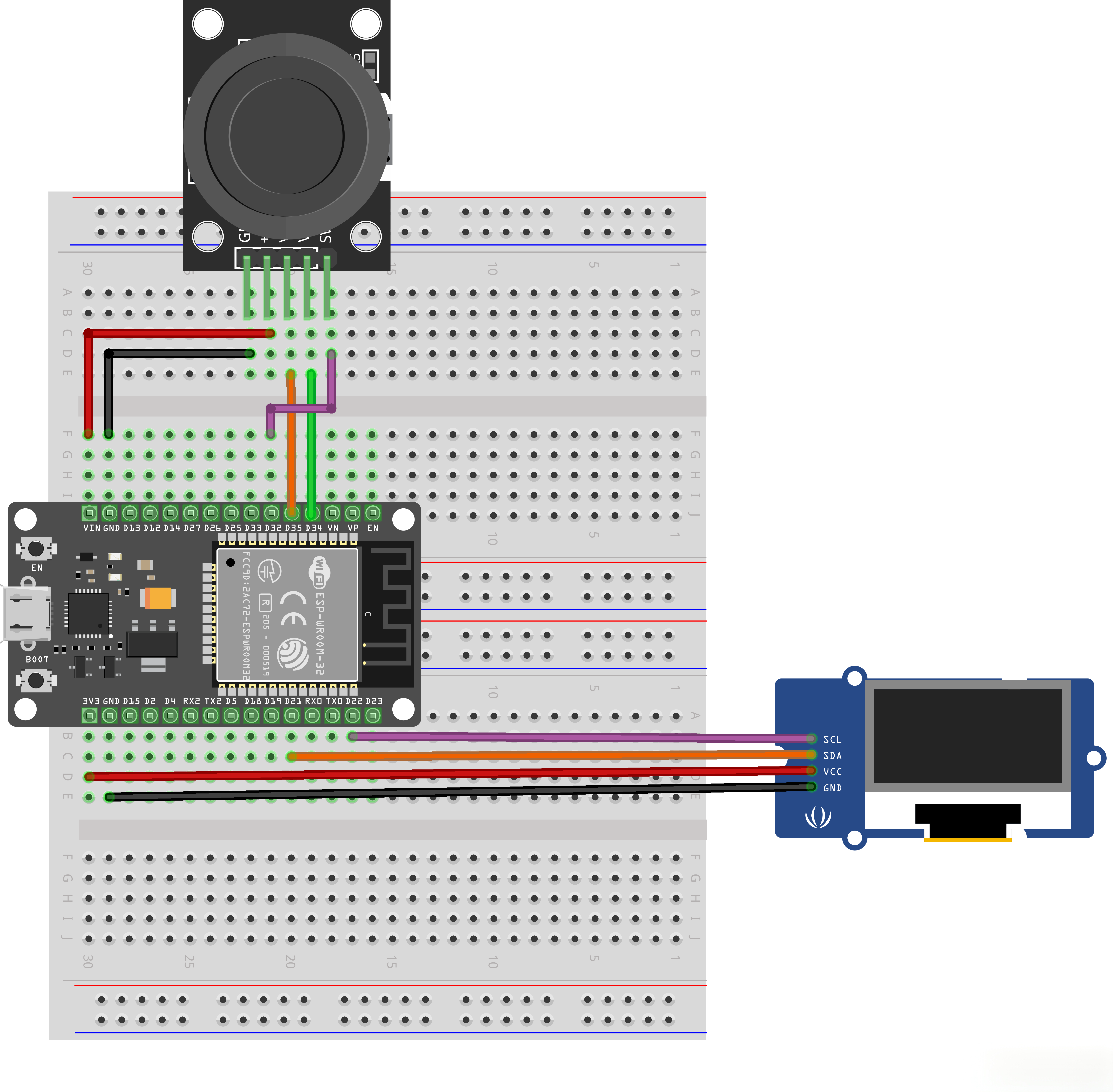
| Component | ESP32 Pin | Component | ESP32 Pin |
|---|---|---|---|
| OLED VCC | 3.3V | OLED GND | GND |
| OLED SDA | GPIO 21 | OLED SCL | GPIO 22 |
| Joystick VCC | 3.3V | Joystick GND | GND |
| Joystick X | GPIO 35 | Joystick Y | GPIO 34 |
| Joystick Button | GPIO 32 |
¶ Program Architecture
snake_game.ino (Main Program)
├── Calls → OLED Module (Adafruit_SSD1306)
├── Calls → Snake Module
│   ├── snake.h (Macro Declarations & Global Variables)
│   └── snake.cpp (Snake Movement & Drawing)
├── Calls → Joystick Module
│   ├── Joystick.h (Pin Definitions)
│   └── Joystick.cpp (Joystick Input Handling)
├── Calls → Food Module
│   └── food.cpp (Food Generation & Collision)
└── Calls → Score Module
    ├── score.h (Score Declarations)
    └── score.cpp (Score Management)
¶ Code Explanation
¶ 1. Header File: snake.h
Function: Defines hardware configuration, game parameters and global variables, serving as the core interface file for the entire project.
Hardware Configuration:
#define OLED_WIDTH  128
#define OLED_HEIGHT 64
#define OLED_ADDR   0x3C
OLED_WIDTH/OLED_HEIGHT: OLED display width and height (128x64 pixels)OLED_ADDR: I2C address of OLED, default 0x3C
Game Parameters:
#define DEAD_ZONE   600
#define MOVE_STEP   1
#define MOVE_SPEED  50
#define SNAKE_SIZE  4
#define MAX_LENGTH  30
DEAD_ZONE: Joystick dead zone threshold to prevent jitter when centeredMOVE_STEP: Snake movement step size (1 pixel)MOVE_SPEED: Game speed (50ms), smaller value means fasterSNAKE_SIZE: Size of snake segments and food (4x4 pixels)MAX_LENGTH: Maximum snake length limit
Global Variables:
extern int snake_x[MAX_LENGTH];
extern int snake_y[MAX_LENGTH];
extern int snake_length;
extern int current_dir;
snake_x/snake_y: Arrays storing coordinates of each snake segment (index 0 is head)snake_length: Current snake lengthcurrent_dir: Current movement direction (-1=none, 0=up, 1=right, 2=down, 3=left)
¶ 2. Implementation File: snake.cpp
(1) resetSnake()
Function: Resets snake to initial state, including position, length, direction, etc.
snake_x[0] = (OLED_WIDTH - SNAKE_SIZE) / 2;
snake_y[0] = (OLED_HEIGHT - SNAKE_SIZE) / 2;
- Moves snake head to screen center (X: (128-4)/2=62, Y: (64-4)/2=30)
snake_length = 1;
- Resets snake length to 1 (only head remains)
current_dir = -1;
- Clears current movement direction, making snake stationary
isShow = true;
- Resets snake head blink state to visible
if(!start_game){ isGameOver=true; }
- If game has already started (not first launch), sets game over flag
(2) moveSnake()
Function: Controls snake movement, including body following and head movement.
if (current_dir == -1) return;
- Returns directly without movement when no direction input
for (int i = snake_length - 1; i > 0; i--) {
  snake_x[i] = snake_x[i - 1];
  snake_y[i] = snake_y[i - 1];
}
- Snake body following algorithm: traverses from tail to head, each segment inherits previous segment's coordinates
switch (current_dir) {
  case 0: snake_y[0] -= MOVE_STEP+current_score/5; break;
  case 1: snake_x[0] += MOVE_STEP+current_score/5; break;
  case 2: snake_y[0] += MOVE_STEP+current_score/5; break;
  case 3: snake_x[0] -= MOVE_STEP+current_score/5; break;
}
- Moves snake head based on direction: 0=up (Y decreases), 1=right (X increases), 2=down (Y increases), 3=left (X decreases)
- Movement speed increases with score:
MOVE_STEP + current_score/5, implementing difficulty progression
(3) checkSnakeOverBoundary()
Function: Detects if snake head crosses boundary, returns true to trigger game reset if out of bounds.
bool xOver = (snake_x[0] < 0) || (snake_x[0] > MAX_SNAKE_X);
- X-axis boundary check: snake head X coordinate less than 0 or greater than max boundary (124)
bool yOver = (snake_y[0] < 8) || (snake_y[0] > MAX_SNAKE_Y+2);
- Y-axis boundary check: snake head Y coordinate less than 8 (reserved for score display) or greater than max boundary (62)
(4) drawSnake()
Function: Draws snake body and blinking snake head.
for (int i = 1; i < snake_length; i++) {
  display.fillRect(snake_x[i], snake_y[i], SNAKE_SIZE, SNAKE_SIZE, SNAKE_BODY_COLOR);
}
- Draws snake body: starts from index 1 (skipping head), each segment is a 4x4 white rectangle
if (isShow) {
  display.fillRect(snake_x[0], snake_y[0], SNAKE_SIZE, SNAKE_SIZE, SNAKE_HEAD_COLOR);
} else {
  display.fillRect(snake_x[0], snake_y[0], SNAKE_SIZE, SNAKE_SIZE, SSD1306_BLACK);
}
- Draws snake head: determines to show white (visible) or black (hidden) based on
isShowflag, creating blinking effect
(5) blinkSnakeAndFood()
Function: Completes one frame drawing including score, snake, food, and toggles blink state.
display.clearDisplay();
- Clears display buffer
drawScore();
- Draws score at top of screen
drawSnake();
- Draws snake (including blinking head)
drawFood();
- Draws food
display.display();
- Refreshes buffer content to OLED screen
isShow = !isShow;
- Toggles snake head blink state, takes effect next frame
¶ 3. Header File: Joystick.h
Function: Defines joystick pin macros and button detection function declarations.
#define JOY_X_PIN   35
#define JOY_Y_PIN   34
#define JOY_BUTTON_PIN 32
JOY_X_PIN: Joystick X-axis analog input pin (GPIO 35)JOY_Y_PIN: Joystick Y-axis analog input pin (GPIO 34)JOY_BUTTON_PIN: Joystick button digital input pin (GPIO 32)
¶ 4. Implementation File: Joystick.cpp
(1) initJoystick()
Function: Initializes joystick pin input modes.
pinMode(JOY_X_PIN, INPUT);
pinMode(JOY_Y_PIN, INPUT);
- Sets X/Y axis pins as analog input mode
pinMode(JOY_BUTTON_PIN, INPUT_PULLUP);
- Sets button pin as digital input with internal pull-up
(2) readJoystick()
Function: Reads joystick analog values, determines movement direction and updates current_dir.
int xVal = analogRead(JOY_X_PIN);
int yVal = analogRead(JOY_Y_PIN);
- Reads X/Y axis analog values (ESP32 12-bit ADC, range 0-4095)
const int MAX_VAL = 4095;
- ADC maximum value constant
if (yVal < DEAD_ZONE && current_dir != 2) { current_dir = 0; }
- Y value less than dead zone and current direction is not down (2), set to up (0)
else if (xVal > MAX_VAL - DEAD_ZONE && current_dir != 3) { current_dir = 1; }
- X value greater than max minus dead zone and current direction is not left (3), set to right (1)
else if (yVal > MAX_VAL - DEAD_ZONE && current_dir != 0) { current_dir = 2; }
- Y value greater than max minus dead zone and current direction is not up (0), set to down (2)
else if (xVal < DEAD_ZONE && current_dir != 1) { current_dir = 3; }
- X value less than dead zone and current direction is not right (1), set to left (3)
(3) isJoystickButtonPressed()
Function: Detects if joystick button is pressed.
return digitalRead(JOY_BUTTON_PIN) == LOW;
- Reads button pin state, returns true if LOW (button pressed and grounded)
¶ 5. Implementation File: food.cpp
(1) generateFood()
Function: Generates food coordinates within valid range that don't overlap with snake body.
food_x = (random(0, MAX_SNAKE_X / SNAKE_SIZE - 2)) * SNAKE_SIZE;
food_y = (random(4, MAX_SNAKE_Y / SNAKE_SIZE )) * SNAKE_SIZE;
- Generates random coordinates, aligned to SNAKE_SIZE (4) multiple for grid alignment
for (int i = 0; i < snake_length; i++) {
  if (abs(snake_x[i] - food_x) < SNAKE_SIZE && abs(snake_y[i] - food_y) < SNAKE_SIZE) {
    overlap = true; break;
  }
}
- Checks if food overlaps with any snake segment, regenerates if overlapping
(2) drawFood()
Function: Draws circular food at food coordinates.
int center_x = food_x + FOOD_SIZE / 2;
int center_y = food_y + FOOD_SIZE / 2;
- Calculates food center point coordinates
display.fillCircle(center_x, center_y, FOOD_SIZE / 2, FOOD_COLOR);
- Draws filled circle with center point and radius of 2
(3) checkFoodCollision()
Function: Detects if snake head eats food, snake grows and returns true if eaten.
bool xOverlap = (snake_x[0] < food_x + FOOD_SIZE/2) && (snake_x[0] + SNAKE_SIZE > food_x + FOOD_SIZE/2);
bool yOverlap = (snake_y[0] < food_y + FOOD_SIZE/2) && (snake_y[0] + SNAKE_SIZE > food_y + FOOD_SIZE/2);
- Collision detection: checks if snake head overlaps with food center point
if (snake_length < MAX_LENGTH) {
  int tail_idx = snake_length - 1;
  int new_tail_x = snake_x[tail_idx];
  int new_tail_y = snake_y[tail_idx];
- Gets current tail coordinates as base position for new segment
switch (current_dir) {
  case 0: new_tail_y += SNAKE_SIZE; break;
  case 1: new_tail_x -= SNAKE_SIZE; break;
  case 2: new_tail_y -= SNAKE_SIZE; break;
  case 3: new_tail_x += SNAKE_SIZE; break;
}
- Extends new segment in opposite direction of movement from tail (moving up → new segment below)
snake_x[snake_length] = new_tail_x;
snake_y[snake_length] = new_tail_y;
snake_length++;
- Stores new segment coordinates in array, increments snake length
¶ 6. Header File: score.h
Function: Declares score variable and related function interfaces.
extern int current_score;
void initScore();
void addScore(int val);
void resetScore();
void drawScore();
¶ 7. Implementation File: score.cpp
(1) initScore()
Function: Initializes score to 0 (called at game start).
current_score = 0;
(2) addScore(int val)
Function: Adds specified score value (called when food is eaten).
current_score += val;
- Adds parameter
valto current score
(3) resetScore()
Function: Resets score to 0 (called at game over).
current_score = 0;
(4) drawScore()
Function: Draws current score at top-left corner of OLED.
display.setTextSize(1);
- Sets font size to 1 (8x8 pixels)
display.setTextColor(SSD1306_WHITE);
- Sets text color to white
display.setCursor(2, 2);
- Sets cursor position to (2, 2), 2 pixels margin from top-left
display.print("Score: ");
display.print(current_score);
- Outputs "Score: " prefix and current score value
¶ 8. Main File: snake_game.ino
Global Objects:
Adafruit_SSD1306 display(OLED_WIDTH, OLED_HEIGHT, &Wire, -1);
- Creates OLED display object with specified dimensions, I2C bus and reset pin (-1 means not used)
setup()
Function: Initializes system hardware and game state.
Serial.begin(115200);
- Initializes serial communication at 115200 baud rate
display.begin(SSD1306_SWITCHCAPVCC, OLED_ADDR);
- Initializes OLED display with internal charge pump power supply
initJoystick();
- Initializes joystick module
initScore();
- Initializes score
resetSnake();
- Initializes snake state
generateFood();
- Generates initial food
loop()
Function: Main game loop, handles game states and logic.
Start Screen:
if(start_game){
  display.print("press joy button");
  if (isJoystickButtonPressed()) { start_game=false; }
  return;
}
- Shows "press joy button" on first launch, waits for button press to start game
Game Over Screen:
if (isGameOver) {
  display.print("GAME");
  display.print("OVER");
  if (isJoystickButtonPressed()) {
    resetSnake(); generateFood(); resetScore();
    isGameOver = false;
  }
  return;
}
- Shows "GAME OVER" when game ends, waits for button press to restart
Main Game Logic:
readJoystick();
- Reads joystick input, updates movement direction
moveSnake();
- Moves snake according to direction
if (checkSnakeOverBoundary()) { resetSnake(); generateFood(); resetScore(); }
- Detects boundary collision, resets game if out of bounds
if (checkFoodCollision()) { generateFood(); addScore(1); }
- Detects food collision, generates new food and adds score if eaten
blinkSnakeAndFood();
- Draws current frame
delay(MOVE_SPEED);
- Delay controls game speed
¶ Code Modification Tips
¶ Modify Movement Range (Boundary Detection)
Location: snake.h
#define MAX_SNAKE_X (OLED_WIDTH - SNAKE_SIZE)
#define MAX_SNAKE_Y (OLED_HEIGHT - SNAKE_SIZE)
Function: checkSnakeOverBoundary()
bool yOver = (snake_y[0] < 8) || (snake_y[0] > MAX_SNAKE_Y+2);
y < 8: Top boundary, reserved for score display area- Modify this value to adjust the upper/lower game area boundaries
¶ Modify Score Rules
Location: addScore() in score.cpp
void addScore(int val) {
  current_score += val;
}
Call Location: snake_game.ino
if (checkFoodCollision()) { generateFood(); addScore(1); }
- Change
addScore(1)toaddScore(10)for 10 points per food - Add
current_score += val * multiplierinaddScore()for multiplier scoring
¶ Modify Game Speed
Base Speed Parameters: snake.h
#define MOVE_SPEED  50   // Unit: milliseconds, smaller = faster
#define MOVE_STEP   1    // Pixels per frame
Dynamic Speed: moveSnake() in snake.cpp
case 0: snake_y[0] -= MOVE_STEP+current_score/5; break;
current_score/5: Speed increase coefficient based on score- Change to
current_score/10for slower speed progression - Change to
current_score/2for faster speed progression
Frame Rate Control: snake_game.ino
delay(MOVE_SPEED);
- Modify
MOVE_SPEEDto directly adjust game frame rate
¶ Modify Snake and Food Size
Location: snake.h
#define SNAKE_SIZE  4
#define FOOD_SIZE   4
- Larger size makes snake and food more visible but reduces play area
- Smaller size increases difficulty and available space
¶ Modify Maximum Snake Length
Location: snake.h
#define MAX_LENGTH 30
- Modify this value to limit maximum snake length
- Increase to extend game duration
¶ Modify Joystick Dead Zone
Location: snake.h
#define DEAD_ZONE 600
- ESP32 ADC range is 0-4095
- Increase
DEAD_ZONEto reduce jitter when joystick is centered - Decrease
DEAD_ZONEto increase joystick sensitivity
¶ Modify Joystick Button Function
Location: isJoystickButtonPressed() in joystick.cpp
bool isJoystickButtonPressed() {
  return digitalRead(JOY_BUTTON_PIN) == LOW;
}
Call Location: snake_game.ino
if (isJoystickButtonPressed()) { start_game=false; }
- Current button function: start/restart game
- Can add pause function: detect button in main loop and toggle pause state
¶ Modify Display Style
Score Display: score.cpp
display.setTextSize(1);           // Modify font size
display.setCursor(2, 2);          // Modify display position
display.print("Score: ");         // Modify display text
Snake Head Blinking: snake.cpp
isShow = !isShow; // Controls blinking in blinkSnakeAndFood()
- Remove this line to disable snake head blinking
¶ 3D model
The downloaded ZIP file contains 3D printing files, which you can use to print the housing by yourself as needed.