¶ Camera Object Detection and Annotation Development
The core objective of Object Detection is not only identifying what classes of objects are present in an image, but also outputting precise spatial bounding boxes and coordinates for each target. Compared to offline inference on static images, achieving high-stability real-time detection via a camera stream requires systematically resolving engineering hurdles such as continuous capture latency, illumination shifts, duplicate overlapping bounding boxes, and coordinate transformation across resolutions.
¶ Quick Start with Official Object Detection Examples
Before building a custom training set, running the official examples first is recommended to verify the full hardware/software pipeline and confirm that your UNO Q operating environment, camera drivers, and edge AI inference services are operational.
¶ 1. Load the Official Example Project
- Open Arduino App Lab.
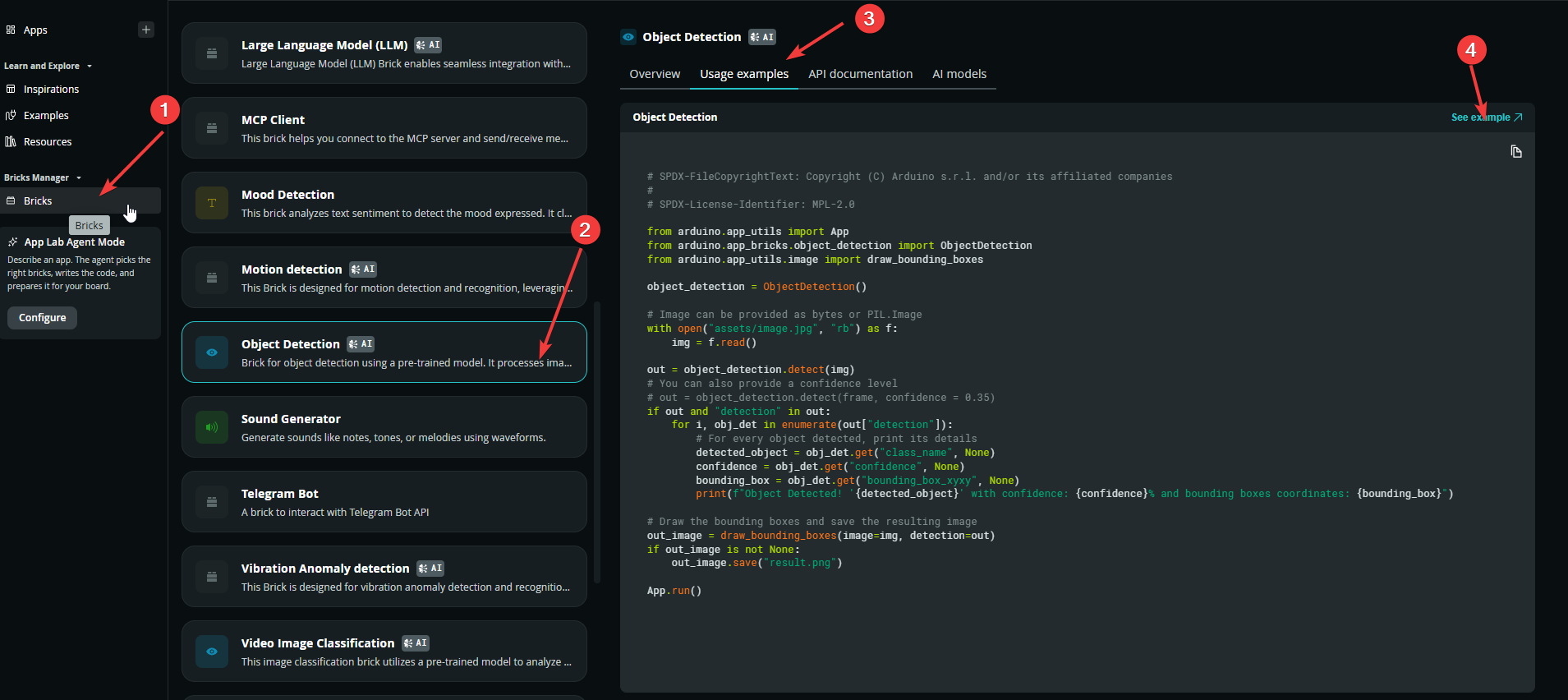
- In the left sidebar, click
bricks. - Locate and open the Object Detection project to test the static image detection workflow.
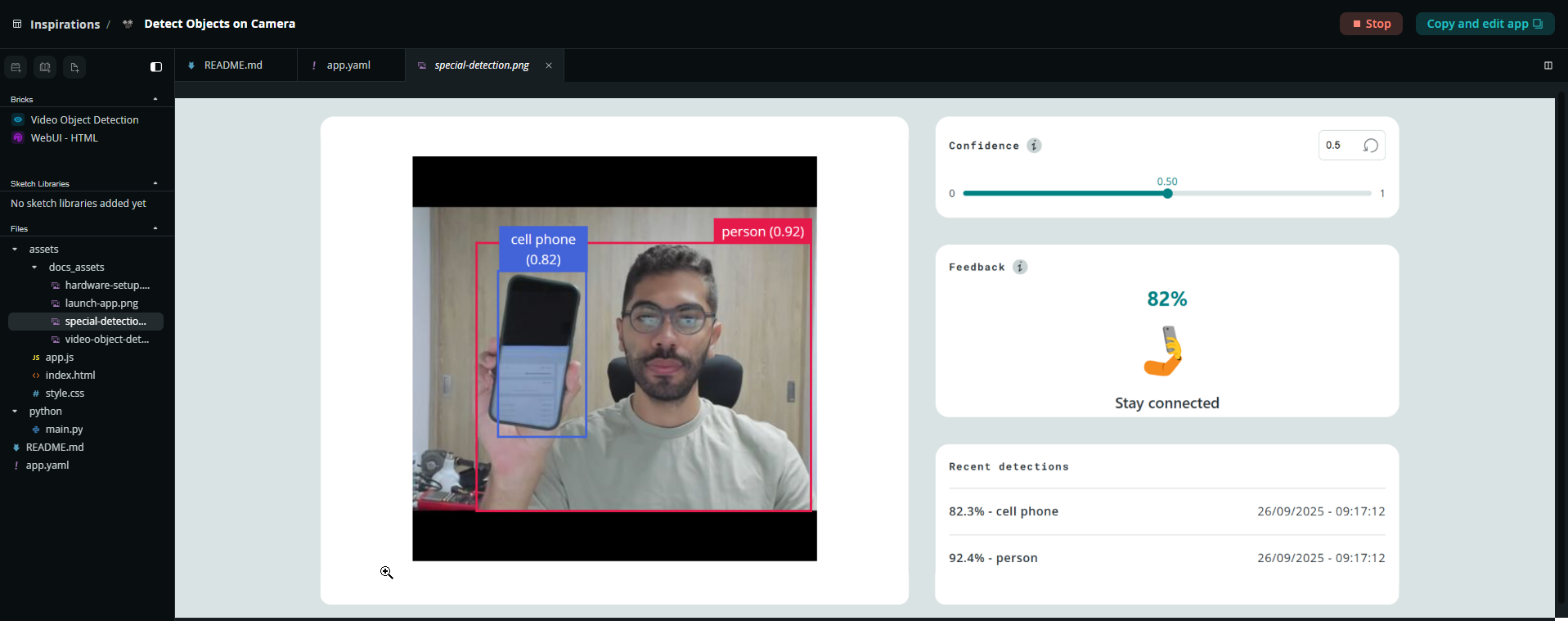
- Switch to the Inspirations page and find Detect Objects on Camera to see live video stream detection and bounding box annotation.
¶ 2. Verify Brick Declarations in app.yaml
This step is critical for ensuring the underlying AI service starts correctly. Open app.yaml in the project root and confirm that the target detection component is declared under bricks:
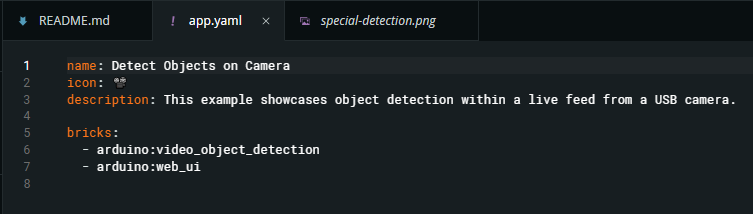
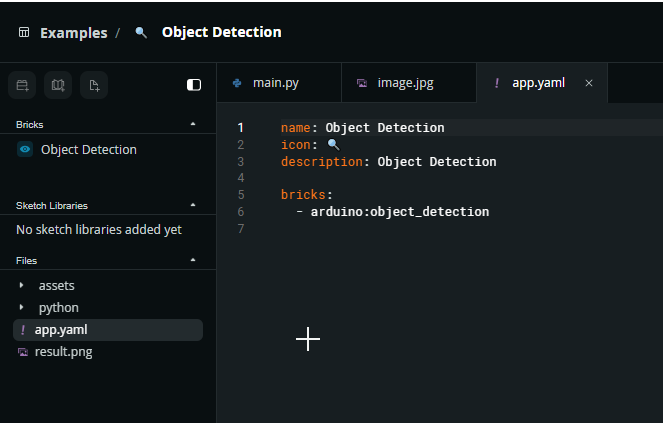
⚠️ If the
bricksentry is missing or empty (bricks: []), the inference service will fail to launch, triggering aFailed to resolve 'ei-object-detection-runner'runtime error.
¶ 3. Run the Example and Inspect Outputs
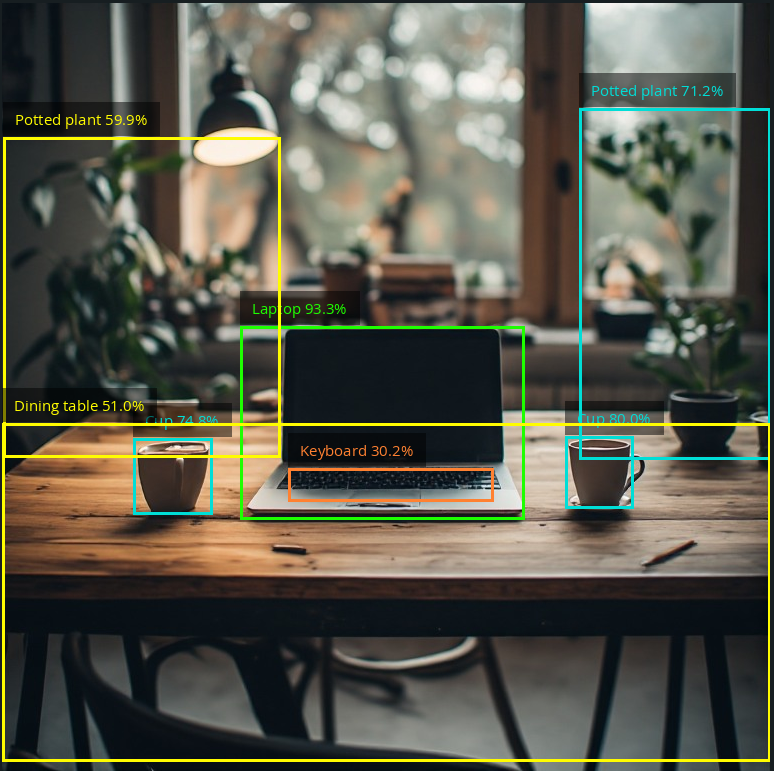
- Static Image Example Result: Running the Object Detection project outputs an annotated image named
result.pngcontaining the predicted bounding boxes:
- Live Camera Example Result: Running Detect Objects on Camera serves a local web view. Connecting your camera displays live detections, and an onscreen slider allows dynamic confidence threshold adjustments:
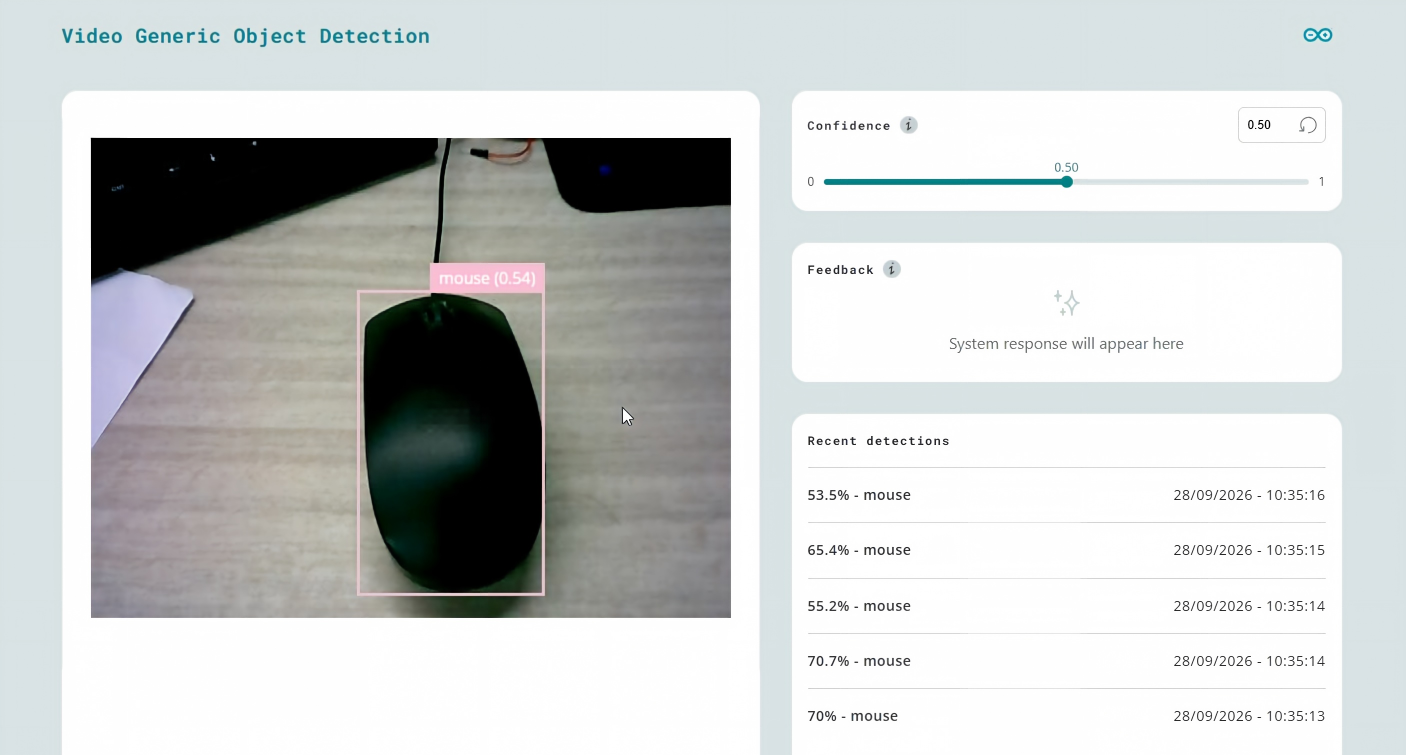
The official pre-trained models target broad, general-purpose classes. For custom parts, workshop objects, or variable lighting, accuracy may fall short. To achieve reliable identification, training a dedicated model on Edge Impulse is required.
¶ Data Annotation and Model Training in Edge Impulse
¶ 1. Data Ingestion and Task Configuration
Create a project in Edge Impulse Studio and navigate to Data acquisition → Upload data to import raw images. When the task configuration dialog appears, select Yes for Bounding boxes:
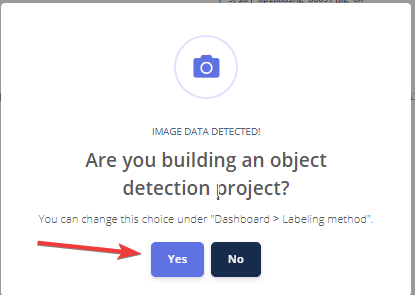
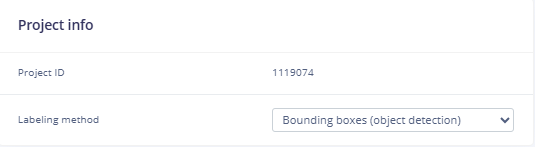
⚠️ Selecting
Noreverts the project to basic Image Classification, preventing bounding box tools from appearing. If this occurs, switch the labeling method back to bounding boxes under Dashboard → Project info.
¶ 2. Bounding Box Annotation and Negative Samples
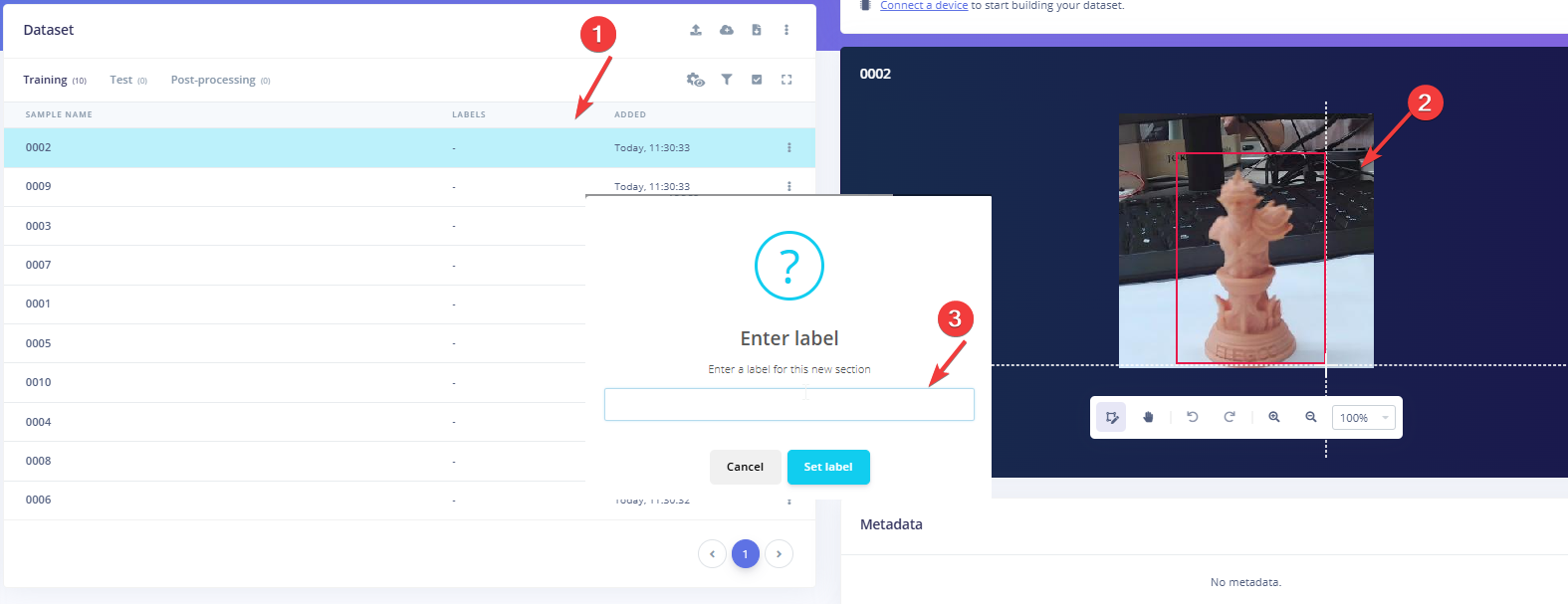
Open Labeling queue from the left navigation menu to label your samples:
- Tight Bounding Boxes: Drag bounding boxes closely around object contours. Avoid including excess background or cast shadows to ensure precise regression loss convergence.
- Assign Labels: Enter the corresponding label name on the right panel (e.g.,
object_a,object_b). - Negative Background Baseline: Include 20–30 frames showing only the operating background (empty tables, bare surfaces, ambient shadows). Do not draw bounding boxes on negative samples. Click Save directly to train the model to suppress background false positives.
¶ 3. Impulse Design
Navigate to Impulse design → Create impulse:
- Image data: Set resolution to
320 × 320. - Resize mode: Select
Squash. - Processing block: Add
Image. - Learning block: Add
Object Detection (Images). - Click
Save impulse.
¶ 4. Feature Generation and Hyperparameter Tuning
- In the
Imagetab, ensure the color depth is set toRGB, clickSave parameters, and runGenerate features. - Under
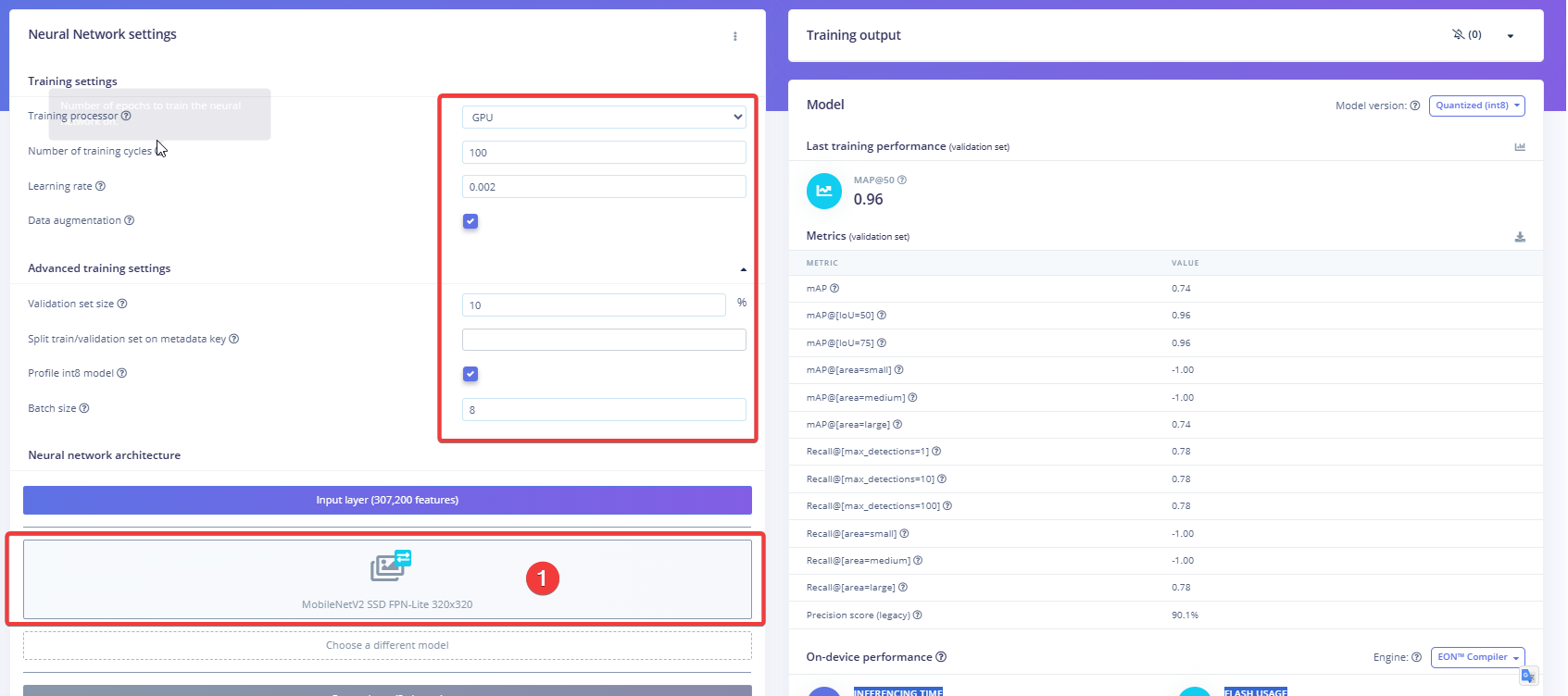
Object detection, apply the following tuning parameters for small datasets (~100 images):- Model Architecture: Select
MobileNetV2 SSD FPN-Lite 320x320(avoid FOMO for medium-to-large targets, as it only estimates centroids and loses sensitivity on larger items). - Training processor: Select
GPU. - Number of training cycles: Set to
80 ~ 100to allow regression and classification losses to fully settle. - Learning rate: Set to
0.001 ~ 0.002(conservative rates prevent degrading pre-trained weights and eliminate gradient oscillation). - Data augmentation: Must be checked (random shifts, scaling, and color jitter expand dataset diversity and prevent white-background overfitting).
- Batch size: Set to
8or16to increase update steps per epoch. - Validation set size: Set to
10%-20%depending on dataset size.
- Model Architecture: Select
- Click
Save & train. After training finishes, confirm that mAP@50 meets your application requirements.
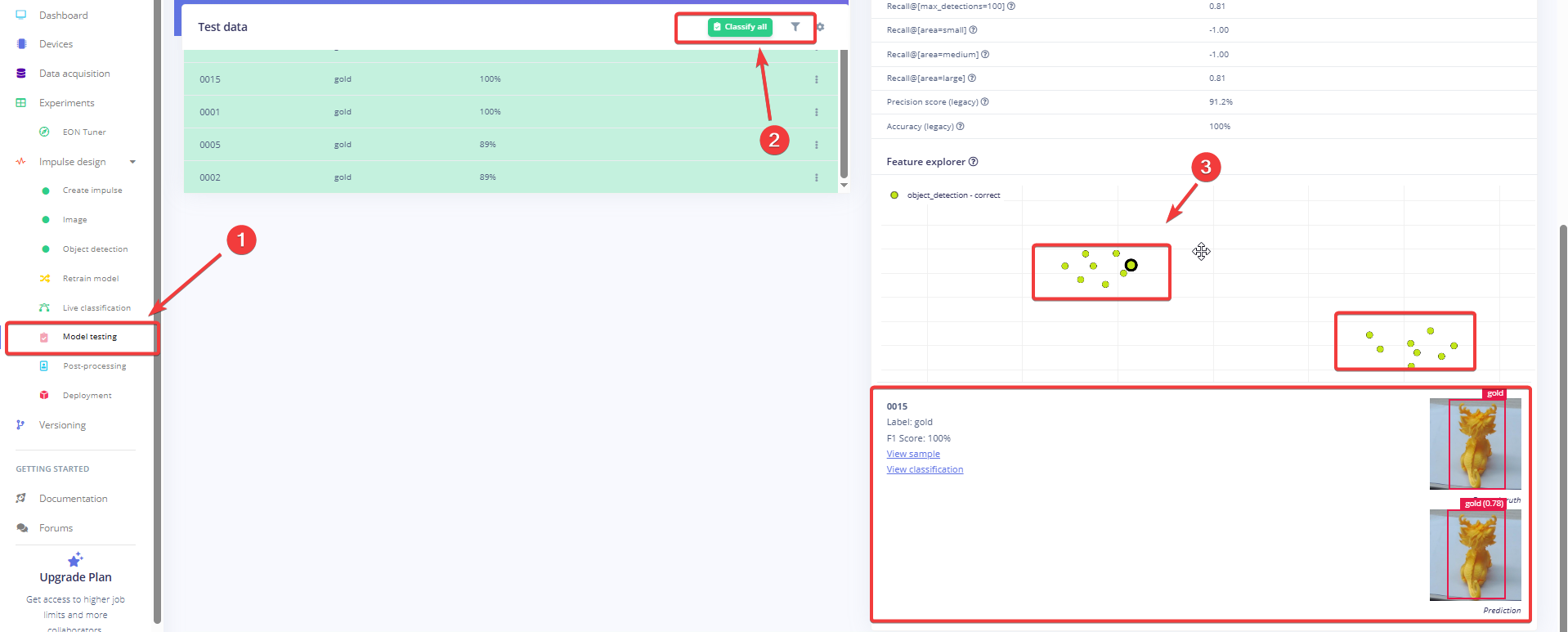
If performance falls short, review test inferences by clicking Model testing on the left, selecting Classify all, and inspecting failure points in the Feature explorer:
¶ 5. Build and Export the Model
- Go to
Deployment. - Select
Arduino UNO Q. - Click
Buildto trigger cross-compilation. - Download the generated
.eimbinary package to your development machine once complete.
¶ Deployment and Environment Setup
This step is similar to the previous image classification operation; only some libraries need to be added. Please refer to the image classification section for detailed steps. The operation instructions are as follows.
¶ 1. Transfer the Model Binary to UNO Q
From your terminal (PowerShell, Command Prompt, or Linux/macOS Shell), run:
scp "C:\Users\Admin\Downloads\1223-linux-aarch64-v2-impulse-#1.eim" arduino@192.168.xxx.xxx:/home/arduino/
⚠️ Wrap local file paths in double quotes if they contain spaces or special characters.
¶ 2. Install System Dependencies on UNO Q
Log in to the UNO Q board via SSH and install OpenCV and V4L2 utility packages:
sudo apt update
sudo apt install -y python3-opencv v4l-utils unzip
¶ 3. Create and Activate the Virtual Environment
cd ~
python3 -m venv ~/ei_venv
source ~/ei_venv/bin/activate
pip install edge_impulse_linux opencv-python numpy
Tip: If you already have a configured virtual environment, activate it directly via
source.
¶ 4. Grant Execution Permissions
Make the transferred model file executable before launching inference:
chmod +x /home/arduino/1223-linux-aarch64-v2-impulse-#1.eim
python3 your_file.py
¶ Real-Time Object Detection Script (classify_de.py)
Create classify_de.py under /home/arduino/, or edit it locally and transfer it via SCP. The complete source code is provided below:
#!/usr/bin/env python3
import cv2
import time
import sys
import os
import signal
from edge_impulse_linux.image import ImageImpulseRunner

# ================== Configuration ==================
MODEL_FILE = "/home/arduino/1223-linux-aarch64-v2-impulse-#1.eim"

# Capture resolution: set to 320x240 for smoother performance
FRAME_WIDTH = 320
FRAME_HEIGHT = 240
DEFAULT_CAMERA_DEVICE = "/dev/video2"

# Threshold parameters
CONFIDENCE_THRESHOLD = 0.50  # Detection threshold
NMS_IOU_THRESHOLD = 0.40     # Non-Maximum Suppression IoU threshold

# Inference rate: infer once every N frames to maintain UI responsiveness
SKIP_FRAMES = 3
# ===================================================

runner = None
show_camera = True


def sigint_handler(sig, frame):
    print('\nInterrupted by SIGINT')
    if runner:
        runner.stop()
    sys.exit(0)


signal.signal(signal.SIGINT, sigint_handler)


def find_camera_device():
    for cam_id in range(10):
        device = f"/dev/video{cam_id}"
        if not os.path.exists(device):
            continue
        cap = cv2.VideoCapture(cam_id, cv2.CAP_V4L2)
        if cap.isOpened():
            ret, _ = cap.read()
            cap.release()
            if ret:
                print(f"Using camera: {device}")
                return device
        else:
            cap.release()
    return DEFAULT_CAMERA_DEVICE


def open_camera():
    device = find_camera_device()
    cam_id = int(device.replace("/dev/video", ""))
    cap = cv2.VideoCapture(cam_id, cv2.CAP_V4L2)
    cap.set(cv2.CAP_PROP_FRAME_WIDTH, FRAME_WIDTH)
    cap.set(cv2.CAP_PROP_FRAME_HEIGHT, FRAME_HEIGHT)
    cap.set(cv2.CAP_PROP_BUFFERSIZE, 1)
    return cap


def main():
    global runner

    if not os.path.exists(MODEL_FILE):
        print(f"Error: Model file not found at: {MODEL_FILE}")
        sys.exit(1)

    with ImageImpulseRunner(MODEL_FILE) as runner:
        cap = None
        try:
            model_info = runner.init()
            in_w = model_info['model_parameters']['image_input_width']
            in_h = model_info['model_parameters']['image_input_height']

            cap = open_camera()
            if not cap.isOpened():
                print("Failed to open camera.")
                sys.exit(1)

            actual_w = int(cap.get(cv2.CAP_PROP_FRAME_WIDTH))
            actual_h = int(cap.get(cv2.CAP_PROP_FRAME_HEIGHT))

            # Calculate center-crop and scaling offsets
            crop_size = min(actual_w, actual_h)
            scale = crop_size / in_w
            offset_x = (actual_w - crop_size) // 2
            offset_y = (actual_h - crop_size) // 2

            if show_camera:
                cv2.namedWindow('UNO Q Object Detection', cv2.WINDOW_NORMAL)
                cv2.resizeWindow('UNO Q Object Detection', actual_w, actual_h)

            frame_count = 0
            cached_boxes = []  # Retain prior detections for smooth rendering

            while True:
                ret, frame = cap.read()
                if not ret or frame is None:
                    continue

                frame_count += 1

                # Subsampled inference branch
                if frame_count % SKIP_FRAMES == 0:
                    img_rgb = cv2.cvtColor(frame, cv2.COLOR_BGR2RGB)
                    features, _ = runner.get_features_from_image(img_rgb)
                    res = runner.classify(features)

                    raw_boxes = []
                    scores = []
                    labels = []

                    if "bounding_boxes" in res["result"].keys():
                        for bb in res["result"]["bounding_boxes"]:
                            if bb['value'] >= CONFIDENCE_THRESHOLD:
                                # Map back to screen coordinate space
                                x = int(bb['x'] * scale + offset_x)
                                y = int(bb['y'] * scale + offset_y)
                                w = int(bb['width'] * scale)
                                h = int(bb['height'] * scale)

                                raw_boxes.append([x, y, w, h])
                                scores.append(float(bb['value']))
                                labels.append(bb['label'])

                        # Apply NMS to eliminate overlapping boxes
                        cached_boxes = []
                        if len(raw_boxes) > 0:
                            indices = cv2.dnn.NMSBoxes(
                                raw_boxes, scores, CONFIDENCE_THRESHOLD, NMS_IOU_THRESHOLD
                            )
                            if len(indices) > 0:
                                for i in indices.flatten():
                                    cached_boxes.append({
                                        "box": raw_boxes[i],
                                        "score": scores[i],
                                        "label": labels[i]
                                    })

                # Render detected bounding boxes on every frame
                for item in cached_boxes:
                    x, y, w, h = item["box"]
                    score = item["score"]
                    label = item["label"]

                    cv2.rectangle(frame, (x, y), (x + w, y + h), (0, 255, 0), 2)
                    text = f"{label}: {score:.2f}"
                    cv2.putText(frame, text, (x, max(y - 8, 20)),
                                cv2.FONT_HERSHEY_SIMPLEX, 0.6, (0, 255, 0), 2)

                if show_camera:
                    cv2.imshow('UNO Q Object Detection', frame)
                    if cv2.waitKey(1) == ord('q'):
                        break

        except KeyboardInterrupt:
            print("\nStopped.")
        finally:
            if cap is not None:
                cap.release()
            if show_camera:
                cv2.destroyAllWindows()
            if runner:
                runner.stop()


if __name__ == "__main__":
    main()
¶ Detailed Code Breakdown
¶ 1. Global Parameters
# ================== Configuration ==================
MODEL_FILE = "/home/arduino/1223-linux-aarch64-v2-impulse-#1.eim"

# Capture resolution: set to 320x240 for smoother performance
FRAME_WIDTH = 320
FRAME_HEIGHT = 240
DEFAULT_CAMERA_DEVICE = "/dev/video2"

# Threshold parameters
CONFIDENCE_THRESHOLD = 0.50  # Detection threshold
NMS_IOU_THRESHOLD = 0.40     # Non-Maximum Suppression IoU threshold

# Inference rate: infer once every N frames to maintain UI responsiveness
SKIP_FRAMES = 3
# ===================================================
MODEL_FILE: Absolute filesystem path to the compiled AArch64 executable model (.eim). Using absolute paths prevents working directory resolution errors when running as a system service.FRAME_WIDTH/FRAME_HEIGHT: Native camera capture resolution requested through V4L2. Dropping this from 640×480 down to 320×240 reduces USB bus utilization and image decoding overhead, improving frame rates on low-power embedded processors.DEFAULT_CAMERA_DEVICE: Fallback device node if dynamic discovery cannot bind to a working node.CONFIDENCE_THRESHOLD = 0.50: Bounding box score cutoff filter. Detections below 0.50 probability are discarded to eliminate background clutter.NMS_IOU_THRESHOLD = 0.40: Intersection-over-Union (IoU) overlap suppression threshold. Overlapping candidate boxes with overlap are merged to ensure single detections per target.SKIP_FRAMES = 3: Frame skipping step size. Full neural network inference runs once every three frames; interim frames re-render cached detections to preserve fluid visual feedback.
¶ 2. Signal Handling and Camera Discovery
def sigint_handler(sig, frame):
    print('\nInterrupted by SIGINT')
    if runner:
        runner.stop()
    sys.exit(0)

signal.signal(signal.SIGINT, sigint_handler)
- Clean Exit Handling: Traps
SIGINT(e.g.,Ctrl+C). It callsrunner.stop()to terminate the background inference IPC worker, preventing orphaned processes from occupying memory.
def find_camera_device():
    for cam_id in range(10):
        device = f"/dev/video{cam_id}"
        if not os.path.exists(device):
            continue
        cap = cv2.VideoCapture(cam_id, cv2.CAP_V4L2)
        if cap.isOpened():
            ret, _ = cap.read()
            cap.release()
            if ret:
                print(f"Using camera: {device}")
                return device
        else:
            cap.release()
    return DEFAULT_CAMERA_DEVICE
- Dynamic Device Traversal: Hot-plugging USB cameras often shifts node indices between
/dev/video0and/dev/video9. This function probes available nodes and verifies frame readability withcap.read(), returning the first working device.
def open_camera():
    device = find_camera_device()
    cam_id = int(device.replace("/dev/video", ""))
    cap = cv2.VideoCapture(cam_id, cv2.CAP_V4L2)
    cap.set(cv2.CAP_PROP_FRAME_WIDTH, FRAME_WIDTH)
    cap.set(cv2.CAP_PROP_FRAME_HEIGHT, FRAME_HEIGHT)
    cap.set(cv2.CAP_PROP_BUFFERSIZE, 1)
    return cap
cv2.CAP_V4L2: Explicitly selects the Linux Video4Linux2 backend to avoid GStreamer pipeline overhead.cap.set(cv2.CAP_PROP_BUFFERSIZE, 1): Prevents the driver queue from buffering frames. Forcing a buffer size of 1 ensures the script processes real-time imagery rather than stale queued frames.
¶ 3. Coordinate Transformation Logic
with ImageImpulseRunner(MODEL_FILE) as runner:
    model_info = runner.init()
    in_w = model_info['model_parameters']['image_input_width']
    in_h = model_info['model_parameters']['image_input_height']
- Metadata Introspection: Loads model specifications directly from the binary, dynamically obtaining the input shape (320×320).
actual_w = int(cap.get(cv2.CAP_PROP_FRAME_WIDTH))
actual_h = int(cap.get(cv2.CAP_PROP_FRAME_HEIGHT))

# Calculate center-crop and scaling offsets
crop_size = min(actual_w, actual_h)
scale = crop_size / in_w
offset_x = (actual_w - crop_size) // 2
offset_y = (actual_h - crop_size) // 2
- Coordinate Mapping:
runner.get_features_from_image()crops incoming frames (320×240) down to a square along the shortest edge (240×240) and resizes them to 320×320.- Raw prediction coordinates must be scaled and offset back to screen pixels:
- Scale factor:
- Horizontal crop offset: \text{offset\_x} = \frac{320 - 240}{2} = 40\text
- Physical coordinates:
¶ 4. Frame Skipping and Duplicate Suppression (NMS)
frame_count += 1

# Subsampled inference branch
if frame_count % SKIP_FRAMES == 0:
    img_rgb = cv2.cvtColor(frame, cv2.COLOR_BGR2RGB)
    features, _ = runner.get_features_from_image(img_rgb)
    res = runner.classify(features)
- Inference Scheduling: SSD forward passes take roughly 150–250 ms on edge CPUs. Limiting inference to every 3rd frame prevents the main capture loop from dropping below acceptable interaction rates.
- Color Conversion: Converts BGR capture buffers to RGB arrays required by the model.
raw_boxes = []
scores = []
labels = []

if "bounding_boxes" in res["result"].keys():
    for bb in res["result"]["bounding_boxes"]:
        if bb['value'] >= CONFIDENCE_THRESHOLD:
            # Map back to screen coordinate space
            x = int(bb['x'] * scale + offset_x)
            y = int(bb['y'] * scale + offset_y)
            w = int(bb['width'] * scale)
            h = int(bb['height'] * scale)

            raw_boxes.append([x, y, w, h])
            scores.append(float(bb['value']))
            labels.append(bb['label'])
- Candidate Parsing: Parses bounding boxes meeting the confidence threshold and projects coordinates into screen display space.
# Apply NMS to eliminate overlapping boxes
cached_boxes = []
if len(raw_boxes) > 0:
    indices = cv2.dnn.NMSBoxes(
        raw_boxes, scores, CONFIDENCE_THRESHOLD, NMS_IOU_THRESHOLD
    )
    if len(indices) > 0:
        for i in indices.flatten():
            cached_boxes.append({
                "box": raw_boxes[i],
                "score": scores[i],
                "label": labels[i]
            })
- Non-Maximum Suppression (NMS):
- Dense anchor predictions frequently generate multiple bounding boxes over the same physical object.
cv2.dnn.NMSBoxesiterates over candidate boxes, compares IoU overlaps againstNMS_IOU_THRESHOLD(0.40), and discards redundant lower-scoring candidates.
¶ 5. UI Rendering
# Render detected bounding boxes on every frame
for item in cached_boxes:
    x, y, w, h = item["box"]
    score = item["score"]
    label = item["label"]

    cv2.rectangle(frame, (x, y), (x + w, y + h), (0, 255, 0), 2)
    text = f"{label}: {score:.2f}"
    cv2.putText(frame, text, (x, max(y - 8, 20)),
                cv2.FONT_HERSHEY_SIMPLEX, 0.6, (0, 255, 0), 2)

if show_camera:
    cv2.imshow('UNO Q Object Detection', frame)
    if cv2.waitKey(1) == ord('q'):
        break
- Decoupled Drawing: Drawing routines operate outside the inference condition. Interim skipped frames re-draw existing bounding boxes from
cached_boxes, maintaining 15–20 FPS rendering rates. - Text Bounds Guard:
max(y - 8, 20)prevents text labels from rendering off-screen when objects touch the top boundary.
¶ Troubleshooting Guide
¶ 1. Edge Impulse Studio Issues
| Issue / Symptom | Root Cause | Solution |
|---|---|---|
| No bounding box annotation tool appears | Selected No during data upload, setting project to standard image classification | Open Dashboard → Project info on the right side and change the labeling method to bounding box object detection. |
| Negative background frames force labels / high false positives | Empty scenes were assigned blank label boxes | Never draw bounding boxes on negative samples. Leave the frame empty and click Save to record it as background. |
| mAP stays near 0% after training | Target architecture was misconfigured to FOMO on large objects | FOMO only predicts single centroids for dense tiny items. In Object detection, switch to MobileNetV2 SSD FPN-Lite 320x320. |
| Loss oscillates or evaluates to NaN | Learning rate is set too high (e.g., 0.15) | When fine-tuning SSD backbones, reduce Learning rate to 0.001 ~ 0.002 for stable convergence. |
| High dataset accuracy, but live inference fails completely | Training images used uniform white backgrounds without augmentation | Enable Data augmentation in training settings and add 20–30 real-world background shots showing natural shadows and surface variations. |
| Build failure or architecture mismatch | Selected an unsupported microcontroller export target | Under Deployment, search for and select Arduino UNO Q to compile the appropriate .eim binary. |
¶ 2. UNO Q Runtime and Driver Issues
| Issue / Symptom | Root Cause | Solution |
|---|---|---|
Permission denied |
The .eim binary is missing execution permissions |
Run chmod +x /home/arduino/1223-linux-aarch64-v2-impulse-#1.eim. |
ModuleNotFoundError: No module named 'edge_impulse_linux' |
Python packages were not installed in the active environment | Run source ~/ei_venv/bin/activate before launching the script. |
Can't initialize GTK backend or Cannot connect to X server |
Launched a GUI script over a headless SSH connection without display forwarding | Connect a physical monitor to UNO Q, or set show_camera = False in the script. |
Failed to open camera / Node not found |
Device node locked by an existing process (e.g., App Lab) or insufficient USB power | Run fuser -v /dev/video* to kill conflicting processes, or attach the camera via an externally powered USB hub. |
| Objects display duplicate boxes | NMS IoU threshold is too lenient | Lower NMS_IOU_THRESHOLD in the code from 0.40 down to 0.30 or 0.25. |
| Bounding boxes appear horizontally shifted | Capture resolution does not match actual sensor aspect ratios | Verify that FRAME_WIDTH and FRAME_HEIGHT match supported V4L2 resolutions. |
| Frequent false positives on empty surfaces | Model lacks negative samples or confidence threshold is too low | Increase CONFIDENCE_THRESHOLD to 0.65 and add 20+ unannotated background images to your Edge Impulse dataset. |