¶ LLM Text Chat System
¶ 1. Introduction and Model/Stack Selection
Arduino UNO Q is a development board that combines microcontroller-style control with Linux application processing. Its core is a Qualcomm QRB2210 SoC with a 4-core ARM Cortex-A53 running at 2.0GHz.
To implement local on-device AI chat with plain text input and streaming text output on the board, the key is to balance model parameters, quantization level, physical memory, and compute/memory bandwidth.
¶ 1.1 Core Selection Decisions
- Base model: use the open-source lightweight instruct model Qwen2.5-0.5B-Instruct.
- Compared with similar-scale English-only small models such as SmolLM2-360M, Qwen2.5 is more solid in Chinese grammar understanding and adaptive Chinese-English bilingual conversation.
- Use Q4_K_M 4-bit quantization to reduce the weight file to about 390 MB with minimal inference accuracy loss.
- Inference backend: use llama.cpp (
llama-server), written in native C++, optimized for the ARMv8 NEON vector instruction set, and exposing an OpenAI-compatible HTTP/SSE streaming service.
¶ 1.2 Hardware Comparison: 2GB vs 4GB RAM, Smoothness and Feasibility
There are two UNO Q versions with 2GB and 4GB RAM. The measured resource behavior for running this system is as follows:
| Evaluation dimension | 2GB RAM version | 4GB RAM version (recommended) |
|---|---|---|
| Baseline Linux resident memory | ~350 MB ~ 450 MB | ~400 MB ~ 600 MB |
| 0.5B model + 1024 context usage | ~550 MB ~ 650 MB | ~550 MB ~ 650 MB |
| Remaining safe usable memory | ~900 MB ~ 1.0 GB (tight safety margin) | ~2.8 GB ~ 3.0 GB (very ample) |
| 0.5B smoothness (tokens/s) | 9 ~ 13 tokens/s (smooth) | 10 ~ 14 tokens/s (very smooth) |
| Swap/freeze risk | Very low for pure text only; opening a desktop in the background may approach OOM edges | High safety margin, essentially eliminates OOM process kills |
| 1.5B advanced model support | Not supported (1.5B needs about 1.6GB; very likely to exhaust memory on 2GB board) | Barely supported (can load and run, but throughput drops to 3~5 tokens/s) |
Evaluation conclusions:
- On the 4GB version: the system has nearly 3GB of safe headroom, memory is no bottleneck, and the Cortex-A53 can stay at its highest frequency. Generation speed exceeds normal silent reading/typing speed, giving an excellent experience.
- On the 2GB version: 0.5B pure text chat fully works and generation speed is basically not reduced; however, you must strictly disable extra services such as the graphical desktop and must not allocate a large context at runtime (keep
-c 1024), otherwise Linux swap is easily triggered and severe lag occurs.
¶ 2. Key Deployment Steps
Beginner note: all operations in this tutorial are performed in the Linux terminal of UNO Q. When copying code, paste and execute segment by segment.
You can send commands via SSH. Run the program in the UNO Q terminal.
¶ Step 1: Install build dependencies and compile llama.cpp
In the board terminal, install the toolchain and Python virtual environment support, clone llama.cpp, and compile with optimization for the ARM NEON vector instruction set:
# 1. Update package sources and install build dependencies
sudo apt update && sudo apt install -y build-essential cmake git python3-pip python3-venv

# 2. Clone the llama.cpp source repository (choose one)

cd ~

# Overseas network
git clone --depth 1 [https://github.com/ggerganov/llama.cpp.git](https://github.com/ggerganov/llama.cpp.git)

# China mirror alternative
# git clone --depth 1 [https://ghproxy.net/https://github.com/ggerganov/llama.cpp.git](https://ghproxy.net/https://github.com/ggerganov/llama.cpp.git)

# 3. Create a build directory and configure vector acceleration for Cortex-A53
cd ~/llama.cpp

mkdir -p build && cd build

cmake .. -DCMAKE_BUILD_TYPE=Release \
         -DCMAKE_C_FLAGS="-march=armv8-a+simd -mtune=cortex-a53" \
         -DCMAKE_CXX_FLAGS="-march=armv8-a+simd -mtune=cortex-a53"

# 4. Build with all 4 cores. Taking about 15~25 minutes is normal; wait patiently.
cmake --build . --config Release -j4
Notes:
After compilation, runls ~/llama.cpp/build/bin/llama-server. If the path is printed normally, the inference service compiled successfully. If it says the file does not exist, the build failed halfway; recheck dependencies and rebuild.
¶ Step 2: Download Qwen2.5-0.5B model weights
Create a project directory and download the quantized GGUF model (about 390MB):
mkdir -p ~/ai_robot/models && cd ~/ai_robot/models

# Official source, direct overseas connection
wget -c [https://huggingface.co/Qwen/Qwen2.5-0.5B-Instruct-GGUF/resolve/main/qwen2.5-0.5b-instruct-q4_k_m.gguf](https://huggingface.co/Qwen/Qwen2.5-0.5B-Instruct-GGUF/resolve/main/qwen2.5-0.5b-instruct-q4_k_m.gguf)

# China high-speed mirror alternative
# wget -c [https://hf-mirror.com/Qwen/Qwen2.5-0.5B-Instruct-GGUF/resolve/main/qwen2.5-0.5b-instruct-q4_k_m.gguf](https://hf-mirror.com/Qwen/Qwen2.5-0.5B-Instruct-GGUF/resolve/main/qwen2.5-0.5b-instruct-q4_k_m.gguf)
Notes:
Runls -lh ~/ai_robot/modelsand make sure the file size is about 390M. If it is only a few KB, the download was interrupted or the link failed. Later loading may report errors such asmagic not match; rerun the download command to resume.
¶ Step 3: Configure an isolated Python virtual environment
Isolate the project from the system-wide Python environment to avoid package-management conflicts (PEP 668):
cd ~/ai_robot

python3 -m venv ai_env

source ai_env/bin/activate
Notes:
After runningsource, check whether(ai_env)appears at the far left of the terminal prompt. If it does, you have entered the isolated virtual sandbox. If you reopen the window later, run the activation command again.
¶ Step 4: Write the terminal streaming text chat script (text_chat.py)
If you copy the code to an editor such as VS Code before uploading, please remove the first and last lines of the following code.
Create a streaming text interaction script under ~/ai_robot/ with incremental multibyte decoding:
cat << 'EOF' > ~/ai_robot/text_chat.py
import sys
import json
import codecs
import urllib.request

# Fix UnicodeDecodeError in input() on Linux terminals with POSIX/C locale
if hasattr(sys.stdin, "reconfigure"):
    sys.stdin.reconfigure(encoding="utf-8", errors="replace")

URL = "[http://127.0.0.1:8080/v1/chat/completions](http://127.0.0.1:8080/v1/chat/completions)"

# Role definition and output length limit for the 0.5B small model
SYSTEM_PROMPT = (
    "You are an AI assistant running on an Arduino UNO Q board. "
    "Respond in the language used by the user (respond in English if the user inputs English, respond in Chinese if the user inputs Chinese). "
    "Keep answers concise, direct, and under two sentences. Do not use Markdown or complex formatting."
)

history = [{"role": "system", "content": SYSTEM_PROMPT}]

def chat_stream(user_prompt):
    global history
    history.append({"role": "user", "content": user_prompt})

    payload = {
        "messages": history,
        "stream": True,
        "temperature": 0.6,
        "top_p": 0.8,
        "max_tokens": 128
    }

    req = urllib.request.Request(
        URL,
        data=json.dumps(payload).encode("utf-8"),
        headers={"Content-Type": "application/json"}
    )

    full_reply = ""
    # Core: use an incremental UTF-8 decoder to join multibyte Chinese characters split by network chunks
    decoder = codecs.getincrementaldecoder("utf-8")(errors="replace")

    try:
        with urllib.request.urlopen(req) as resp:
            for line_bytes in resp:
                text_line = decoder.decode(line_bytes)
                for line in text_line.splitlines():
                    line = line.strip()
                    if not line or not line.startswith("data: "):
                        continue
                    if line == "data: [DONE]":
                        break

                    data_str = line[6:]
                    try:
                        chunk_obj = json.loads(data_str)
                        delta = chunk_obj["choices"][0]["delta"].get("content", "")
                        if delta:
                            sys.stdout.write(delta)
                            sys.stdout.flush()
                            full_reply += delta
                    except Exception:
                        continue

        print()  # newline
        history.append({"role": "assistant", "content": full_reply})

        # Keep only the latest 6 turns to prevent KV cache growth from slowing computation
        if len(history) > 7:
            history = [history[0]] + history[-6:]

    except Exception as e:
        print(f"\n[Error]: {e}")

def main():
    print("=" * 48)
    print("  UNO Q bilingual text chat system ready (type quit to exit)")
    print("=" * 48)
    while True:
        try:
            user_input = input("\nYou: ").strip()
            if not user_input:
                continue
            if user_input.lower() in ["quit", "exit", "q"]:
                break
            print("AI: ", end="", flush=True)
            chat_stream(user_input)
        except KeyboardInterrupt:
            break

if __name__ == "__main__":
    main()
EOF
¶ Step 5: Run and verify with two terminals (core operation guide)
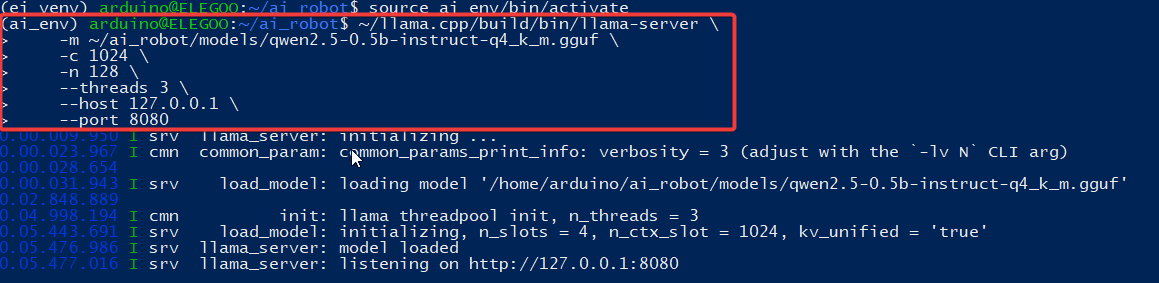
In daily use, this system uses a decoupled front-end/back-end architecture: Terminal 1 runs the model inference service in the background, while Terminal 2 handles user text input and streaming interaction.
¶ 1. Terminal 1: start the model inference server
In the current terminal window connected to the board, start the service directly:
~/llama.cpp/build/bin/llama-server \
    -m ~/ai_robot/models/qwen2.5-0.5b-instruct-q4_k_m.gguf \
    -c 1024 \
    -n 128 \
    --threads 3 \
    --host 127.0.0.1 \
    --port 8080
Notes:
- After pressing Enter, the console prints many system and weight-loading logs.
- When the last line stays at
HTTP server listening on 127.0.0.1:8080, the underlying AI engine is ready.- At this point the window is occupied by the server process and no command prompt appears. This is normal. Do not close the window and absolutely do not press Ctrl+C, or the service will be killed immediately.
¶ 2. Detailed guide for opening Terminal 2
To chat without interrupting the service, open a second terminal window on your computer and SSH into UNO Q again. Do not close Terminal 1; start a brand-new independent session:
-
Method A: Windows Terminal / PowerShell / CMD
- Press Win + R, type
powershellorcmd, and press Enter to open a new window; or click the plus sign in Windows Terminal to create a new tab. - In the new window, log in with the board IP, for example:
ssh arduino@192.168.1.100 - Enter the board password and log in.
- Press Win + R, type
-
Method B: macOS / Linux terminal
- In an existing terminal, press Command + T for a new tab or Command + N for a new window.
- In the new terminal, log in via SSH:
ssh arduino@192.168.1.100 - Enter the password and finish login.
-
Method C: third-party tools (MobaXterm / PuTTY / VS Code)
- VS Code: click Terminal -> New Terminal in the top menu, or click the plus sign on the right side of the bottom panel to open a new terminal, then SSH again.
- MobaXterm: right-click the existing session tab and choose Duplicate session to reopen a new connection.
- PuTTY: right-click the program icon in the upper-left corner and choose New Session or Duplicate Session to open a new login window.
¶ 3. Terminal 2: activate the environment and run text interaction
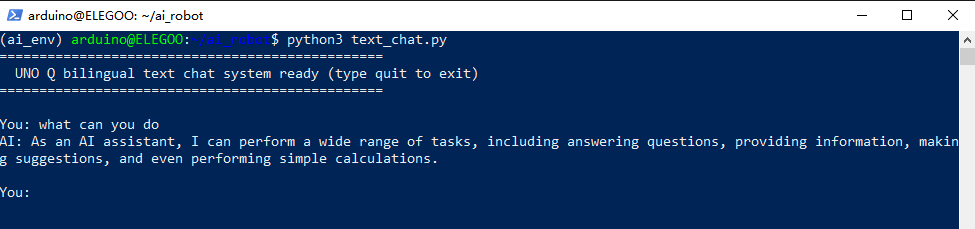
In the newly opened and logged-in Terminal 2, paste and run these two commands in order:
# 1. Enter the project directory and activate the previously configured virtual environment
cd ~/ai_robot
source ai_env/bin/activate

# 2. Start the streaming text interaction UI
python text_chat.py
Notes:
- After the terminal prints that the UNO Q bilingual text chat system is ready, type at the
You:prompt.- First-response waiting time: because the on-board Cortex-A53 CPU needs to compute self-attention for the system persona and input tokens for the first time (time-to-first-token), there is usually a short 1~2 second wait after pressing Enter. Then the AI outputs continuously in typewriter form. This is normal for on-device hardware, not a board freeze.
- Exit chat: type
quit,exitatYou:, or press Ctrl+C.
¶ 3. Key Code and Architecture Explanation
¶ 3.1 Why use decoupled llama-server front end/back end?
On embedded Linux devices, avoid repeatedly loading/unloading the model inside a single Python process through native binding libraries:
- Resident memory and instant response: llama-server runs as a resident C++ service and provides a standard HTTP/SSE interface. When the interaction script is modified or restarted repeatedly, there is no need to wait for the long model loading process again.
- Zero third-party dependencies: the script can use only Python standard-library
urllib.request; no bulky or conflict-prone third-party SDK is needed.
¶ 3.2 Deep dive into startup parameters
-m qwen2.5-0.5b-instruct-q4_k_m.gguf -c 1024 -n 128 --threads 3
-c 1024(context length):
Self-attention compute complexity and KV cache grow significantly with sequence length. Locking it to 1024 keeps the KV cache strictly within about 80MB and greatly reduces memory-bandwidth pressure on embedded LPDDR4.-n 128(maximum generated tokens per response):
Limits the maximum single-response generation length (about 60~80 Chinese characters) and prevents the lightweight small model from mistakenly entering long repetitive generation, keeping Q&A agile.--threads 3(CPU thread allocation):
UNO Q has a 4-core Cortex-A53. Limiting model inference to 3 threads deliberately leaves one physical core for Linux scheduling and terminal/network I/O, preventing all cores from saturating and making SSH lag or the system unresponsive.
¶ 3.3 Core logic of the Python script and line-by-line module analysis
¶ 3.3.1 Overall runtime flow
The overall logic of text_chat.py has five stages:
- User input and pre-filtering: the main loop captures console input, strips whitespace, and checks exit commands.
- Context packaging and request construction: append the new input to multi-turn history and assemble an OpenAI-compatible JSON payload.
- HTTP streaming and incremental byte-stream parsing: use
urllib.requestto keep a long connection, and combine it withIncrementalDecoderto buffer and restore network slices at byte level. - SSE protocol parsing and unbuffered typewriter output: extract each new token and force-flush the terminal buffer.
- Sliding memory trimming and state update: append the full reply to context, trim excess turns, and prevent KV cache growth.
¶ 3.3.2 Segment-by-segment module breakdown and line-by-line explanation
¶ 1. Global configuration and role initialization
URL = "[http://127.0.0.1:8080/v1/chat/completions](http://127.0.0.1:8080/v1/chat/completions)"

SYSTEM_PROMPT = (
    "You are an AI assistant running on an Arduino UNO Q board. "
    "Respond in the language used by the user (respond in English if the user inputs English, respond in Chinese if the user inputs Chinese). "
    "Keep answers concise, direct, and under two sentences. Do not use Markdown or complex formatting."
)

history = [{"role": "system", "content": SYSTEM_PROMPT}]
- API address (
URL): connect directly to the default OpenAI-compatible port 8080 of the local llama-server through loopback127.0.0.1, with zero cross-machine network latency. - System prompt constraints: a 0.5B lightweight edge model can easily drift without instruction constraints. Explicitly requiring “within two sentences”, “no Markdown”, and “adapt to the user’s language” greatly improves generation stability and response speed.
- Custom prompt examples for multiple scenarios:
- Example 1: default general bilingual assistant
SYSTEM_PROMPT = ( "You are an AI assistant running on an Arduino UNO Q board. " "Respond in the language used by the user. " "Keep answers concise, direct, and under two sentences." ) - Example 2: minimalist English-only hardware assistant
SYSTEM_PROMPT = ( "You are an edge AI assistant on Arduino UNO Q. " "Answer hardware, sensor, and coding questions in English. " "Be extremely concise, technical, and reply in 1-2 short sentences." ) - Example 3: humorous friendly voice/interaction companion
SYSTEM_PROMPT = (
    "You are a witty, friendly robot buddy running locally on Arduino. "
    "Reply warmly in English or the user's language, kept strictly under two sentences."
)
- Example 1: default general bilingual assistant
¶ 2. Request assembly and sampling-parameter control
def chat_stream(user_prompt):
    global history
    history.append({"role": "user", "content": user_prompt})

    payload = {
        "messages": history,
        "stream": True,
        "temperature": 0.6,
        "top_p": 0.8,
        "max_tokens": 128
    }

    req = urllib.request.Request(
        URL,
        data=json.dumps(payload).encode("utf-8"),
        headers={"Content-Type": "application/json"}
    )
- Context assembly: first append the current user prompt to history.
- Core parameter matrix:
streamisTrue: enables Server-Sent Events (SSE) server streaming, the prerequisite for the typewriter effect.temperatureis0.6andtop_pis0.8: narrows the random sampling space. For an on-device assistant, excessive randomness makes a 0.5B small model drift logically; the 0.6/0.8 ratio keeps answers interesting while locking down logical accuracy.max_tokensis128: serves as a backend safety valve together with the server startup parameter to limit generation length and avoid excessive compute consumption.
- Zero-dependency native request construction: no heavyweight external library is used. Built-in
urllib.request.Requestencodes the payload as UTF-8 bytes and sends it.
¶ 3. Incremental UTF-8 decoding mechanism (core fix for Chinese interruption)
full_reply = ""
decoder = codecs.getincrementaldecoder("utf-8")(errors="replace")
- Technical background: standard ASCII English uses only 1 byte, while a Chinese character occupies 3 bytes in UTF-8.
- Pain point: in network streaming, TCP chunk boundaries are determined by network buffer size and do not align with character boundaries. If the 3 bytes of one Chinese character are split into 1 byte plus 2 bytes by packet fragmentation, ordinary code using
decode("utf-8")will hit illegal continuation bytes and crash withutf-8 codec can't decode bytes... invalid continuation byte. - Mechanism:
codecs.getincrementaldecodermaintains a tiny internal byte buffer. When the incoming byte sequence ends with an incomplete multibyte character, the decoder keeps the incomplete bytes in the buffer and waits. After the next bytes are read and joined into a complete character, it emits the complete character at once. Settingerrorstoreplaceadds a fallback: truly corrupt data is replaced with a placeholder instead of crashing the program.
¶ 4. SSE line-by-line parsing and real-time typewriter flush
with urllib.request.urlopen(req) as resp:
    for line_bytes in resp:
        text_line = decoder.decode(line_bytes)
        for line in text_line.splitlines():
            line = line.strip()
            if not line or not line.startswith("data: "):
                continue
            if line == "data: [DONE]":
                break

            data_str = line[6:]
            try:
                chunk_obj = json.loads(data_str)
                delta = chunk_obj["choices"][0]["delta"].get("content", "")
                if delta:
                    sys.stdout.write(delta)
                    sys.stdout.flush()
                    full_reply += delta
            except Exception:
                continue
- Protocol filtering: OpenAI-compatible SSE streams send each data segment starting with
data:. The code first usesstrip()to filter heartbeat empty lines and matches payload lines precisely withstartswith. - Termination marker: when the termination marker is detected, the model has finished generation and the network-read loop exits safely.
- Slice extraction: remove the protocol prefix to get clean JSON, then read the newest generated single character or word chunk from the dictionary path
choices[0].delta.content. - Forced I/O flush: by default Python buffers non-newline output. Calling low-level
sys.stdout.write(delta)followed immediately bysys.stdout.flush()empties the OS terminal buffer, producing a low-latency typewriter effect where each generated character appears immediately. At the same time, full text is accumulated infull_reply.
¶ 5. Sliding-window memory protection
print()  # newline
history.append({"role": "assistant", "content": full_reply})

if len(history) > 7:
    history = [history[0]] + history[-6:]
- State persistence: load the complete model output as the assistant role and append it to the context stack.
- Window trimming strategy:
- Without context truncation, self-attention computation grows polynomially as conversation turns increase, greatly reducing Cortex-A53 token speed and exhausting limited memory.
- The trimming logic permanently fixes
history[0](the system persona) while keeping only the latest 3 turns (6 user/assistant messages total) and discarding older stale dialogue. This preserves coherent context while strictly limiting the input token count for each inference.
¶ 6. Interaction main loop and graceful exit
def main():
    print("=" * 48)
    print("  UNO Q bilingual text chat system ready (type quit to exit)")
    print("=" * 48)
    while True:
        try:
            user_input = input("\nYou: ").strip()
            if not user_input:
                continue
            if user_input.lower() in ["quit", "exit", "q"]:
                break
            print("AI: ", end="", flush=True)
            chat_stream(user_input)
        except KeyboardInterrupt:
            break

if __name__ == "__main__":
    main()
- Safe capture:
KeyboardInterrupt(Ctrl+C) is caught so users do not see messy Python tracebacks when forcibly interrupting a reply or exiting, keeping the CLI clean. - Empty-input filtering: accidental blank Enter is ignored so meaningless requests are not sent to the model.
¶ 4. Troubleshooting and Pitfall Guide
¶ Q1: Cloning GitHub code is extremely slow or times out (Connection timed out)
- Cause: in some regions, direct GitHub access has packet loss or blocking.
- Fix: choose the appropriate network path for your region. If you are in mainland China, use a mirror/proxy and
--depth 1to fetch only a shallow commit:git clone --depth 1 [https://ghproxy.net/https://github.com/ggerganov/llama.cpp.git](https://ghproxy.net/https://github.com/ggerganov/llama.cpp.git)
¶ Q2: cmake reports -bash: cmake: command not found
- Cause: the base board system image is minimal and lacks build dependencies.
- Fix: install the build suite:
sudo apt update && sudo apt install -y cmake build-essential
¶ Q3: cmake .. reports that CMakeLists.txt cannot be found
- Cause: wrong directory level.
..means “look in the parent directory” for the config file. - Fix: make sure you are inside the
~/llama.cpp/buildsubdirectory before runningcmake ...
¶ Q4: Activating the virtual environment reports -bash: .../activate: No such file or directory
- Real error example:
arduino@ELEGOO:~/ai_robot$ source ~/llama.cpp/ai_env/bin/activate -bash: /home/arduino/llama.cpp/ai_env/bin/activate: No such file or directory - Cause: the environment was created in another directory (for example
~/ai_robot/modelsor the home directory), but later you entered a non-existent path from memory such as~/llama.cpp/ai_env. - Fix: use
find ~ -name "activate"to locate the real virtual environment path. To keep the project tidy, create and activate the dedicated environment directly under the project root~/ai_robot:cd ~/ai_robot python3 -m venv ai_env source ai_env/bin/activate
¶ Q5: pip install reports error: externally-managed-environment (PEP 668)
- Real error example:
(ai_env) arduino@ELEGOO:~/ai_robot$ pip install openai -i [https://pypi.tuna.tsinghua.edu.cn/simple](https://pypi.tuna.tsinghua.edu.cn/simple) error: externally-managed-environment This environment is externally managed - Cause: although the prompt showed
(ai_env, the whole virtual environment folder had previously been moved withmvfrom~/ai_robot/models/ai_envto the parent directory. Many scripts inside the environment still contain absolute Shebang paths pointing to the old invalid location. The OS cannot find the target interpreter and falls back to the system-wide Python, triggering the system’s PEP 668 protection. - Fix: never
mva virtual environment across directories. After moving or changing paths, delete and recreate it cleanly in place:cd ~/ai_robot deactivate 2>/dev/null rm -rf ai_env python3 -m venv ai_env source ai_env/bin/activate pip install openai -i [https://pypi.tuna.tsinghua.edu.cn/simple](https://pypi.tuna.tsinghua.edu.cn/simple)
¶ Q6: When asking in Chinese, the terminal reports utf-8 codec can't decode bytes... invalid continuation byte
- Real error example:
But pure English input such asYou: What is today's date? [Error]: 'utf-8' codec can't decode bytes in position 18-19: invalid continuation bytehow are youworks normally. - Cause: this is not the model failing to understand Chinese; it is caused by network transmission chunking. ASCII English uses 1 byte, so any slice is still a complete character. A Chinese character occupies 3 bytes in UTF-8. When llama-server pushes TCP streaming chunks, packet boundaries may cut through the 3-byte structure. Official OpenAI clients or ordinary code that decode each block immediately will crash when they see half a Chinese character.
- Fix: rewrite the client interaction script to use the built-in
codecs.getincrementaldecoder("utf-8"). The decoder automatically buffers incomplete bytes and emits complete Chinese characters only after they are joined, completely solving this error (see Step 4 and section 3.3.2).