¶ Library
¶ What is an Arduino Library
An Arduino library is a complete packaged set of code files, consisting of .h header files and .cpp implementation files. Pre-written by developers, it is specially designed to drive hardware such as sensors, screens, real-time clocks and motors, or implement general functions including network communication, timing and algorithms.
It acts as a ready-made toolkit that encapsulates and hides low-level register operations, communication timings and complex computing logic, so users do not need to write underlying drivers from scratch.
¶ Core Functions of Libraries
1. Simplify development and lower learning barriers
- Take the HC-SR04 ultrasonic sensor as an example: raw low-level development requires manual control of IO high/low levels, calculation of sound wave round-trip time and conversion to actual distance, which needs at least dozens of lines of native code. By contrast, only 3 lines of code are required with the SR04 library to get distance readings, without mastering ultrasonic hardware timing principles.
2. Reusable code to avoid redundant development
- The driver logic for the same hardware only needs to be written once as a library file, which can be directly called in all projects, eliminating repeated coding of underlying drivers for every new sketch.
3. Standardized hardware driver interfaces
- It unifies standardized calling interfaces for the same type of hardware. Programs written by different developers follow consistent syntax rules, facilitating code sharing, cross-board porting and troubleshooting.
4. Extend native basic functions of Arduino
- Arduino only comes with native minimalist functions such as Serial, basic IO, I2C and SPI. Various peripheral modules including RTC real-time clocks, OLED screens, WiFi, Bluetooth, servos and motors can only be driven with third-party libraries.
¶ Three Names of Arduino Libraries:
¶ IDE Display Name
- Definition: The name displayed in Arduino Library Manager for users to search and identify hardware.
- Features: It can contain brand names, module models and hyphens, and has no mandatory matching rule with local folder names.
- Example: IDE display name of ELEGOO ultrasonic library: HC-SR04; IDE display name of RTC clock library: DS1307RTC.
¶ Library Folder Name
- Definition: The actual folder name stored under Documents/Arduino/libraries after library installation. The IDE loads libraries relying on this name.
- Rules: Only letters, numbers and underscores are allowed; spaces and hyphens are forbidden.
- Therefore, if the compiler prompts that the library cannot be found, troubleshoot in the following order: first check whether the library has been installed; second confirm the exact name of the header file used in the code. All sketches in this tutorial that require extra libraries come with matching compressed library packages. You can unzip the package to check the correct header filename. For libraries downloaded online, their default storage directory is C:\Users\Admin\Documents\Arduino\libraries, where you may check the files manually.
¶ Header File Name (Key Distinction)
- Definition: Full name of the .h file inside the library folder. The name used in #include must be identical to the real file name.
- Key Rule: The compiler only matches actual files on disk. Any spelling error will trigger the compile error "No such file or directory".
- Example: The header file of SR04 library is SR04.h. Only #include "SR04.h" is valid; #include "HC-SR04.h" cannot work.
¶ How to download online
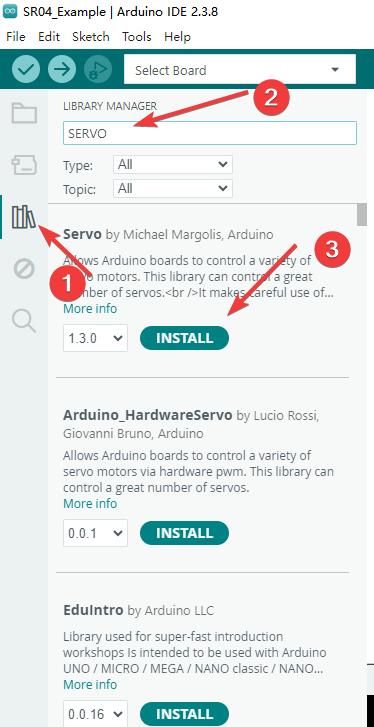
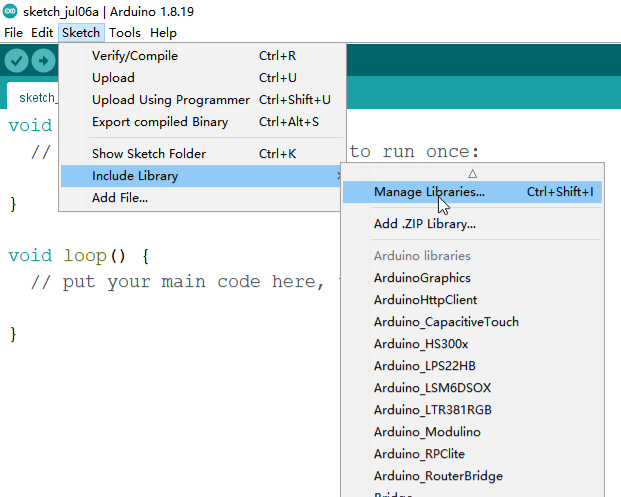
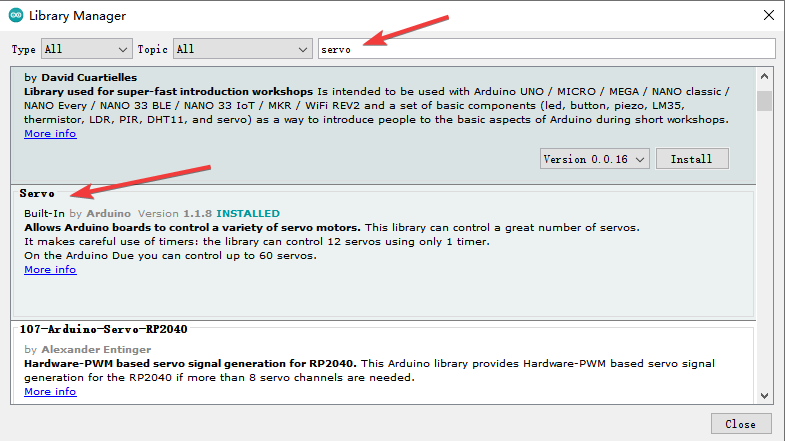
If you are using IDE 2.0, click the icon on the left sidebar of the software, enter the name of the sensor or library in the search box to search, and click install after locating the required library.
¶ How to Install Locally
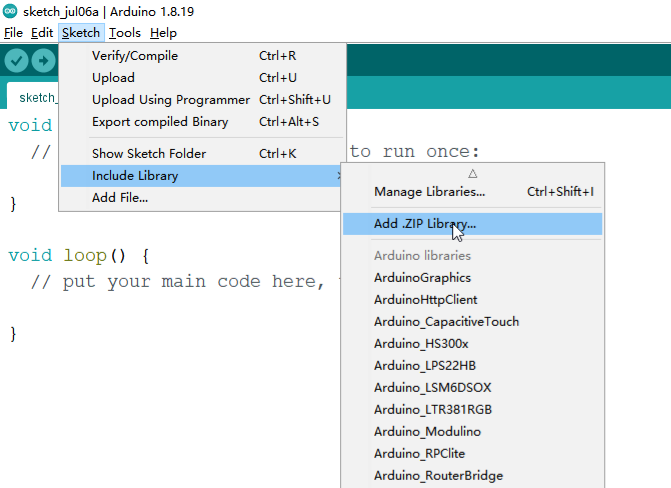
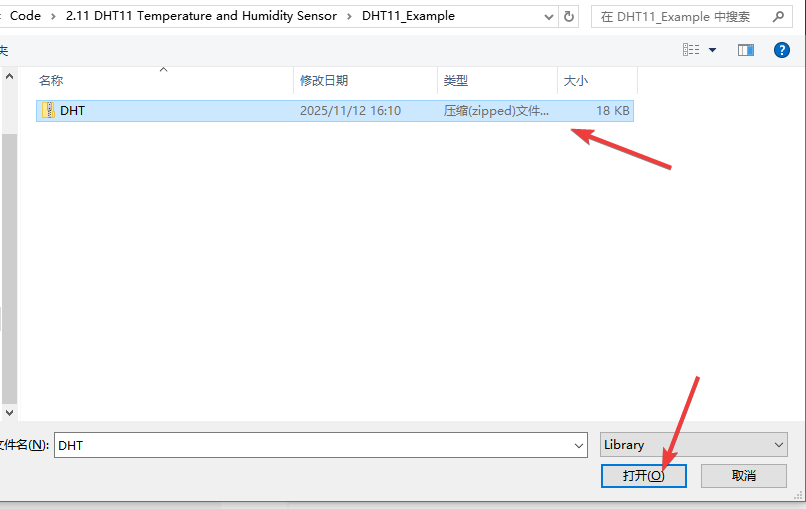
It differs from online library installation. Local installation loads exported or self-written library files into the IDE's library scan directory. Follow these steps as shown in the figure: Sketch -> Include Library -> Add .ZIP Library.