¶ Real Time Clock Module
¶ Overview
In this lesson, you will learn how to use the RTC module, The DS1307 real-time clock is a low-power chip.
Address and data are transferred serially through an I2C, which can be used unless being connected to UNO with only three data cables. DS1307 provides seconds, minutes, hours, day, date, month, and year information. Timekeeping operation continues while the part operates from the backup supply.
¶ Component Required:
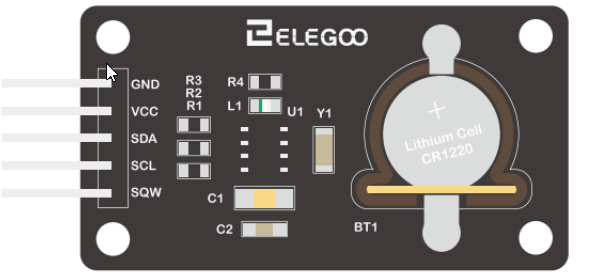
(1) x Elegoo Uno R3
(1) x DS1307 RTC module
(4) x F-M wires (Female to Male DuPont wires)
¶ Component Introduction
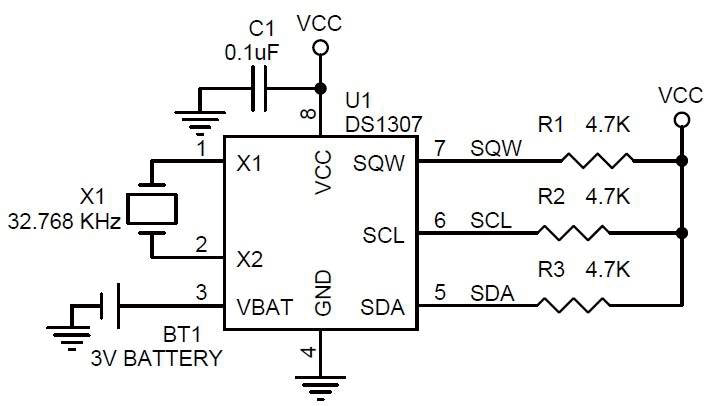
¶ Connection Schematic
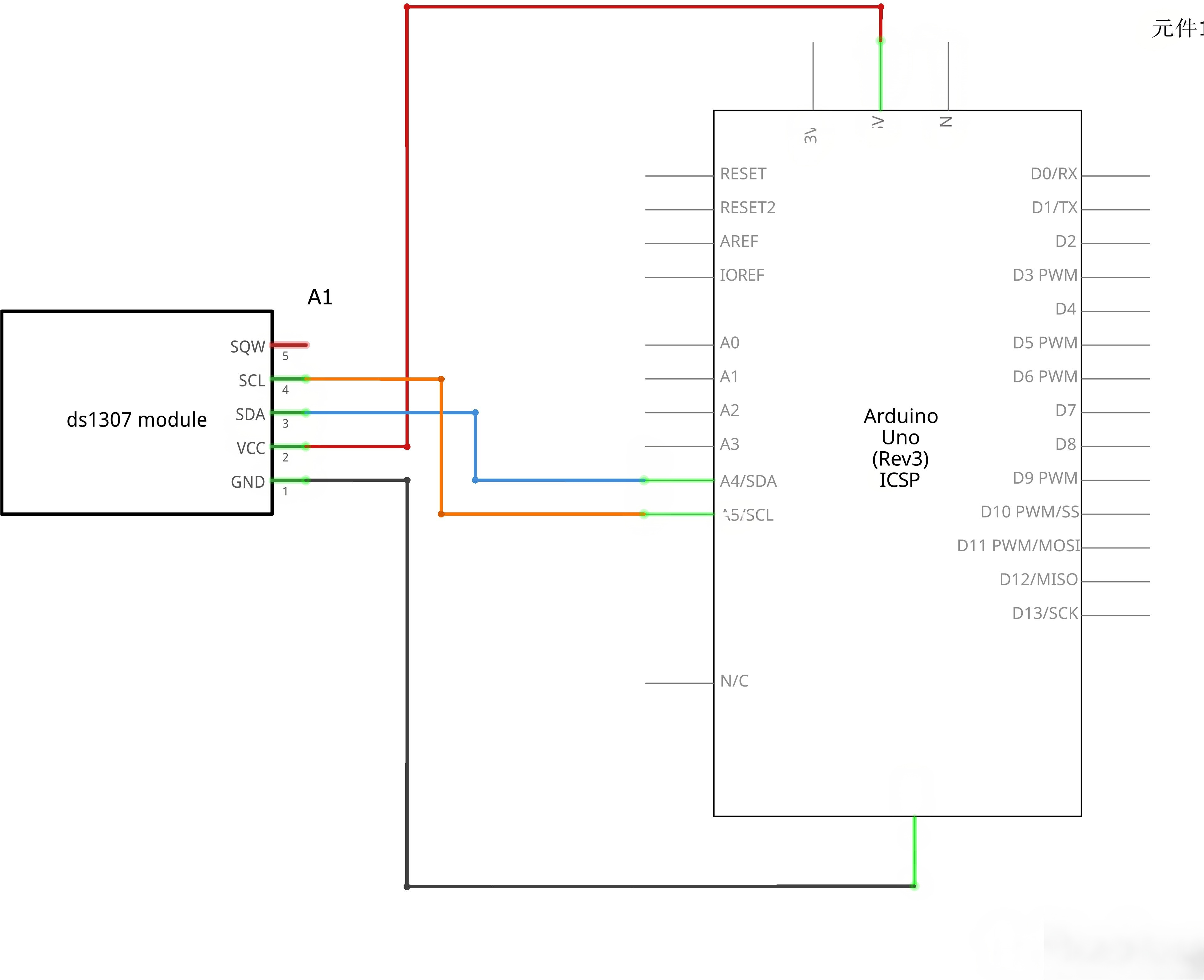
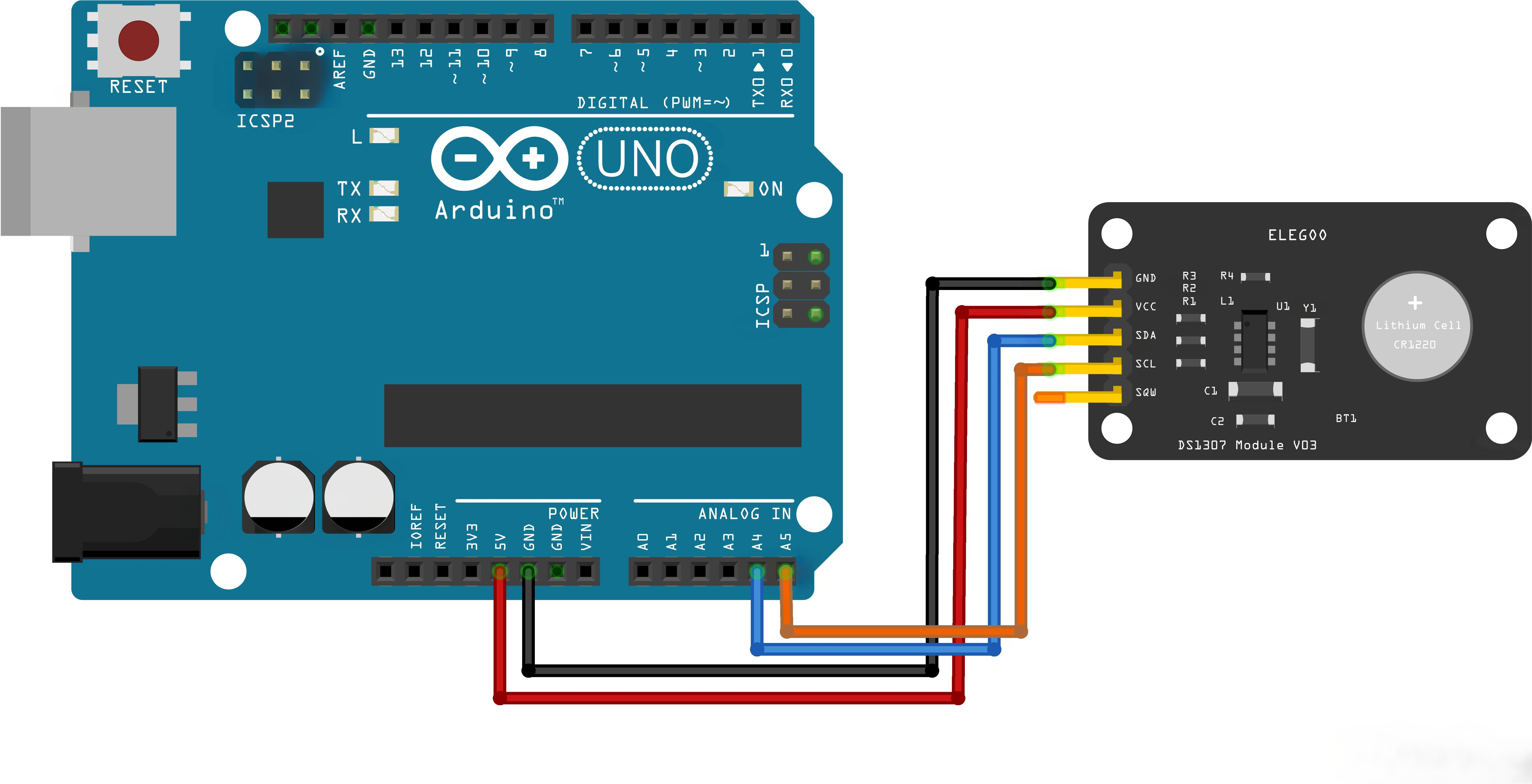
¶ Wiring diagram
¶ Code
You can click the blue text link to download the program file to your local device, and double-click the file to open it after the download is complete. Please note: Before opening the file, ensure that you have installed the Arduino IDE development environment and completed the installation of relevant components such as the board support package and driver corresponding to the UNO R3. If you have any questions about this operation process, you can refer to the "part 1" chapter of the document for detailed guidance.
Download the RTClib library before running the program. You can either install it by importing the compressed library file provided in the package or search for and download it directly in the IDE's library manager.
¶ Includes and Global Variables
#include <Wire.h>
#include <RTClib.h>

RTC_DS3231 rtc;
#include <Wire.h>: Includes the Wire library for I2C communication#include <RTClib.h>: Includes the RTClib library for RTC controlRTC_DS3231 rtc;: Creates an RTC_DS3231 object to interface with the DS3231 module
¶ Setup Function
void setup()
{
  Serial.begin(9600);

  Serial.println("Initialize RTC module");

  if (!rtc.begin()) {
    Serial.println("Couldn't find RTC");
    while (1);
  }

  if (rtc.lostPower()) {
    Serial.println("RTC lost power, setting compile time!");
    rtc.adjust(DateTime(F(__DATE__), F(__TIME__)));
  }

  Serial.println("Enter time to set: YYYY-MM-DD HH:MM:SS");
}
Serial.begin(9600): Initializes serial communication at 9600 baud ratertc.begin(): Initializes the DS3231 RTC module, returnsfalseif module not foundrtc.lostPower(): Checks if the RTC lost power (first use or battery drained)rtc.adjust(DateTime(F(__DATE__), F(__TIME__))): Sets RTC time to the sketch compilation time- The compile time is only used as a fallback when the RTC loses power
¶ Loop Function
void loop()
{
  if (Serial.available() >= 19) {
    String input = Serial.readStringUntil('\n');
    input.trim();

    if (input.length() >= 19) {
      int year = input.substring(0, 4).toInt();
      int month = input.substring(5, 7).toInt();
      int day = input.substring(8, 10).toInt();
      int hour = input.substring(11, 13).toInt();
      int minute = input.substring(14, 16).toInt();
      int second = input.substring(17, 19).toInt();

      rtc.adjust(DateTime(year, month, day, hour, minute, second));
      Serial.println("Time set successfully!");
    }
  }

  DateTime now = rtc.now();

  Serial.print(now.year(), DEC);   Serial.print("-");
  if (now.month() < 10) Serial.print("0");
  Serial.print(now.month(), DEC);  Serial.print("-");
  if (now.day() < 10) Serial.print("0");
  Serial.print(now.day(), DEC);    Serial.print(" ");
  if (now.hour() < 10) Serial.print("0");
  Serial.print(now.hour(), DEC);   Serial.print(":");
  if (now.minute() < 10) Serial.print("0");
  Serial.print(now.minute(), DEC); Serial.print(":");
  if (now.second() < 10) Serial.print("0");
  Serial.println(now.second(), DEC);

  delay(1000);
}
Serial.available() >= 19: Checks if there is enough input data (19 characters for "YYYY-MM-DD HH:MM:SS")- Parses the input string to extract year, month, day, hour, minute, and second
rtc.adjust(DateTime(...)): Sets the RTC to the specified timertc.now(): Gets the current date and time from the RTC- Time is printed in YYYY-MM-DD HH:MM:SS format with leading zeros
delay(1000): Waits 1 second before updating
¶ Upload and Run
¶ Step 1: Connect Arduino
- Connect your Arduino UNO to your computer using the USB cable
- Ensure the DS3231 module is properly connected to Arduino
¶ Step 2: Open the Code
- Open the
DS1307_Example.inofile in Arduino IDE - Wait for the IDE to verify the code
¶ Setting the Time
- In the Serial Monitor, type the current time in the format:
2024-07-02 15:30:00 - Press Enter to send the command
- You will see "Time set successfully!" if the time was set correctly
¶ Time Format
The input must follow this exact format:
- YYYY: 4-digit year (e.g., 2024)
- MM: 2-digit month (01-12)
- DD: 2-digit day (01-31)
- HH: 2-digit hour (00-23, 24-hour format)
- MM: 2-digit minute (00-59)
- SS: 2-digit second (00-59)
Example: 2024-12-31 23:59:59
¶ Expected Output
Initialize RTC module
RTC lost power, setting compile time!
Enter time to set: YYYY-MM-DD HH:MM:SS
2024-07-02 15:30:00
2024-07-02 15:30:01
2024-07-02 15:30:02
...
If you enter a new time:
2024-07-02 15:30:45
2024-07-02 15:30:46
2024-07-02 15:30:47
2024-07-02 15:30:00
Time set successfully!
2024-07-02 15:30:01
2024-07-02 15:30:02
...
¶ Troubleshooting
¶ Common Issues
¶ 1. "Couldn't find RTC" Error
Problem: The Arduino cannot detect the DS3231 module.
Solutions:
- Check all wiring connections
- Verify SDA is connected to A4 and SCL is connected to A5
- Ensure the DS3231 module is powered (VCC to 5V, GND to GND)
- Check if the module is properly seated
- Try restarting the Arduino
¶ 2. No Output on Serial Monitor
Problem: The Serial Monitor shows no data.
Solutions:
- Verify the baud rate is set to 9600
- Check the USB connection
- Ensure the correct COM port is selected
- Press the Reset button on Arduino after opening Serial Monitor
¶ 3. Incorrect Time Display
Problem: The time displayed is not correct.
Solutions:
- Use the manual time setting feature to input the correct time
- Ensure the DS3231 has a working CR2032 battery
- The compile time (
__DATE__,__TIME__) may be outdated; re-upload the sketch
¶ 4. Time Not Updating
Problem: The time stays the same or doesn't increment.
Solutions:
- Check if the battery is properly installed and has charge
- Verify the RTC module is receiving power
- The DS3231 may need a battery replacement
¶ 5. Library Compilation Errors
Problem: Error messages like "DS3231 does not name a type" or "redeclared as different kind of symbol".
Solutions:
-
Ensure RTClib library is installed (not the old DS3231 library)
-
Remove any conflicting DS3231 libraries from the libraries folder
-
Use the correct class name
RTC_DS3231instead ofDS3231 -
Press Enter after typing the time