¶ Fault Phenomenon:
Mechanical sensor status abnormal error reported during device self-test.
¶ Possible Causes
Build plate not installed
Build plate latch loose
Poor contact at contact points
Poor contact at force sensor plug or adapter cable
Magnetic suction connector or force sensor adapter board faulty
¶ Tools Required for Troubleshooting
Tweezers
3.0 mm hex screwdriver
Alcohol
Lint-free cloth
¶ Troubleshooting Steps
¶ Check if the build plate is not installed
If the build plate is already installed, unlock the build plate latches and reinstall the build plate. Ensure the build plate is properly aligned with the contact points and the latches are securely locked.
¶ Check for poor contact at the contact points
1.Turn off the printer power switch and unplug the power cord.
.png)
2.Release the latches and remove the build plate.
.png)
.png)
3.Use a lint-free cloth + alcohol to wipe the build plate and the cantilever contact points.
.png)
.png)
¶ Check the internal wiring of the build plate
1.Remove the build plate and temporarily place it on the desktop.
2.Use tweezers to gently pry open the silicone plug.
.png)
3.Use the 3.0 mm hex screwdriver to remove the 2 screws in the platform housing.
.png)
4.Slowly open the platform housing.
The platform housing contains wires inside,Please be careful not to pull and break the wires
.gif.gif)
5.Remove the PCB board
Pinch the PCB board and pull it outward. Do not pull directly on the wires, as this may damage the plugs/wires.
-1.png)
6.Hold the build plate and do not reinstall it yet. Manually connect the magnetic suction terminals on the build plate side to the cantilever contact positions.
.png)
Keep the magnetic suction head markings on the same side
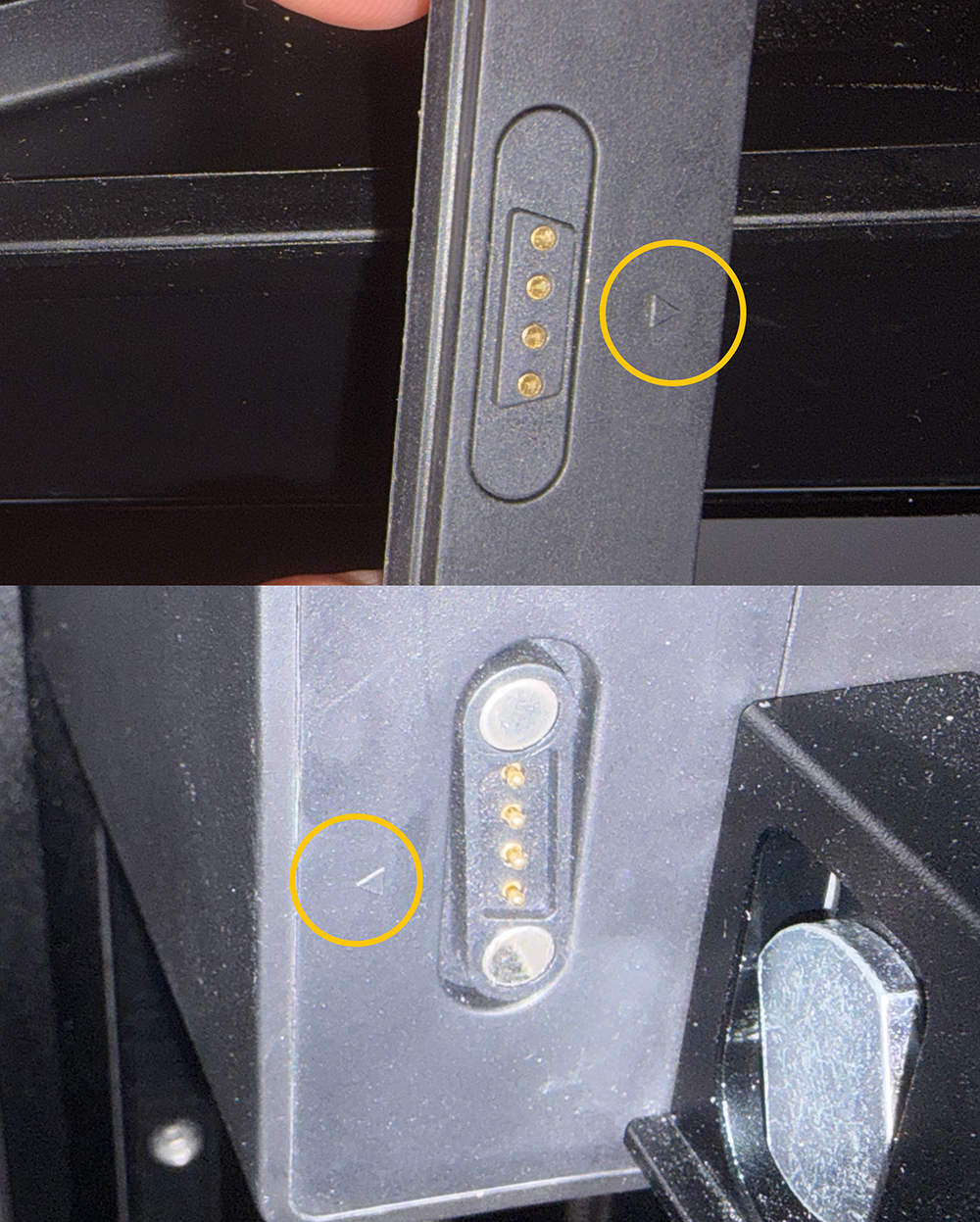
7.Check whether the force sensor adapter board indicator light flashes.
.gif)
-
If it flashes, the connection is normal. Go to Touchscreen → Tools → Self-test and check if the printer can pass the self-test.
.png)
-
If it does not flash, check if the force sensor plug is loose and re-plug the force sensor and adapter cable connectors.
.png)
Note:
Insert the plugs into the force sensor adapter board according to the labels on the force sensor wires. The 1234 plugs must be inserted into the ABCD sockets in sequence (as shown in the figure).
.png)
If the force sensor adapter board indicator light still does not flash and the self-test fails after re-plugging, replace the magnetic suction connector, adapter cable, and force sensor adapter board.
Technical Support Email: 3dp@elegoo.com