¶ Description
- Inconsistent extrusion. During extrusion, the filament appears to be strands, resulting in noticeable pauses and gaps on the model's surface.
- Under extrusion. The extruded filament amount is significantly less than normal. The printed layer width becomes narrower, the lines become thinner, and it is even unable to cover the model outline.
- Unable to extrude. The filament only rotates or accumulates at the feed inlet. The nozzle does not produce any filament, or the printing process is directly interrupted.
- Extruder noises and filament accumulation. The extrusion is accompanied by abnormal noises, such as the feed gear clicking, arbonization and filament accumulation of consumables at the nozzle, which further aggravates the blockage.
¶ Reason
- Excessive extrusion resistance.
- The filament is tangled on the spool.
- The PTFE tube has foreign objects, bends, or wear inside.
- The extruder gear is damaged.
- The internal channel of the hotend is blocked.
- The melting and extrusion speed of the filament cannot keep up with the printing speed.
- The filament flow rate or other slicing parameters are incorrectly set.
- The filament is moistured, or the filament diameter is incorrect.
¶ Solutions
Step 1 Check the filament spool for deformation, damage, or unstable suspension.
- If the spool is severly deformed, replace the old spool with a new one immediately.
- If the spool has minor deformation, download and print the relevant repair parts.
https://www.elegoo.com/pages/model-gallery - If there are foreign objects, bends, or wear inside the PTFE tube, clean the foreign objects or replace the PTFE tube.
https://youtu.be/pnRTHs4xE50 - If the extruder gear is stuck or damaged, clean or replace it with a new one.
https://youtu.be/7dGtYT3cMIY - If the extruder is clogged, clean the extruder or replace it with a new one.
Step 2 Re-slice the model file and check the parameters.
- Increase the nozzle temperature or decrease the print speed.
- If using third-party consumables, it is recommended to select the Generic parameter and reduce the print speed.
- If the overall model is significantly short of filament, increase the flow rate appropriately in the slicing software.
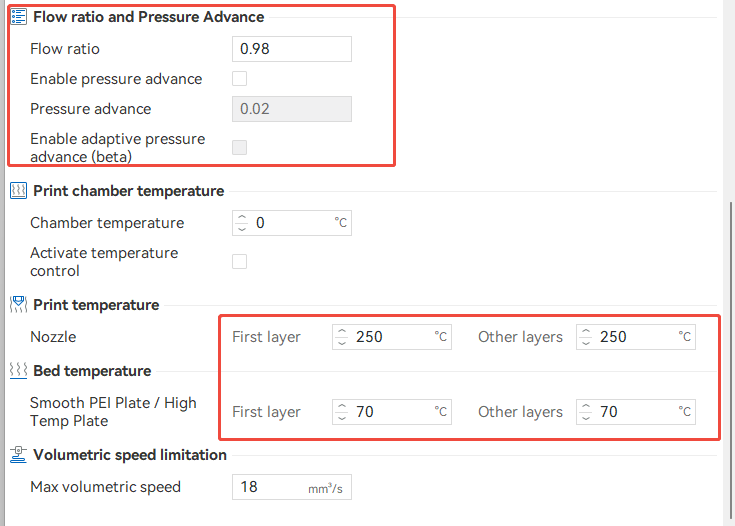
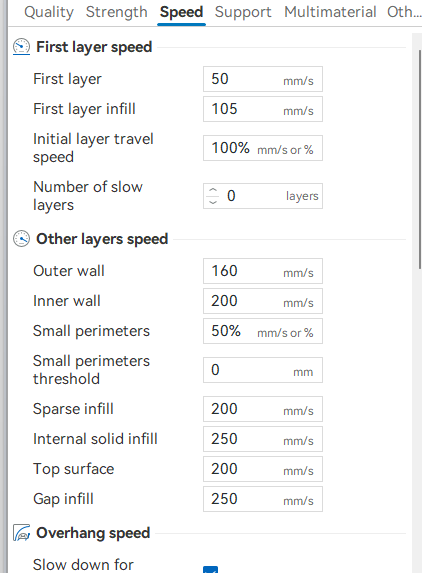
Step 3 Clean and replace the extruder.
- Check the temperature settings and clean or replace the nozzle if necessary. Refer to the official replacement instructions.
https://youtu.be/dRLgzSIZkl8 - Refer to the official blockage troubleshooting and cleaning methods.
https://youtu.be/DfXCMzTMSAY
Step 4 Dry the filament before printing and check the filament diameter.
Step 5 Check the slicing parameters.
Check if the filament type in the slicing software matches the actual filament.
If the issue still occurs, reach out to the ELEGOO after-sales technical team. When you contact them, make sure to include the results of your filament. The ELEGOO technical team will review the information you provide and will work to offer a solution.