¶ Issue description
¶ Stalling
After powering on the printer, the motor struggles to move or can't move the build plate at all.
¶ Inconsistent movement
The Z-axis may become stuck during printing.
¶ Z-axis travelling too far or too short
Z axis movement is not correct. For example, you set the value of the movement as 10 mm, but it moves 6 mm or 14 mm.
¶ Abnormal noise
Grinding or whining noises during Z-axis movement.
video_01.mp4
¶ Solutions
¶ Motor stalling can be cause by:
- Poor contact of motor cables.
- Motherboard signal failure.
- Cured resin on the Z-axis lead screw.
- Burnt out motor.
¶ Troubleshooting steps
¶ Step 1. Check the interface and cables of the motor.
Re-plug the cables and inspect the interface to make sure that the cables are connected firmly and the interface are not damaged.
¶ Step 2. Check the indicator light of the motherboard.
If the indicator light of the motherboard is off, replace the motherboard with a new one.
¶ Step 3. Check the Z-axis lead screw.
If there is any cured resin on the Z-axis lead screw, clean it immediately.
¶ Step 4. Check the Z-axis motor.
If the motor has been burnt out, replace it with a new one.
¶ Inconsistent movement of motor can be cause by:
- The Z-axis guide rail is not lubricated enough.
- The Z-axis guide rail surface is dirty, damaged or deformed.
- The anti-backlash nut is worn or is blocked by the cured resin.
¶ Troubleshooting steps
¶ Step 1. Check the Z-axis guide rail for dryness and dirt.
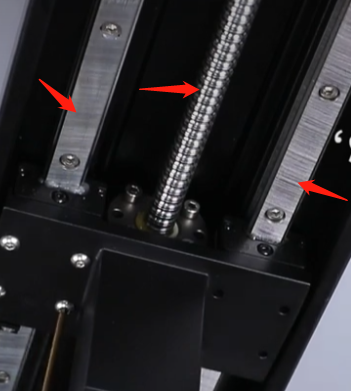
If the surface is dry, lubricate using gease. If it has dirts, clean the surface using dust-free cloth.
¶ Step 2. Check the anti-backlash nut for wear and tear, and check for resin leakage.
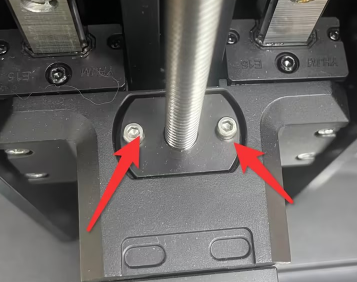
If the anti-backlash nuts frays or is blocked by cured resin, replace them with new ones.
¶ Z-axis travelling abnormality can be caused by:
- The Z-axis screw parameters are incorrect.
- The lead screw is worn resluting in clearance.
¶ Troubleshooting steps
¶ Step 1. Check the Z-axis lead value in the printer parameters.
If the parameters are wrong, reset the parameters and update .gcode file.
¶ Step 2. Manually shake the Z-axis platform to check the lead screw clearance.
If the lead screw is deformed, replace the lead screw with a new one.
¶ Abnormal noise can be caused by:
- Lacks of lubrication in lead screw or guide rail and dirt on the surface.
- Loose connection between the motor and lead screw.
- Wear or cured resin leakageon the anti-backlash nuts.
¶ Troubleshooting steps
¶ Step 1. Check the Z-axis guide rail for dryness and dirt.
If the surface is dry, lubricate using gease. If it has dirts, clean the surface using dust-free cloth.
¶ Step 2. Check the anti-backlash nut for wear and tear, and check for resin leakage.
If the anti-backlash nuts frays or is blocked by cured resin, replace them with new ones.