¶ Issue Description
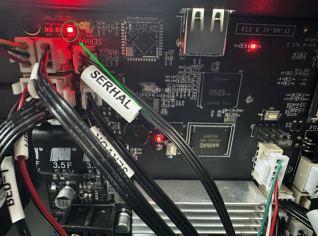
The motherboard cooling fan connection is abnormal.
¶ Reasons
- The motherboard cooling fan cable is loosely connected.
- The motherboard cooling fan ports are damaged.
¶ Troubleshooting Steps
- Turn the power switch OFF (symbol "〇") and unplug the power supply cable.
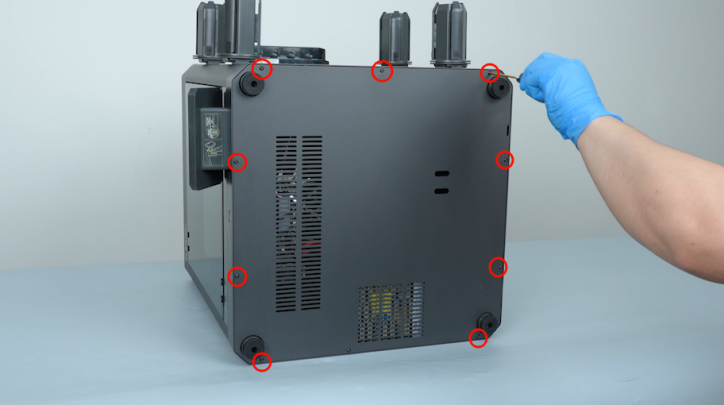
- Place the printer on its side.
- Remove the ten screws securing the bottom cover with a 2.0 mm Allen key. Remove the bottom cover.
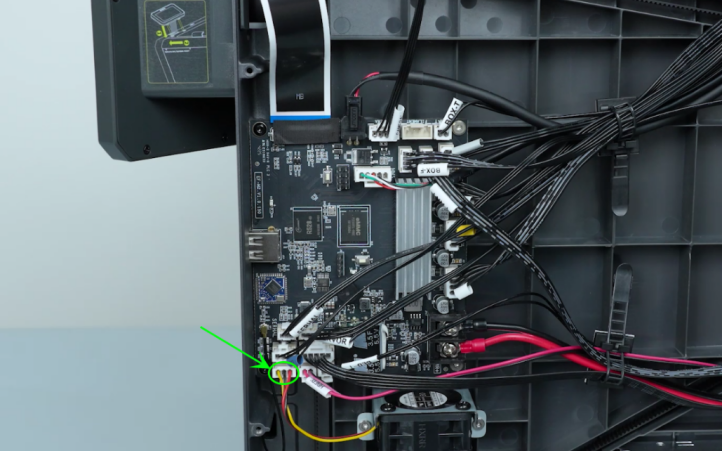
- Re-plug the motherboard cooling fan cable.
- Plug in the power supply cable and turn the power switch ON (symbol "|").
- Heat up the nozzle on the touch screen and check if the fan can operate normally.
- If the motherboard cooling fan operates normally, it indicates that the issue has been resolved.
- If the motherboard fan still malfunctions, heat up the nozzle and check whether the motherboard indicator light is on.
- If the status light is on, it indicates that the connection between the fan and the motherboard is intact, and the motherboard cooling fan needs to be replaced.
- If the indicator light is off, it indicates that the motherboard is damaged and needs to be replaced.