¶ Description
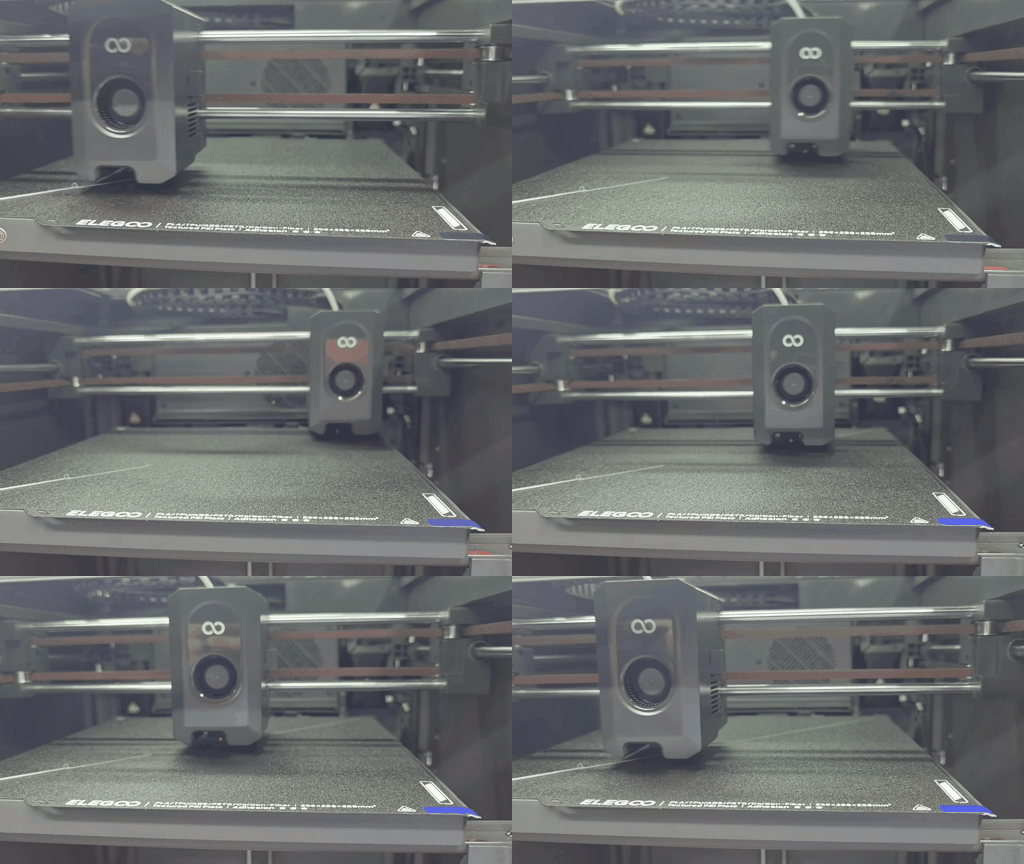
Issue 1: After the homing process or automatic leveling, the motor makes a noisy sound.
Issue 2: Once printing begins, the extruder moves diagonally along the build plate.
¶ Reasons
- Timing belts are too loose.
- The cable for the X-axis motor or the Y-axis motor is connected loosely.
- The X-axis motor, Y-axis motor or motor wire is damaged.
- The motherboard is damaged.
¶ Tools for troubleshooting
- A 2.0mm Allen key
¶ Step 1 Check whether the X/Y motor plug is securely connected.
Before operation, power off the printer.
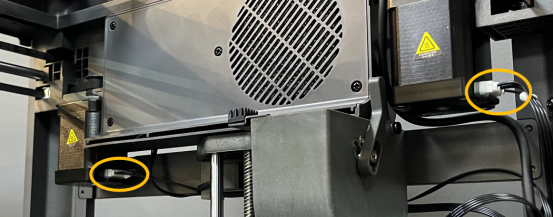
- Check if the X/Y motor cable is loosely connected. Then, re-plug the cable.
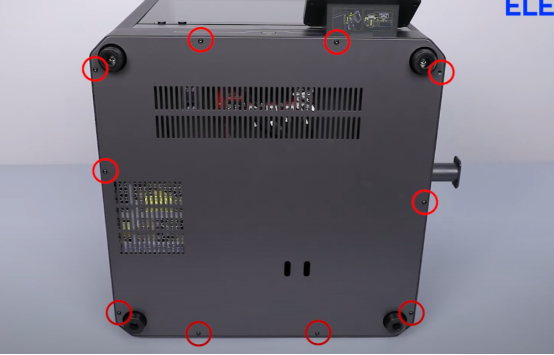
- Remove the screw securing the bottom cover.
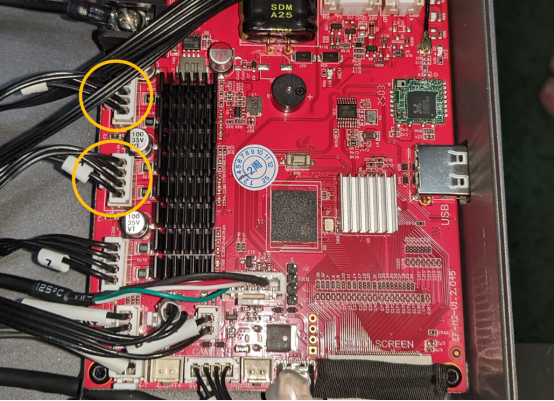
- On the motherboard, re-connect the X/Y motor cables to ensure they are securely connected.
Note: Refer to the photos below for poor cable connections.
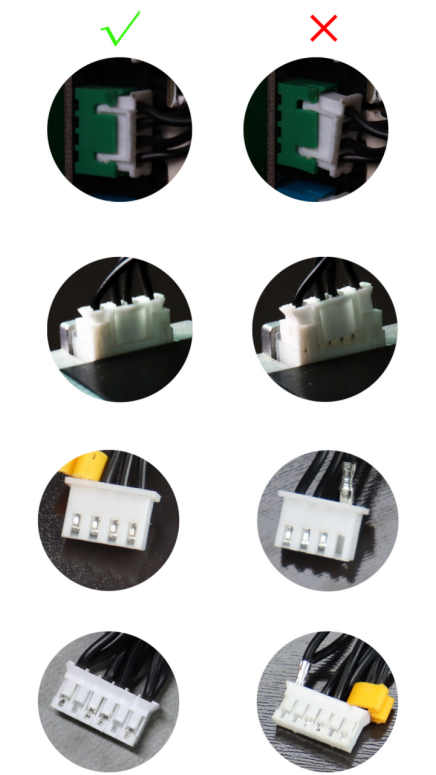
4.After completing the steps above, turn on the printer and check if the issue still occurs.
If the issue persists, follow the instructions below for further troubleshooting.
¶ Step 2 Check if the X/Y belts are loose.
Before operation, power off the printer.
- Manually move the extruder along the X/Y direction. Check if the extruder is stuck when you manually move the extruder.
- Refer to the following video to check if the X/Y axis belts are loose.
How to Adjust the Belt Tensioner: https://youtu.be/7ucqlIZr_yw
How to Replace the Timing Belts of the Print Head: https://www.youtube.com/watch?v=14BHTMoErSc - After check the belts, power off the printer.
¶ Step 3.1 Check the Y-axis motor.
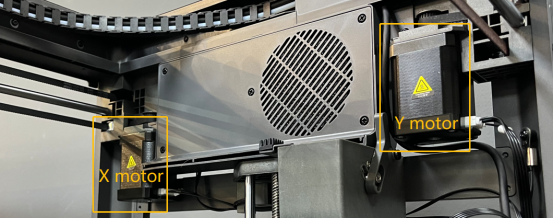
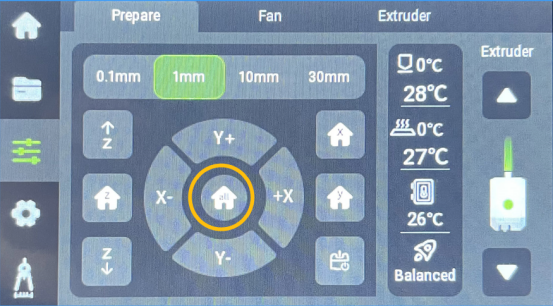
-
Disconnect the X-axis motor connector, and power on the printer.
-
Select Home on the touchscreen and check if the Y-axis motor rotates normally.
¶ Step 3.2 Check the X-axis motor.
- Disconnect the Y-axis motor connector, and power on the printer.
- Select Home on the touchscreen. And check if the X-axis motor rotates normally at this point.
¶ Step 4 Final confirmation.
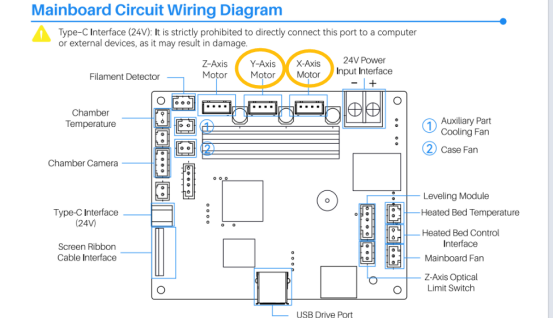
If the Y-aixs motor rotates normally after disconnecting the X-axis motor connector during the homing process, it indicates that the X motor, the X motor cable, or the motherboard may be faulty.
Follow the steps below for further confirmation.
- Power off the printer.
- Disconnect the connectors of X-axis and Y-axis motors on the motherboard side.
- Plug the Y-axis motor into the X-axis motor socket on the motherboard.
- Power on the printer and start the homing process.
- If the Y-axis motor rotates normally, it indicates that the X-axis motor and its cable should be replaced.
- If the Y-axis motor does not rotate or vibrates, it indicates that the motherboard should be replaced.
If the X-axis motor rotates normally after disconnecting the Y-axis motor connector during the homing process, it indicates that the Y motor, the Y motor cable, or the motherboard may be faulty.
Follow the steps below for further confirmation.
- Power off the printer.
- Disconnect the connectors of X-axis and Y-axis motors on the motherboard side.
- Plug the X-axis motor into the Y-axis motor socket on the motherboard.
- Power on the printer and start the homing process.
- If the X-axis motor rotates normally, it indicates that the Y-axis motor and its cable need to be replaced.
- If the X-aixs motor does not rotate or vibrates, it indicates that the motherboard needs to be replaced.
¶ Still have issues?
Contact ELEGOO official technical support team if you need further assistance. Please provide a video of the motor malfunction and inform us the inspection results for the following steps.
- Does the extruder get stuck when you move it along the X/Y directions?
- After unplugging the X-axis motor and start the homing process, can the Y-axis motor rotate normally?
- After unplugging the Y-axis motor and start the homing process, can the X-axis motor rotate normally?