Centauri Carbon is a high-speed 3D printer. Normal operational vibrations and noise are generated by fan/motor operation, model cooling, and printing motions.
- Resonance may occur at certain speed ranges, causing temporary increased noise (normal operation).
- Avoid placing the machine on metal cabinets, which can amplify noise.
- Use a decibel meter app on your phone to verify noise levels.
Noise Test Results (Measured at 1m Distance)
- With auxiliary cooling fans and case fans ON: ≤60dB
- With fans ON and upper/lower glass doors open: ≤65dB
- With fans OFF: ≤55dB
- With fans OFF and doors open: ≤65dB
¶ Solutions
¶ Regular Maintenance and Lubrication
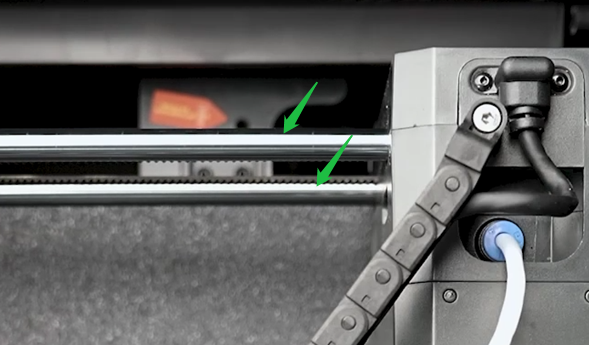
- Clean and maintain linear shafts:
- Wipe dust from shafts with a lint-free cloth or clean tissue.
- Apply standard lubricating grease to keep shafts smooth (no special requirements for grease type).
¶ Reduce Print Speed and Enable Silent Mode
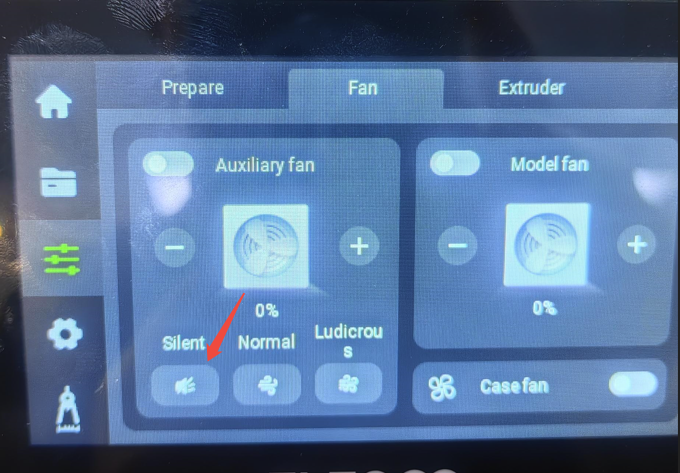
- Lower the print speed and activate silent mode.
- Keep the machine cover open during operation to ensure proper cooling and prevent nozzle clogging.