¶ Issue Description
- The first layer cannot stick to the PEI plate.
- The model falls over mid-print.
¶ Reasons
- The Z offset value is set incorrectly, or automatic calibration has failed.
- The PEI surface is contaminated by dust or oil stains.
¶ Troubleshooting Steps
Tools needed for troubleshooting
- Glue stick x 1
- Leveling paper or A4 paper x 1
¶ Step 1 Reset the Z offset value and relevel the printer
Note: Adjust the distance between the nozzle and the heated bed until you feel slight resistance as you move the A4 paper back and forth, but the paper cannot be scratched.
Refer to the following tutorial guides:
Neptune 4 How to set the Z offset value and auto leveling calibration
Time duration: 05:45-08:18
https://www.youtube.com/watch?v=RAOR25cMWbk&list=PLkFeYZKRTZ8YXhuPC4VaIMVktfs5CTjCZ
Neptune 4 Pro How to set the Z offset value and auto leveling calibration
Time duration: 04:04-06:00
https://youtu.be/WJbgjfA26dg?si=bR4OK2GX7QGruBrw
Neptune 4 Max How to set the Z offset value and auto-leveling calibration
Time duration: 03:52-05:31
https://www.youtube.com/watch?v=NmY_OQ1D2ag&list=PLkFeYZKRTZ8YtkA1-ZWWD5TlkWCoXSvtI&index=4
Neptune 4 Plus How to set the Z offset value and auto leveling calibration
Time duration: 07:38-11:05
https://www.youtube.com/watch?v=TPJ960XAZJ4&t=8s
¶ Step 2 Check if the Z offset value is correct
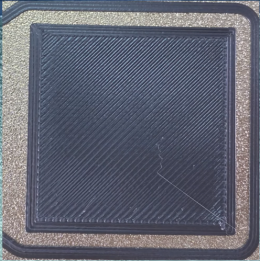
- Try to print a simple-structured model and check the frist layer.
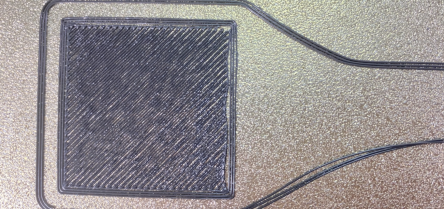
If the nozzle is too far from the heated bed, gaps between the lines are large. (You can refer to the pircture below.)
In this case, the Z offset value needs to be reduced.
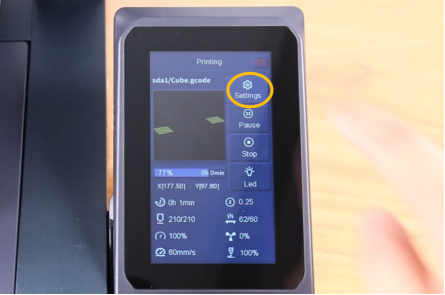
- Fine-tune the Z offset value during printing.
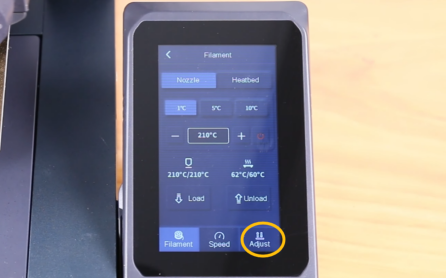
a. On the touch screen, select Settings - Adjust and reset the Z offset value.
b. Select 0.1mm or 1mm and fine-tune the value.
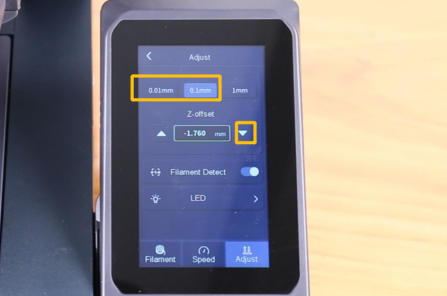
Refer to the picture below for the optimal result of the first layer.
¶ Step 3 Clean the PEI plate before printing
The adhesion of the PEI plate can be impacted by the dust in the environment and oil stains from fingers.
It is recommended to clean the PEI plate with alcohol or water before printing. After cleaning, dry the PEI plate thoroughly.
¶ Step 4 Reset the slicing settings
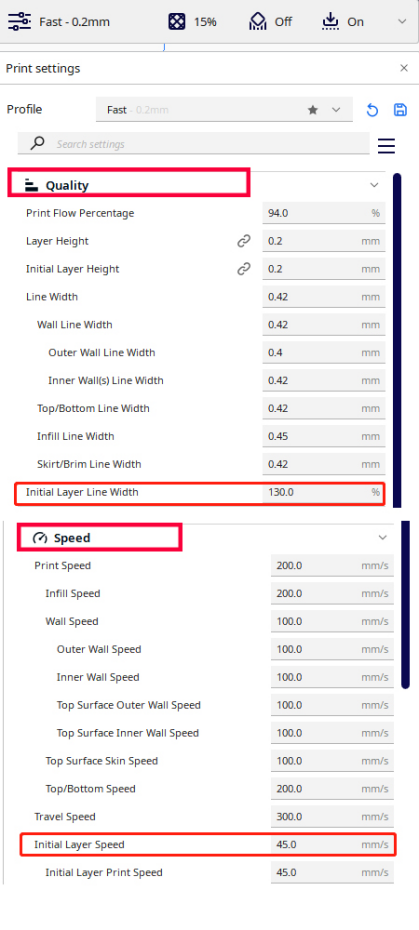
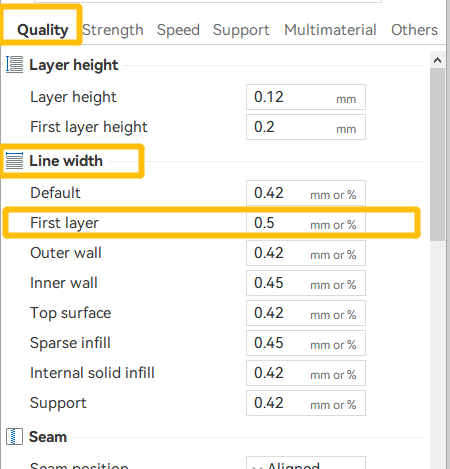
- Increase the width of the first-layer height and a setting of 120-150% is recommended.
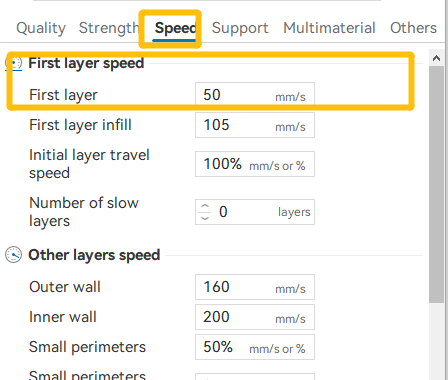
- Decrease the first layer printing speed and a setting of 15-40 mm/s is recommended.
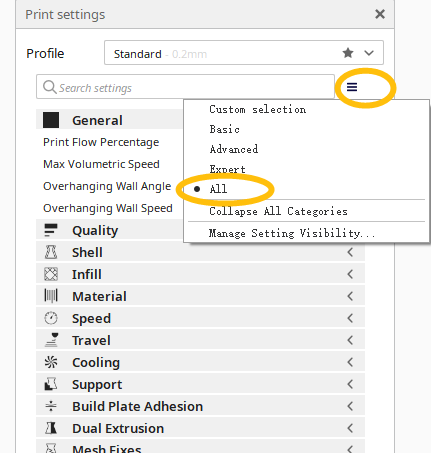
¶ For ELEGOO Cura, select All on the top right corner.
¶ For ELEGOO Slicer, refer to the following pirctures for settings.
¶ Step 5 Increase the temperature of the heated bed appropriately to make the first layer adhere more firmly
If the first layer is not sticking or the model is detaching, it is recommended to increase the heated bed temperature by 5-10℃ based on the recommended temperature of the filament. The recommended temperature of the filament can usually be found on the label on the side of the package.